 PH
PHQ. How to run Bluestacks on HPI?
A. The answer is in Proxifier.
But before that,
Step 1.) Install the latest Proxfier here: You do not have permission to view the full content of this post. Log in or register now.
Kayo na bahala sa Registration Key, search niyo nalang sa Google.
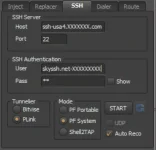
Step2. ) If done installed, In HPI under the SSH Tab, instead selecting "PF Portable", select "PF System" like in the Screen Shoot below.
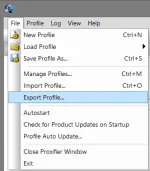
Step3. ) Open Installed Proxifier, hanap lang sa desktop. In Proxifier under File/Export Profile (Shown in SS Below)
Find po natin yung Profile na gamit ni HPI sa:
(64bit path) : C:\Program Files (x86)\A-Developer1410\HTTP Proxy Injector\AppData\Profiles
(86bit path) : C:\Program Files\A-Developer1410\HTTP Proxy Injector\AppData\Profiles
(Ang Hinahahanap natin, yung SS sa baba.)
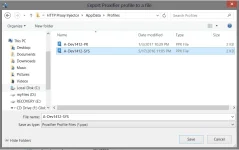
(Pili nalang kayo kung saan gusto niyo, pero mas preferred ko yung highlighted file, di kasi siya na'DC in my Experience)
Then, S A V E.
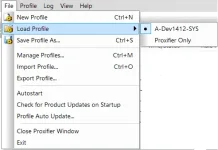
Load na po natin yung imported Profile under File/Load. (See SS Below)
Important Part: Para mag'work si Bluestacks:
Under Profile/Advanced, Click po natin si "Services and Other Users..
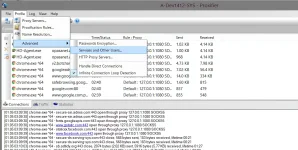
and check as what SS is shown below:
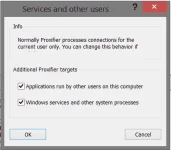
Click OK, And Start HPI.
(Save nalang ulit and Give it a name para mas safe at di sayang yung ginawa natin. Hahaha)
The Result will be this if your successfully and carefully read the steps.
A Bluestacks running on Proxifier.
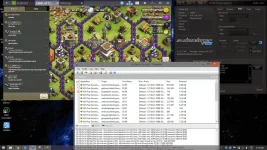
Kung alam niyo gamtin ang Proxifier Only, pwede rin yun basta yung latest na Proxifier ang gamitin niyo, Check lang natin yung nasa Services and Other Users and Kaboooom, working na si Bluestacks sa Proxifier.
Paki move nalang ng thread kung di dito pwede. Globe kasi gamit ko kaya dito ko nalang pinost.
Delete nalang din kung may naka'post na nito.
Enjoy! ^______^
Bluestacks App Player Download Link: You do not have permission to view the full content of this post. Log in or register now.
A. The answer is in Proxifier.
But before that,
Step 1.) Install the latest Proxfier here: You do not have permission to view the full content of this post. Log in or register now.
Kayo na bahala sa Registration Key, search niyo nalang sa Google.
Step2. ) If done installed, In HPI under the SSH Tab, instead selecting "PF Portable", select "PF System" like in the Screen Shoot below.
Step3. ) Open Installed Proxifier, hanap lang sa desktop. In Proxifier under File/Export Profile (Shown in SS Below)
Find po natin yung Profile na gamit ni HPI sa:
(64bit path) : C:\Program Files (x86)\A-Developer1410\HTTP Proxy Injector\AppData\Profiles
(86bit path) : C:\Program Files\A-Developer1410\HTTP Proxy Injector\AppData\Profiles
(Ang Hinahahanap natin, yung SS sa baba.)
(Pili nalang kayo kung saan gusto niyo, pero mas preferred ko yung highlighted file, di kasi siya na'DC in my Experience)
Then, S A V E.
Load na po natin yung imported Profile under File/Load. (See SS Below)
Important Part: Para mag'work si Bluestacks:
Under Profile/Advanced, Click po natin si "Services and Other Users..
and check as what SS is shown below:
Click OK, And Start HPI.
(Save nalang ulit and Give it a name para mas safe at di sayang yung ginawa natin. Hahaha)
The Result will be this if your successfully and carefully read the steps.
A Bluestacks running on Proxifier.
Kung alam niyo gamtin ang Proxifier Only, pwede rin yun basta yung latest na Proxifier ang gamitin niyo, Check lang natin yung nasa Services and Other Users and Kaboooom, working na si Bluestacks sa Proxifier.
Paki move nalang ng thread kung di dito pwede. Globe kasi gamit ko kaya dito ko nalang pinost.
Delete nalang din kung may naka'post na nito.
Enjoy! ^______^
Bluestacks App Player Download Link: You do not have permission to view the full content of this post. Log in or register now.
 Keep on Sharing
  Hoping for working feedback guys.