❓ Help How to remove white overlay

Status
Not open for further replies.

ivanmagtoto

Grasshopper
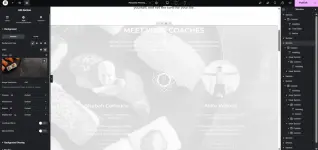
Hi po, need ko po ng help sa mga webpress experts gamit elementor, baguhan palang po kasi asko and tinry ko mag download ng template online para pag praktisan, so ang issue ko hindi ko matanggal yung white overley dito sa may section na to, tinry ko na i reset yung style, reset backgrond and overlay. kaso walng nagbabago , nachchange ko yung mga images and text pero automatic sila nag aadapt sa white, pag tintry ko ichange color yung text maigiging gray lang sya. 🙏
Screenshot 2025-05-07 214454.webp
 
Solution
I-select mo ang Section (yung pinaka-outer section kung nasaan yung "MEET YOUR COACHES").

Mukhang naka-select ka na sa screenshot.

Sa kaliwang panel, go to:
Style → Background Overlay

Check the Overlay Color:

Sa Color, kung naka-set ito sa white (#ffffff) or may opacity:

I-click mo yung color box at baguhin ang opacity (drag mo pababa yung transparency bar o tanggalin ang color).

Or set the opacity to 0 by sliding the transparency all the way left.

Kung naka-enable ang blend mode, i-set mo to Normal.

Extra Tips:
Text color issue: Dahil may overlay, hindi mo rin makita agad ang full effect ng text color changes. Ayusin muna ang overlay, tapos saka mo i-adjust ang text colors (white text sa dark image background or black sa...
I-select mo ang Section (yung pinaka-outer section kung nasaan yung "MEET YOUR COACHES").

Mukhang naka-select ka na sa screenshot.

Sa kaliwang panel, go to:
Style → Background Overlay

Check the Overlay Color:

Sa Color, kung naka-set ito sa white (#ffffff) or may opacity:

I-click mo yung color box at baguhin ang opacity (drag mo pababa yung transparency bar o tanggalin ang color).

Or set the opacity to 0 by sliding the transparency all the way left.

Kung naka-enable ang blend mode, i-set mo to Normal.

Extra Tips:
Text color issue: Dahil may overlay, hindi mo rin makita agad ang full effect ng text color changes. Ayusin muna ang overlay, tapos saka mo i-adjust ang text colors (white text sa dark image background or black sa light).

Check Section > Advanced > Custom CSS: Baka may nakalagay na custom CSS na naglalagay ng overlay. Kung meron, tanggalin mo.
 
Solution
I-select mo ang Section (yung pinaka-outer section kung nasaan yung "MEET YOUR COACHES").

Mukhang naka-select ka na sa screenshot.

Sa kaliwang panel, go to:
Style → Background Overlay

Check the Overlay Color:

Sa Color, kung naka-set ito sa white (#ffffff) or may opacity:

I-click mo yung color box at baguhin ang opacity (drag mo pababa yung transparency bar o tanggalin ang color).

Or set the opacity to 0 by sliding the transparency all the way left.

Kung naka-enable ang blend mode, i-set mo to Normal.

Extra Tips:
Text color issue: Dahil may overlay, hindi mo rin makita agad ang full effect ng text color changes. Ayusin muna ang overlay, tapos saka mo i-adjust ang text colors (white text sa dark image background or black sa light).

Check Section > Advanced > Custom CSS: Baka may nakalagay na custom CSS na naglalagay ng overlay. Kung meron, tanggalin mo.
Thank you so much po, Okay na sya !
 
Status
Not open for further replies.

About this Thread

  • 2
    Replies
  • 317
    Views
  • 2
    Participants
Last reply from:
ivanmagtoto

Trending Topics

Online now

Members online
367
Guests online
879
Total visitors
1,246

Forum statistics

Threads
2,273,071
Posts
28,947,407
Members
1,236,586
Latest member
Salvia
Back
Top