👨‍🏫 Tutorial How to remove annoying ads when browsing online

pakshet

Elite

Hello mga bossing magandang gabi were back again for another tutorial! For sharing lang para wala ng mag pop-up na annoying ads pag nagbabrowse kayo at for your safety na rin para di kung ano-ano napipindot pag may lumabas na ads at nag pop up. Matagal ko na rin tong gamit.

Option 1 (recommended for pc/desktop users):

1772366502719.webp
Item logo image for AdGuard AdBlocker

AdGuard AdBlocker

If you're using computer, sa google chrome hanapin niyo lang yung extesion na adguard and install niyo lang. After installation restart google chrome and you can browse free of ads na. Kahit sa youtube if wala kayo premium pwede ito.

Option 2 (recommended for mobile users)


1772366532332.webp
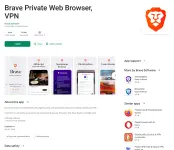
If you're using mobile, you can download brave browser and from there yun na gamitin niyong browser so that you can browse free of annoying ads and another tip pwede ding dun na kayo manood ng youtube para tuloy-tuloy lang pagwawatch niyo and many more sites.


Hopefully this helps! Please comment if this works and is greatly appreciated ♥

Follow me for more tips


About this Thread

  • 3
    Replies
  • 520
    Views
  • 3
    Participants
Last reply from:
Kurukutuk

Trending Topics

Online now

Members online
364
Guests online
2,003
Total visitors
2,367

Forum statistics

Threads
2,314,560
Posts
29,178,800
Members
1,184,196
Latest member
gopal134
Back
Top