 PH
PHarsenal1205
Rarely opens PHC
TL;DR
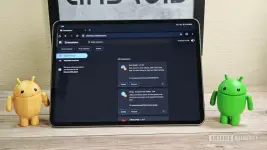
- Here’s a first look at the Desktop Android version of Google Chrome, which supports browser extensions.
- Extension support is pretty rudimentary at the moment, but Google is hard at work making it better.
- The Desktop Android version of Chrome is intended for Chromebooks and PCs that run Android and not phones or tablets.
You do not have permission to view the full content of this post. Log in or register now. may be the most popular web browser on Android, but it’s not the most powerful option. That’s because it lacks a key feature found on many other You do not have permission to view the full content of this post. Log in or register now.: extension support. Google is finally working on a version of Chrome for Android that supports browser extensions, though, and we managed to get it up and running for a quick demonstration.
You’re reading an Authority Insights story. Discover You do not have permission to view the full content of this post. Log in or register now. for more exclusive reports, app teardowns, leaks, and in-depth tech coverage you won’t find anywhere else.
Last year, we revealed that Google is working on special You do not have permission to view the full content of this post. Log in or register now.. These special builds of Chrome are intended for PCs that run Android rather than mobile devices, hence why they’re called “desktop” builds. The reason for this is that Google plans to You do not have permission to view the full content of this post. Log in or register now., so the company needs to build a version of Chrome for Android with extension support in order to maintain feature parity between Chrome OS and Android.
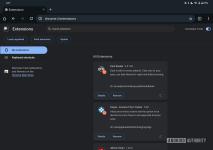
Although Google doesn’t intend for these “desktop” builds of Chrome for Android to come to mobile devices, there’s nothing stopping us from installing them regardless. Google doesn’t publish these builds on the Play Store, though it does provide them on its download server. Until recently, though, it wasn’t possible to install extensions on these “desktop” builds of Chrome for Android, but that’s no longer the case thanks to the implementation of You do not have permission to view the full content of this post. Log in or register now.. This code change makes it possible to manually install browser extensions in Chrome by downloading their .crx files and dragging and dropping them into the chrome://extensions page, which is a special page in Chrome where you can manage your extensions.
Mishaal Rahman / Android Authority
After downloading a “desktop” build of Chrome for Android that had this change, I was able to get some of the You do not have permission to view the full content of this post. Log in or register now. up and running on my tablet, like Dark Reader, Keepa, and uBlock Origin. These extensions were automatically enabled upon installation, so all I had to do was refresh web pages to see them in action. Web pages turned dark thanks to Dark Reader, Amazon listings had a Keepa button to show price history, and ads were blocked thanks to uBlock Origin.

An Amazon store listing with the Keepa price tracker extension enabled.
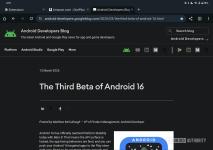
The Android Developers blog with the Dark Reader extension enabled.
During my limited testing, while some extensions functioned well, many were unusable. This limitation stems from the lack of support for opening extension options pages and the absence of an “extensions” button in the toolbar, both of which are essential for many extensions. Understandably, Google’s focus right now is on enabling basic extension installation. However, the current manual installation process, which requires dragging and dropping .crx files, is cumbersome. Therefore, I hope that Google will soon add support for installing extensions via the Chrome Web Store.
If you want to install these “desktop” builds of Chrome for Android on your own device, you can grab them from You do not have permission to view the full content of this post. Log in or register now.. Note that these builds are compiled from the Chromium codebase, which means they lack Google account sync and other Chrome-exclusive features.
Unfortunately, Google currently has no plans to officially bring these new “desktop” builds of Chrome for Android to phones or tablets, nor does it have plans to add the extensions feature to existing versions of the mobile browser. This means that regular users will have to install other web browsers in order to You do not have permission to view the full content of this post. Log in or register now.. Hopefully, Google will change its mind and bring extension support to all Chrome for Android users in the future.
FROM: ANDROID AUTHORITY