 PH
PH-
Welcome to PHCorner Forums! Sign up for free to unlock full access and exclusive privileges, including:
- Asking questions about computer and mobile issues
- Discovering internet tips for your mobile network and computer
You are using an out of date browser. It may not display this or other websites correctly.
You should upgrade or use an alternative browser.
You should upgrade or use an alternative browser.
👨🏫 Tutorial CONTROLD READY-SETUP YøùTùbé No Ads/ãdül Content/Browser/Security (Android&IOS&Windows&Chrome&Firefox&Android Tv)
- Status
- Not open for further replies.
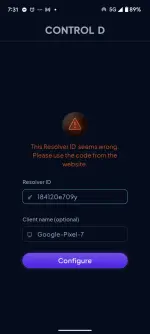

Boss sa setting ka mag lagay Kasi android phone gamit mo...tignan mo meth Ng android
Lady-T-Tea
Forum Guru
Salamat
LUDOCIEL_18
Honorary Poster
Thanks po
Hndi 24/7 ako gising hahalakas mo man, natutulog kaba
-PH_NAKAMA-
Honorary Poster
Support lodicakes
Kyla Marquez
Eternal Poster
Ano po itsura ng ControlID sa playstore ??
Okay naman po sakin… baka na rereset niyo po.Dami beses ko na na try sa tv, bumibitaw po sya. Sa uuna kokonek pero sa mga susunod ns araw hindi na. May paraam ba para hindi bumitaw
Ano po itsura ng ControlID sa playstore ??
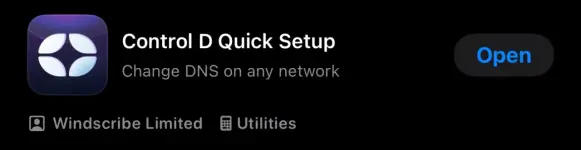
Ganyan po
indyingarms
Fanatic
Working po siya sa hisense smart TV.
Para sa mga may hisense TV po just check below instruction
1. Go to Menu > Settings > Network > Network Configuration > Advance Settings
2. Go to IP Settings
3. IP Version should be IPV4
4. IP Setting Mode choose Manual
5. Enter DNS Server 1 and DNS Server 2 from sir VCODE post.
6. Save
Thanks boss VCODE

Para sa mga may hisense TV po just check below instruction
1. Go to Menu > Settings > Network > Network Configuration > Advance Settings
2. Go to IP Settings
3. IP Version should be IPV4
4. IP Setting Mode choose Manual
5. Enter DNS Server 1 and DNS Server 2 from sir VCODE post.
6. Save
Thanks boss VCODE
Salamat sa info boss..Working po siya sa hisense smart TV.
Para sa mga may hisense TV po just check below instruction
1. Go to Menu > Settings > Network > Network Configuration > Advance Settings
2. Go to IP Settings
3. IP Version should be IPV4
4. IP Setting Mode choose Manual
5. Enter DNS Server 1 and DNS Server 2 from sir VCODE post.
6. Save
Thanks boss VCODE
Aldrian-PHC
Established
salamat sa dns boss, ad free na ako.
lodikokita
Eternal Poster
Thank you po
Cyber Bricked
Elite
thanks paps
- Status
- Not open for further replies.
Similar threads
About this Thread
-
167Replies
-
12KViews
-
129Participants
Last reply from:
brianlobitana
brianlobitana
New Topics
-
Free Residential Proxy
- Started by Noztrebor
- Replies: 1
- 🚀 Freenet & Tunneling
-
Need vpn free internet
- Started by Bon26
- Replies: 0
- 🚀 Freenet & Tunneling
-
LPB PISO WIFI HELP
- Started by -shutdown-
- Replies: 5
- 🚀 Freenet & Tunneling
-
DNS LOOPING IN LINUX V2RAY TUN
- Started by Hidedeath
- Replies: 2
- 🚀 Freenet & Tunneling
-
MGa BOSS FREE VPN NA MAY PH SERVER PARA DITO SA AFRICA?
- Started by Junbiel 26
- Replies: 1
- 🚀 Freenet & Tunneling
-
PISOWIFI NO HULOG | (26-09-30) | NPV TUNNEL
- Started by Calcifeer
- Replies: 8
- 🚀 Freenet & Tunneling
-
[NOW WORKING] Youtube No Ads & Other Sites! via DNS
- Started by Lerps
- Replies: 41
- 🚀 Freenet & Tunneling
-
Free vpn can bypass captive portal
- Started by Darz2468
- Replies: 6
- 🚀 Freenet & Tunneling
Trending Topics
-
Oct. 19, 2026 - GTM NoLoad | STS NoLoad | AllNet and AllCountry NoLoad | OpenCFG
- Noahclanman
Replies: 14 -
-
-
-
-
-
Online now
- Members online
- 762
- Guests online
- 8,671
- Total visitors
- 9,433