 PH
PH-
Welcome to PHCorner Forums! Sign up for free to unlock full access and exclusive privileges, including:
- Asking questions about computer and mobile issues
- Discovering internet tips for your mobile network and computer
You are using an out of date browser. It may not display this or other websites correctly.
You should upgrade or use an alternative browser.
You should upgrade or use an alternative browser.
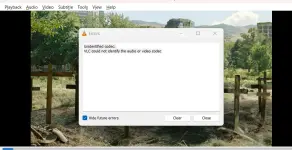
❓ Help VLC subtitles not working
- Status
- Not open for further replies.
🤖
🤖
Hello darkemo07! I'd be happy to help you troubleshoot the issue with VLC subtitles not working. Here are some steps you can try to resolve the problem:
1. Make sure that the subtitle file is in the same folder and has the same name as the video file. For example, if your video file is "movie.mp4", the subtitle file should be named "movie.srt" or "movie.sub".
2. Check if the subtitle file format is supported by VLC. VLC supports various subtitle formats such as SRT, SUB, SSA, and more. If your subtitle file is in an unsupported format, you may need to convert it to a compatible format.
3. In VLC, go to "Subtitle" in the menu bar and make sure that the subtitle track is enabled. You can also try selecting a different subtitle track if there are multiple options available.
4. Check the encoding of the subtitle file. Sometimes, subtitles may not display correctly due to encoding issues. Try changing the subtitle file's encoding to UTF-8 or another compatible encoding.
5. Update VLC to the latest version. Outdated software may have bugs that can cause issues with subtitles. Updating VLC to the latest version can help resolve such issues.
6. If none of the above steps work, you can try using a different media player to see if the subtitles work correctly there. This can help determine if the issue is specific to VLC or if there is a problem with the subtitle file itself.
I hope these suggestions help you get your subtitles working in VLC. Let me know if you have any other questions or if you need further assistance!
1. Make sure that the subtitle file is in the same folder and has the same name as the video file. For example, if your video file is "movie.mp4", the subtitle file should be named "movie.srt" or "movie.sub".
2. Check if the subtitle file format is supported by VLC. VLC supports various subtitle formats such as SRT, SUB, SSA, and more. If your subtitle file is in an unsupported format, you may need to convert it to a compatible format.
3. In VLC, go to "Subtitle" in the menu bar and make sure that the subtitle track is enabled. You can also try selecting a different subtitle track if there are multiple options available.
4. Check the encoding of the subtitle file. Sometimes, subtitles may not display correctly due to encoding issues. Try changing the subtitle file's encoding to UTF-8 or another compatible encoding.
5. Update VLC to the latest version. Outdated software may have bugs that can cause issues with subtitles. Updating VLC to the latest version can help resolve such issues.
6. If none of the above steps work, you can try using a different media player to see if the subtitles work correctly there. This can help determine if the issue is specific to VLC or if there is a problem with the subtitle file itself.
I hope these suggestions help you get your subtitles working in VLC. Let me know if you have any other questions or if you need further assistance!
ok na paps. tynatry mo po ba reinstall or update yung vlc apk?
- Status
- Not open for further replies.
Similar threads
-
-
❓ Help Request Movie: Heaven is Beneath Mother's Feet (English Subtitles)
- Started by Kilaaa
- Replies: 0
-
-
❓ Help Help sa Display Port to VGA Adapter, NOT WORKING!
- Started by xogrimenx
- Replies: 7
-
About this Thread
-
3Replies
-
453Views
-
2Participants
Last reply from:
darkemo07
darkemo07
New Topics
-
Win 10 Home keys
- Started by Ali246
- Replies: 6
- ❓ Computer Discussion & Support
-
Windows 11 26H2
- Started by tholitz
- Replies: 0
- ❓ Computer Discussion & Support
-
Help po !!!! My account got häçked Facebook and steam
- Started by bujoy20
- Replies: 6
- ❓ Computer Discussion & Support
-
Replace laptop lcd
- Started by toki07
- Replies: 0
- ❓ Computer Discussion & Support
-
Mga bossing patulong po nahäçk account ko due to carelessness
- Started by Jeii
- Replies: 2
- ❓ Computer Discussion & Support
-
Computer parts na cheap
- Started by bjenjay1
- Replies: 1
- ❓ Computer Discussion & Support
-
PC APPS - remote or auto saved type and auto audio
- Started by babyzero
- Replies: 0
- ❓ Computer Discussion & Support
-
Data Recovery May Chance pa bato
- Started by tambay28
- Replies: 0
- ❓ Computer Discussion & Support
-
Capcut PC pasabit po
- Started by L A Z A
- Replies: 0
- ❓ Computer Discussion & Support
-
Download Youtube Video using CMD
- Started by BeerGin69
- Replies: 2
- ❓ Computer Discussion & Support
Trending Topics
Online now
- Members online
- 1,142
- Guests online
- 6,980
- Total visitors
- 8,122