 PH
PHVrInG BaCk
Forum Guru
Hello po mga ka phc! I just wanted to share this info/tutorial that i recently found on internet on how to activate your windows...but before i discover this info/tutorial, i was experiencing trouble on my laptop that my windows isn't activated anymore, so it needs to be activated so that i can have access to something that i wanted to do...so i search on the internet and then i found this tutorial i tried to follow it and, it actually work po, and i wanted to share this for those people who experience that same problem that i've encountered...so please use it as your own risk.
Note: Please Read and follow the steps Carefully.
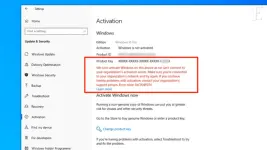
As you can see, the windows isn't activated.
Step 1: Open your Command Prompt(CMD) and then click Run as administrator then may mag ppop-up just click the yes.
Step 2: Copy and Paste this code in the Cmd and then click enter.
slmgr /skms kms8.msguides.comStep 3: After you hit the enter may mag ppop-up na "Key Management Service machine name set to ksm8.guides.com successfully" just click " Ok"
Step 4: After you click the "Ok" close the cmd then open it again. (Same thing lang run as administrator then yes)
Step 5: And then after it opened copy and paste this code in your cmd
slmgr /ato then click enter. just wait and this will gonna pop-up.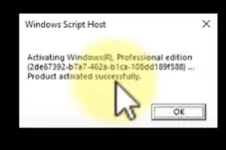
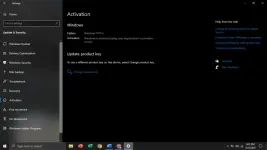
just click "Ok" and then you can check if it worked in your settings in activation if not you can proceed to the following steps...
NOTE: But if you experience an error after you do the step 5. like this error..."Error code:0xC004F074" proceed to step 6.
Step 6: Open your Cmd (as usual run administrator then yes) type or paste this code
sfc /scannowthen enter just be patient then after it is done scanning, you can close the cmd.Step 7: Then type on your windows search bar "Troubleshoot Settings" then double tap on it.
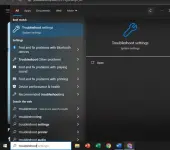
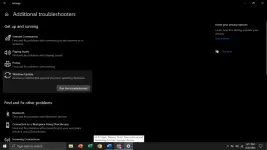
Step 8: Go to troubleshoot then click "additional troubleshooters"
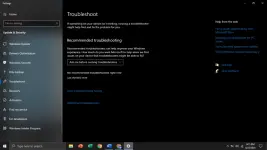
Step 9: click "windows update" and click "Run the Troubleshooter"...after it finish troubleshooting just ignore the other problems then you can just close the troubleshooter.
Step 11: repeat the steps from step 1 to step 5, then it will work and check it in your settings
I hope it helps mga paps, pasensya po if medyu magulo arrangement po ng steps. Sundan nyu lang po ng tama yung steps mga paps.
I Hope this helps po, Thank you so much


