Help converge Mac filtering not working

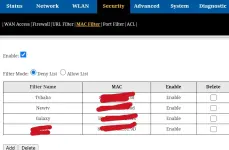
Help converge Mac filtering not working kahit sa mismong phone ko ayaw gumana.

Model: GN630V

Patulong salamat
IMG_20250409_230213.webp
 
Pangit deny list kasi naka random mac adress na mga device ngayon dapat yung allow list gamitin mo at i off mo random mac adress ng device mo
 
1. Check MAC Filtering Settings
Login to your router’s admin page (usually, this can be done by typing the router’s IP address in your browser. Typically it’s 192.168.1.1 or 192.168.0.1).

Enter your username and password (default login details should be in the router's manual or on a label on the router).

Go to the MAC Filtering section (the exact location might vary, but it’s often under Wireless Settings or Security).

Make sure MAC Filtering is enabled and that the MAC address of your phone is added to the list of allowed devices.

2. Verify Your Phone’s MAC Address
On your phone, go to the Settings > About Phone or Status > Wi-Fi MAC address.

Ensure the MAC address you’re entering in the router’s MAC filtering list is correct. Double-check for any possible typos.

3. Check for Router Firmware Updates
Sometimes, issues with MAC filtering can be fixed with a firmware update.

Go to the Firmware Update section on your router’s admin page and check if there is any new firmware available for your device.

Update if necessary and reboot the router.

4. Ensure Your Router Supports the MAC Filtering Feature Properly
Not all routers have MAC filtering working 100% correctly across all devices or might have bugs in some firmware versions.

Check the router's manual to make sure the feature is properly supported.

5. Disable Any Conflicting Security Features
Sometimes, other security features like WPA3 encryption or Advanced Security Settings may cause issues with MAC filtering. Try temporarily disabling those and see if it makes a difference.

6. Test Without MAC Filtering
As a test, temporarily disable MAC filtering and check if your phone can connect to the network without any restrictions. This will help determine if the issue lies with MAC filtering or something else.

7. Reboot Router & Device
After adjusting the settings, it’s always a good idea to reboot both the router and your phone. This ensures that changes to the settings take effect properly.
 
Hindi Naman dapat kami lang mkakakonek kasi white list kaso baliktad naw

Hindi Naman dapat kami lang mkakakonek kasi white list kaso baliktad nawalan kami lahat
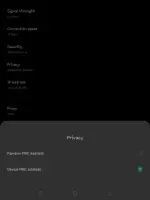
Kaya nga pag i wawhite list mo lng mga devices nyo o kayo² lang coconect, its better na iset nyo ung mga devices nyo sa device mac, hnd dapat naka random mac ,kasi kada connect nyo nag iiba mac nyo, so kaya d kayo Maka connect

Screenshot_2025-05-06-14-55-36-36_8ecb18ff21726a42693957ff5a148085.webp


Hindi Naman dapat kami lang mkakakonek kasi white list kaso baliktad nawalan kami lah
Hindi Naman dapat kami lang mkakakonek kasi white list kaso baliktad nawalan kami lahat
Screenshot_2025-05-06-14-59-41-71_96b26121e545231a3c569311a54cda96.webp

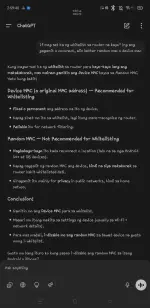
Ayan na ung sagot kay chat gpt

Kung kayo² lng nmn gumagamit ng wifi nyo o d nyo sini share

Tas ung sa filter mode mo naka deny list pa HAHAHAHA 🤣
 
Kaya nga pag i wawhite list mo lng mga devices nyo o kayo² lang coconect, its better na iset nyo ung mga devices nyo sa device mac, hnd dapat naka random mac ,kasi kada connect nyo nag iiba mac nyo, so kaya d kayo Maka connect

View attachment 3696660


Ayan na ung sagot kay chat gpt

Kung kayo² lng nmn gumagamit ng wifi nyo o d nyo sini share

Tas ung sa filter mode mo naka deny list pa HAHAHAHA 🤣
Naka deny list yan dahil sa di gumagana mga device namin sa whitelist at dyan sa deny list Naman gumagana device namin.

Naka set na din lahat sa own device Mac address at di na naka random Mac address.
 

About this Thread

  • 7
    Replies
  • 951
    Views
  • 4
    Participants
Last reply from:
Fiore daffodil

Trending Topics

Online now

Members online
1,068
Guests online
988
Total visitors
2,056

Forum statistics

Threads
2,274,417
Posts
28,955,727
Members
1,234,219
Latest member
mickaella18
Back
Top