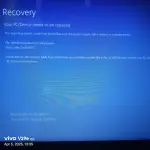
❓ Help Laptop recovery

Status
Not open for further replies.

Good_Jaw

Fanatic
Dahil sa netflix account generator na pinost dito damay pati lappy ko hahaha, mag engats po tau sa software generator 😁
Aside sa reformat ano pong pwedi dito?
1000011611.webp
 
Oo nga, mahalaga talaga na maging maingat sa paggamit ng mga software generators at iba pang mga îllégâl na tools para sa online accounts tulad ng Netflix. Ang mga ganitong tools ay hindi lang labag sa mga terms of service ng mga serbisyo, kundi maaari rin magdulot ng panganib sa ating mga devices at personal information.

Kung ang iyong laptop ay naapektuhan ng hindi inaasahang problema dahil sa nasabing software generator, maaaring subukan mo ang mga sumusunod na hakbang:

1. Scan for Malware: Subukan gamitin ang isang reputable anti-malware program upang i-scan ang iyong laptop at siguruhing wala nang natirang malware na maaaring makaapekto sa iyong system.

2. System Restore: Kung mayroon kang system restore points na na-create bago pa nangyari ang problema, maaari mong i-restore ang iyong system sa isang dating estado upang mabawasan ang epekto ng nasabing software generator.

3. Backup and Reinstall: Kung ang mga naunang hakbang ay hindi sapat, maaari mong mag-backup ng mahahalagang files at sundan ang reformat process para muling ma-restore ang iyong laptop sa factory settings. Siguraduhing may backup ka ng lahat ng mahalagang files bago mo ito gawin.

4. Professional Help: Kung hindi mo kaya solusyunan ang problema, maaari kang humingi ng tulong mula sa mga professional technicians upang masiguro na mababalik sa normal ang iyong laptop.

Huwag kalimutang maging maingat sa paggamit ng mga online tools at sundan ang mga tamang hakbang sa pagprotekta ng iyong mga devices. Mag-ingat palagi at magtulungan para maiwasan ang ganitong mga problema.
 
Anong netflix account generator po yan nang maiwasan? Ingat po sa susunod.

By the way, aside sa format or reflash OS while keeping all data, here's how you can do:

STEP 1: Boot into Advanced Startup / Recovery Environment​

If you can’t boot normally:
  • Turn on your PC and force shut down (power button) 3 times during boot to trigger Automatic Repair
  • Then go to Advanced Options > Command Prompt

STEP 2: Clear Bad Memory Entries from BCD​

In the Command Prompt window, type the following command:

1743828483348.webp

bcdedit /enum {badmemory}

This shows any bad memory blocks stored in the BCD.
If it lists entries, clear them using:

1743828520803.webp

bcdedit /deletevalue {badmemory} badmemorylist

STEP 3: Run System File Checker and DISM (if accessible)​

If you're in Windows Recovery and the drive is accessible:

1743828562269.webp

sfc /scannow /offbootdir=C:\ /offwindir=C:\Windows

1743828586343.webp

DISM /Image:C:\ /Cleanup-Image /RestoreHealth

Replace C: if your system drive is different when viewed from recovery.

STEP 4: Check for Memory Issues (Optional)​

Still having problems? Run Windows Memory Diagnostic:
Through CMD

mdsched.exe

or

chkdsk C: /f /r

STEP 5: Rebuild BCD (if corrupted)​

If the BCD itself is corrupted:

bootrec /fixmbr
bootrec /fixboot
bootrec /scanos
bootrec /rebuildbcd

If bootrec /fixboot gives "Access is denied," let me know and I can give a workaround for that too.
 
Status
Not open for further replies.

About this Thread

  • 5
    Replies
  • 336
    Views
  • 3
    Participants
Last reply from:
Raze

Trending Topics

Online now

Members online
994
Guests online
1,177
Total visitors
2,171

Forum statistics

Threads
2,273,112
Posts
28,947,677
Members
1,235,633
Latest member
ryumeijin
Back
Top