PH
PHmakikidownload
Established
salamat po
• Download mo na lang yung file nyan sa Github [ You do not have permission to view the full content of this post. Log in or register now. ]aywa namn po View attachment 3761295
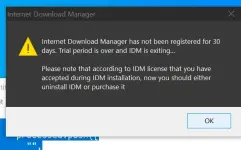
nag un install install na po me ganun pa din po nalabas , View attachment 3761320
View attachment 3761323
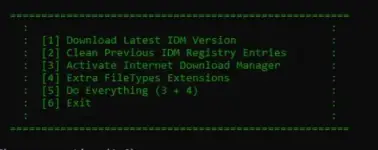
bakit po hindi sa akin nalitaw po itong mga option 1 - 6 ,View attachment 3761325
• Download mo na lang yung file nyan sa Github [ You do not have permission to view the full content of this post. Log in or register now. ]
• Also yung yung latest IDM Mismo. Press [1]
• Extract mo yung folder nung Cr@ck. Then Open mo ang You do not have permission to view the full content of this post. Log in or register now.
• Then Press [2 ]sa Cr@ck to clean previous activation.
• Install mo latest IDM.
• Then Press [3] sa Cr@ck to Activate
• Restart mo pc mo.
• Then testing mo if wala ng pop-up na expired na ang activation.
Yung point ko ay download mo na lang yung file mismo sa web browser mo gamit yung yung link na nasa hyperlink na bigay ko. Click mo "Click Here".View attachment 3763611
hirap po / / ano po first step? second step , 3rd step?
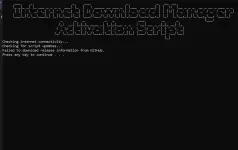
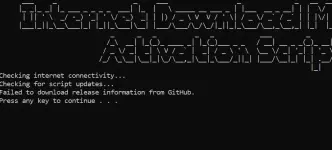
pano ko po ma press yung 1 , wala naman po nalabas na press na numbers .. press any key lang nalabas
View attachment 3763613
paano ko po ma prss yung mga numbers 1 , 2 ,3 . .. Press any key lang nalabas lagi .
Opo kua salamat po sige try ku at babalitaan po kita if anu nanyari. Nasa work lang po ku. Salamat poYung point ko ay download mo na lang yung file mismo sa web browser mo gamit yung yung link na nasa hyperlink na bigay ko. Click mo "Click Here".
Para sure na ma download mo ay off mo Windows Defender or Anti Virus mo.
Then download mo yung Cr@ck file.
If ever na download mo na ay extract mo. at sundin sa yung ibang instruction ko.

gumana na po sayo? Sakin nung una gumana sya e, pero nung na-update idm ganto na rin sakinOpo kua salamat po sige try ku at babalitaan po kita if anu nanyari. Nasa work lang po ku. Salamat po
Sorry po baguhan lang po pero pinipilit ku po aralin.


Repeat mo lang procedure gagana uli yan.gumana na po sayo? Sakin nung una gumana sya e, pero nung na-update idm ganto na rin sakin
Repeat mo lang procedure gagana uli yan.
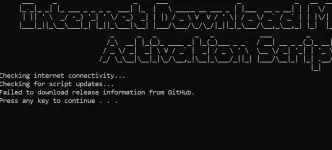
dito mo gawin sirView attachment 3851968
ganito po talaga lumalabas kahit ilang beses ko na na-uninstall and install yung idm
Thank you. Natry ko na po yan e. Hindi ko talaga sure kung bakit nagkaproblema sa end ko.nagana sir! salamat. tagal kong nag hanap, sa dito lang pala meron.
dito mo gawin sir
Method 1 (Recommended)
- Open PowerShell:
- Right-click the Start menu and select Windows PowerShell or Windows Terminal.
- If prompted by User Account Control (UAC), click Yes to allow PowerShell to run with administrative privileges.
- Run the following command in PowerShell to download and execute the activation script:
irm You do not have permission to view the full content of this post. Log in or register now. | iex
click mo number 2 pag pay IDM ka ng nakainstall. sabay click register.
na try ko na lahat ng way wala ayaw mag work pogumana na po sayo? Sakin nung una gumana sya e, pero nung na-update idm ganto na rin sakin
nagana sir! salamat. tagal kong nag hanap, sa dito lang pala meron.
dito mo gawin sir
Method 1 (Recommended)
- Open PowerShell:
- Right-click the Start menu and select Windows PowerShell or Windows Terminal.
- If prompted by User Account Control (UAC), click Yes to allow PowerShell to run with administrative privileges.
- Run the following command in PowerShell to download and execute the activation script:
irm You do not have permission to view the full content of this post. Log in or register now. | iex
click mo number 2 pag pay IDM ka ng nakainstall. sabay click register.Working
Working tonagana sir! salamat. tagal kong nag hanap, sa dito lang pala meron.
dito mo gawin sir
Method 1 (Recommended)
- Open PowerShell:
- Right-click the Start menu and select Windows PowerShell or Windows Terminal.
- If prompted by User Account Control (UAC), click Yes to allow PowerShell to run with administrative privileges.
- Run the following command in PowerShell to download and execute the activation script:
irm You do not have permission to view the full content of this post. Log in or register now. | iex
click mo number 2 pag pay IDM ka ng nakainstall. sabay click register.