 PH
PH
File size: 475 MB
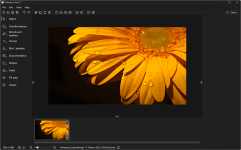
Ashampoo Snap 17 raises the bar, again! The new instant shot feature requires only two clicks to create beautiful screenshots. In addition, video captures now support live annotations through arrows and rectangles to instantly redirect attention and shorten post-processing.
Then, there's the new always-present toolbar with quick-access to all essential capture functions during screenshotting, seamless zooming during editing, and a revamped magic eye that saves you clicks! New technology, more speed, more efficiency, and streamlined workflows: That's what Ashampoo Snap 16 is all about!
Handy toolbar for seamless zooming
Revised "magic eye" for quicker results
Live video annotations with arrows and rectangles
Convenient context menu with quick access to recording features
Cutting-edge image and video capturing engine
Add watermarks
Capture mouse pointer
Different color presets for selections
Fast two-click screenshots
Improved support for high-res and low-res displays
New scroll-capture technology
Fast OCR language switching
Across the board performance improvements
Screen :
What's New
Spoiler contents are visible only to Established Members.
HOMEPAGE
Code:
https://www.ashampoo.com/en-us/snap/detailYou do not have permission to view the full content of this post. Log in or register now.
You do not have permission to view the full content of this post. Log in or register now.
You do not have permission to view the full content of this post. Log in or register now.