 PH
PH-
Welcome to PHCorner Forums! Sign up for free to unlock full access and exclusive privileges, including:
- Asking questions about computer and mobile issues
- Discovering internet tips for your mobile network and computer
You are using an out of date browser. It may not display this or other websites correctly.
You should upgrade or use an alternative browser.
You should upgrade or use an alternative browser.
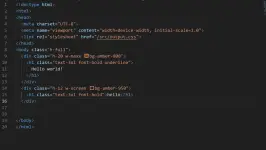
Help tailwind css not working bgcolors but text styles is working badly need help

🤖
🤖
Hello! It seems like you're having trouble getting background colors to work in Tailwind CSS. Let's try to troubleshoot the issue together. Here are a few common reasons why background colors might not be working as expected in Tailwind CSS:
1. Check Tailwind Configuration: Make sure that your Tailwind CSS configuration file is set up correctly. Sometimes, background colors may not work if they are not configured properly in your
2. Check HTML Structure: Double-check your HTML structure to ensure that the classes for background colors are applied correctly. For example, you should use classes like
3. Check CSS Specificity: CSS specificity can sometimes override your Tailwind CSS styles. Make sure there are no conflicting styles in your custom CSS or other external stylesheets that might be affecting the background colors.
4. Important Note: Remember that Tailwind CSS uses utility classes, so you need to ensure that you are using the correct utility classes for background colors. For example,
If you can provide some code snippets or more specific details about your setup, I'd be happy to help debug further! Feel free to share any relevant code, and we can work through the issue together.
1. Check Tailwind Configuration: Make sure that your Tailwind CSS configuration file is set up correctly. Sometimes, background colors may not work if they are not configured properly in your
tailwind.config.js file.2. Check HTML Structure: Double-check your HTML structure to ensure that the classes for background colors are applied correctly. For example, you should use classes like
bg-red-500 for a red background color.3. Check CSS Specificity: CSS specificity can sometimes override your Tailwind CSS styles. Make sure there are no conflicting styles in your custom CSS or other external stylesheets that might be affecting the background colors.
4. Important Note: Remember that Tailwind CSS uses utility classes, so you need to ensure that you are using the correct utility classes for background colors. For example,
bg-red-500 for a red background color.If you can provide some code snippets or more specific details about your setup, I'd be happy to help debug further! Feel free to share any relevant code, and we can work through the issue together.
goods na boss ni rerun kolang sa prompt yung pang last instruction sa tailwind ayaw ma copy ditoPatingin ng output.css mo
Ah yung watch nogoods na boss ni rerun kolang sa prompt yung pang last instruction sa tailwind ayaw ma copy dito
yup bossAh yung watch no
Similar threads
-
❓ Help E5573CS-933 OPENLINE BUT TNT OR SMART , SIM IS NOT WORKING
- Started by DOPEinDOPAMINE
- Replies: 6
-
❓ Help Really need help from tech out there nvidia app not working
- Started by JINWOOO11
- Replies: 0
About this Thread
-
6Replies
-
327Views
-
2Participants
Last reply from:
Panto
Panto
New Topics
-
Okay kaya ÒnlÿFánš tool
- Started by Gizmooh
- Replies: 0
- 💻 Coding & Programming
-
Sino po dito marunong magbypass ng geetest v4?
- Started by lumiere072695
- Replies: 0
- 💻 Coding & Programming
-
Every serious vibe coder should have bookmarked this
- Started by KumaKuma
- Replies: 2
- 💻 Coding & Programming
-
DDOS ATTACK (EDUCATION PURPOSE ONLY)
- Started by seanwhun
- Replies: 9
- 💻 Coding & Programming
-
Wifi Jammer RTL8720DN
- Started by akosirenkz
- Replies: 2
- 💻 Coding & Programming
-
How to automatically synchronize your files to google drive
- Started by No liabilities
- Replies: 1
- 💻 Coding & Programming
-
****** SCRIPT SOURCE CODE
- Started by anonymoustechsell
- Replies: 1
- 💻 Coding & Programming
-
Smart Barangay E-Governance System
- Started by If Else
- Replies: 5
- 💻 Coding & Programming
-
Microsoft Activation Scripts (MAS) | From GitHub
- Started by J u g g y
- Replies: 3
- 💻 Coding & Programming
-
LF gpt plus or business for vps with dedi ipv4
- Started by ambitiousnoob
- Replies: 7
- 💻 Coding & Programming
Trending Topics
Online now
- Members online
- 1,217
- Guests online
- 5,883
- Total visitors
- 7,100