❓ Help Paano iformat ?

Status
Not open for further replies.

Jessica Lee

Owner of VolantSSH
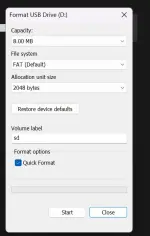
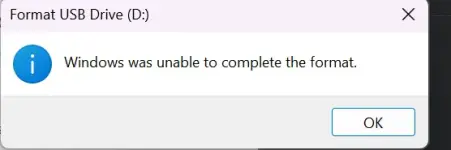
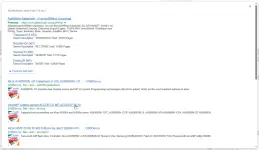
I have 64GB storage of flashdrive po rito, pero ang lumalabas lang po is 8.00MB, then kapag ifoformat ko ang lumalabas ay "Windows was unable to complete the format", paano po kaya ito? Thanks in advance

1741877023669.webp
1741877081652.webp
 
May ilang posibleng dahilan kung bakit hindi maayos na naformat ang iyong flash drive at bakit hindi sumasalamin ang tamang storage capacity. Narito ang ilang mga solusyon na maaari mong subukan:

1. Subukan ang iba't ibang USB ports: Minsan, ang isang USB port sa iyong computer ay hindi nagtatrabaho nang maayos kaya't subukan ang iba pang mga USB ports upang makita kung magiging successful ang format.

2. Gumamit ng ibang computer: Kung hindi pa rin maayos ang format sa iba't ibang USB ports, subukan itong i-format sa ibang computer. Baka may sira ang USB port ng iyong computer kaya't hindi gumagana nang maayos.

3. Gamitin ang Disk Management Tool: Maaring subukan ang Disk Management Tool ng Windows para i-reformat ang flash drive. Pindutin ang Windows Key + R, pagkatapos ay i-type ang "diskmgmt.msc" at i-press ang Enter. Dito, maaari mong subukan i-delete ang existing partition sa flash drive at i-create ulit ito.

4. Gumamit ng third-party software: Kung hindi pa rin magawa, maaari mong subukan ang mga third-party software tulad ng HP USB Disk Storage Format Tool o EaseUS Partition Master para ma-format ang flash drive.

5. Check for physical damage: Baka mayroong physical damage ang flash drive kaya't hindi ito maayos na naformat. Subukan itong ikonekta sa iba't ibang device para masiguro na hindi ito ang problema.

Kung wala sa mga nabanggit na solusyon ang nagtatrabaho, maaaring sira na ang flash drive at kailangan itong ipagawa o palitan. Sana makatulong ito sa iyo. Mag-ingat!
 
Good Day TS!

If okay pa po ang FLASH Memory, pwede pa po yan ma reprogram yung FW. As long as legit po ang Flash Drive ninyo.

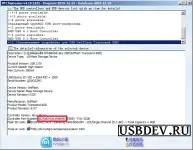
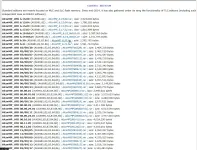
Download First yung Chip Genius Soft to check kung anung Controller po meron USB ninyu. At take note po nang Controller Part Number.
1742103189521.webp

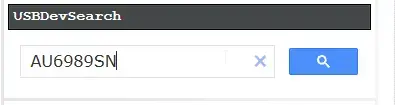
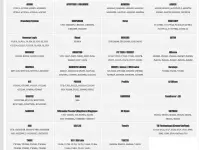
Punta po kayo dito You do not have permission to view the full content of this post. Log in or register now.. Scroll Down at hanapin po yung Vendor. at Search nyo po ang part number

1742104035752.webp


1742104149821.webp


Dadalhin po akayo nito sa Download Page ng Reprogrammer.
1742104207155.webp

NOTE: always compare your USB`s Part Number to the Corresponding Reprogrammer. If used with a wrong one could result in an Brick USB Device.

Kung nag aalinlangan po kayo sa software, you can always use a VM and do a Passthough for the USB connection.

1742103959661.webp
 
Wasak na chip nyan. Paulit ulit lang yan kahit Low level format mo pa.
Naka-ilang format na rin ako at reprogram bumabalik lang.
Kung memory card naman may bali na yan.
 
Method 1: Use Diskpart (Windows)

1. Open Command Prompt as Administrator

Press Win + R, type cmd, and press Ctrl + Shift + Enter to run as administrator.


2. Launch Diskpart

Type diskpart and press Enter.


3. List All Drives

Type list disk and press Enter. Identify your flash drive (look for the one with incorrect storage size).


4. Select Your USB Drive

Type select disk X (replace X with your USB drive number) and press Enter.


5. Clean the USB Drive

Type clean and press Enter.


6. Create a New Partition

Type create partition primary and press Enter.


7. Format the USB Drive

Type format fs=ntfs quick (or use format fs=fat32 quick for compatibility) and press Enter.


8. Assign a Drive Letter

Type assign and press Enter.


9. Exit Diskpart

Type exit and press Enter.


Now, check if your flash drive is restored to its full capacity.


Method 2: Use Third-Party Tools

If Diskpart doesn’t work, try using free USB repair tools like:

Rufus (for low-level formatting)

HP USB Disk Storage Format Tool

MiniTool Partition Wizard

EaseUS Partition Master
 
Status
Not open for further replies.

About this Thread

  • 12
    Replies
  • 840
    Views
  • 10
    Participants
Last reply from:
AdmiralKape

Trending Topics

Online now

Members online
1,278
Guests online
1,047
Total visitors
2,325

Forum statistics

Threads
2,273,186
Posts
28,948,061
Members
1,235,655
Latest member
hkql
Back
Top