 PH
PH-
Welcome to PHCorner Forums! Sign up for free to unlock full access and exclusive privileges, including:
- Asking questions about computer and mobile issues
- Discovering internet tips for your mobile network and computer
You are using an out of date browser. It may not display this or other websites correctly.
You should upgrade or use an alternative browser.
You should upgrade or use an alternative browser.
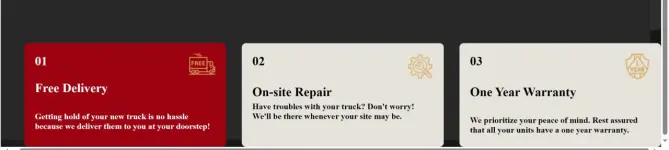
❓ Help Same css codes pero di same output
🤖
🤖
Hello! It seems like you are encountering some issues with your CSS styling. In cases where the CSS code is the same but the output is not consistent, there could be various factors causing this behavior. Here are some common reasons why the text may not be displaying consistently even with the same CSS code:
1. Browser Rendering Differences: Different web browsers may interpret CSS rules slightly differently, leading to variations in how the text is displayed. It's a good practice to test your code on multiple browsers to ensure consistent rendering.
2. Specificity: If there are conflicting CSS rules targeting the same text element with different specificity, the browser may prioritize one over the other, leading to differences in the displayed output.
3. Caching: Sometimes, browser caching can cause the CSS styles to not update properly. Try clearing your browser cache or using a private browsing window to see if the issue persists.
4. CSS Precedence: Make sure that there are no inline styles or !important declarations that could be overriding the styles you've defined in your CSS file.
5. External Factors: External factors like server configuration, network issues, or conflicting scripts on the webpage can also impact the consistency of the displayed text.
To troubleshoot the issue further, you can inspect the elements using your browser's developer tools to see the applied styles and diagnose any potential conflicts or inconsistencies. If you can provide more specific details or share the CSS code you are using, I can help you further in identifying the root cause of the issue.
1. Browser Rendering Differences: Different web browsers may interpret CSS rules slightly differently, leading to variations in how the text is displayed. It's a good practice to test your code on multiple browsers to ensure consistent rendering.
2. Specificity: If there are conflicting CSS rules targeting the same text element with different specificity, the browser may prioritize one over the other, leading to differences in the displayed output.
3. Caching: Sometimes, browser caching can cause the CSS styles to not update properly. Try clearing your browser cache or using a private browsing window to see if the issue persists.
4. CSS Precedence: Make sure that there are no inline styles or !important declarations that could be overriding the styles you've defined in your CSS file.
5. External Factors: External factors like server configuration, network issues, or conflicting scripts on the webpage can also impact the consistency of the displayed text.
To troubleshoot the issue further, you can inspect the elements using your browser's developer tools to see the applied styles and diagnose any potential conflicts or inconsistencies. If you can provide more specific details or share the CSS code you are using, I can help you further in identifying the root cause of the issue.
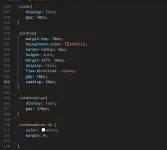
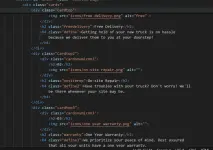
ito yung ibang code sa css
.cardsnumicon img{
width: 50px;
}
.freedelivery{
color: white;
margin: 0;
}
.define{
color: white;
margin-bottom: 10px;
}
.Cardtop2{
margin-top: 70px;
background-color: #e6e3dd ;
border-radius: 8px;
width: 30%;
height: auto;
display: flex;
flex-direction: column;
gap: 10px;
padding: 20px;
}
.cardsnumicon2{
display: flex;
gap: 270px;
}
.cardsnumicon2 h2{
margin: 0;
}
.cardsnumicon2 img {
width: 50px;
}
.onsiterep{
margin: 0;
}
.define2{
margin-top: -5px;
}
.cardtop3{
margin-top: 70px;
background-color: #e6e3dd;
border-radius: 8px;
width: 30%;
height: auto;
display: flex;
flex-direction: column;
gap: 10px;
padding: 20px;
}
.cardsnumicon3{
display: flex;
gap: 270px;
}
.cardsnumicon3 h2{
margin: 0;
}
.cardsnumicon3 img{
width: 50px;
}
.warranty{
margin: 0;
}
.define3 {
margin-bottom: -5px;
}
.cardsnumicon img{
width: 50px;
}
.freedelivery{
color: white;
margin: 0;
}
.define{
color: white;
margin-bottom: 10px;
}
.Cardtop2{
margin-top: 70px;
background-color: #e6e3dd ;
border-radius: 8px;
width: 30%;
height: auto;
display: flex;
flex-direction: column;
gap: 10px;
padding: 20px;
}
.cardsnumicon2{
display: flex;
gap: 270px;
}
.cardsnumicon2 h2{
margin: 0;
}
.cardsnumicon2 img {
width: 50px;
}
.onsiterep{
margin: 0;
}
.define2{
margin-top: -5px;
}
.cardtop3{
margin-top: 70px;
background-color: #e6e3dd;
border-radius: 8px;
width: 30%;
height: auto;
display: flex;
flex-direction: column;
gap: 10px;
padding: 20px;
}
.cardsnumicon3{
display: flex;
gap: 270px;
}
.cardsnumicon3 h2{
margin: 0;
}
.cardsnumicon3 img{
width: 50px;
}
.warranty{
margin: 0;
}
.define3 {
margin-bottom: -5px;
}
Blackstone03
Enthusiast
1 possible problem is yung device na ginamit mo? Same laptop lang ba ang gamit mo? May na encounter na din akong ganyan 1080p yung gamit na isang laptop tapos yung isa mas maliit and yung output sa maliit ay hindi tugma sa mas malaking screen.
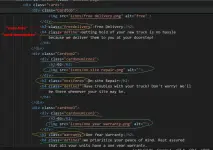
Try niyo po sir the same nalang class names para di po masyado hahaba css niyo po at para din po isa nalang class gagalawin niyo sa css kung may gusto ka po baguhin. And make sure po na set then sizes nung images/icons niyo.
View attachment 3594025
one thing I can recommend is, remove all codes.
use the basic default code to all cards (no design). then modify the display thru the html not in the css.
advantage. less css code. centralized modifications. after this, you can move those in the css.
noted thanks!1 possible problem is yung device na ginamit mo? Same laptop lang ba ang gamit mo? May na encounter na din akong ganyan 1080p yung gamit na isang laptop tapos yung isa mas maliit and yung output sa maliit ay hindi tugma sa mas malaking screen.
Similar threads
About this Thread
-
6Replies
-
417Views
-
4Participants
Last reply from:
Panto
Panto
New Topics
-
Tips on MS SQL Server
- Started by Porky Chao Fan
- Replies: 0
- 💻 Coding & Programming
-
Windows Form Open Source Libraries
- Started by Porky Chao Fan
- Replies: 0
- 💻 Coding & Programming
-
Looking po ako na marunong maglocate ng location.
- Started by Niel_08
- Replies: 1
- 💻 Coding & Programming
-
The Best Social Media Site I coded in past 24 hours
- Started by tutor21
- Replies: 0
- 💻 Coding & Programming
-
D_x416.exe system error
- Started by Ngangasi2586
- Replies: 0
- 💻 Coding & Programming
-
Pahinge po code ng pisowifi os pls
- Started by Zhaidan
- Replies: 0
- 💻 Coding & Programming
-
Sino po dito marunong magbypass ng geetest v4?
- Started by lumiere072695
- Replies: 0
- 💻 Coding & Programming
-
Every serious vibe coder should have bookmarked this
- Started by KumaKuma
- Replies: 3
- 💻 Coding & Programming
-
DDOS ATTACK (EDUCATION PURPOSE ONLY)
- Started by seanwhun
- Replies: 9
- 💻 Coding & Programming
Trending Topics
Online now
- Members online
- 1,156
- Guests online
- 9,617
- Total visitors
- 10,773