 PH
PHStep 1:
Open your phone and go to “Settings”.
Step 2:
Scroll down settings and tap on “Google.”

Step 3:
Once you reach Google, tap on your “Current Google account”.
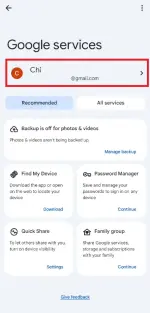
Step 4:
hehe
hehe
Tap on “Add Another Account.”

Step 5:
Tap on “Create Account.”
Step 6:
Enter your first name and last name and tap “Next.”
Step 7:
Enter your date of birth & gender. Tap “Next.”
Step 8:
Choose any suggested Gmail account in the given options or Create your own Gmail address, and tap “Next.”
Step 9:
Scroll down the page and tap “I agree.”
Now your new Gmail account is ready for personal and business use.
;pag ni login mo sa browser mag a-ask sya ng phone number, ang gagawin mo lang pindutin mo "search bar" search gmail.com then enter. hehe

Open your phone and go to “Settings”.
Step 2:
Scroll down settings and tap on “Google.”
Step 3:
Once you reach Google, tap on your “Current Google account”.
Step 4:
hehe
hehe
Tap on “Add Another Account.”
Step 5:
Tap on “Create Account.”
Step 6:
Enter your first name and last name and tap “Next.”
Step 7:
Enter your date of birth & gender. Tap “Next.”
Step 8:
Choose any suggested Gmail account in the given options or Create your own Gmail address, and tap “Next.”
Step 9:
Scroll down the page and tap “I agree.”
Now your new Gmail account is ready for personal and business use.
;pag ni login mo sa browser mag a-ask sya ng phone number, ang gagawin mo lang pindutin mo "search bar" search gmail.com then enter. hehe