 PH
PHtest42myhttp
Leecher
linking the screen app to my pc
Download the app, link the device and adjust the settings using the recommended settings provided by OP and enjoy the content. Idk what your asking, dude. Everything has been provided already by OP.After successfully linking the screen and downloading PLEX HTPC app to my pc, what is the next step?
I did.Download the app, link the device and adjust the settings using the recommended settings provided by OP and enjoy the content. Idk what your asking, dude. Everything has been provided already by OP.
Obviously u need to open the app, its not like magically put content on your storage or something. Best if u send a screenshot of the interface of the app here, what does it show after linking your device to the server?I did that, I downloaded the Plex HPTC app on my PC , got the code, put it on as required, what is my next step here, open up the Plex app on my PC? because I did that but I do not see any new content?
just the typical free content.Obviously u need to open the app, its not like magically put content on your storage or something. Best if u send a screenshot of the interface of the app here, what does it show after linking your device to the server?
Unfortunately, it is very obvious that u did something wrong with the setup. r u using your PC connected to your TV via HDMI? is that what Im lookin at rn?
based on this, this is not the server that we r using.Unfortunately, it is very obvious that u did something wrong with the setup. r u using your PC connected to your TV via HDMI? is that what Im lookin at rn?
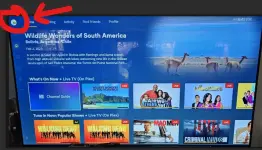
on the log in screen, right after downloading the app and opening it. it will give u a code that u need to enter on the link provided by OP to link your device (w/c u said youve done already) its a pretty straight forward setup tbh.r u using your PC connected to your TV via HDMI? = YES
where can I see the server connection, on what tab?
that was the whole confusion.on the log in screen, right after downloading the app and opening it. it will give u a code that u need to enter on the link provided by OP to link your device (w/c u said youve done already) its a pretty straight forward setup tbh.
log out on that account (im assuming u created or logged in to that account) and redo the whole process.
Thanks, I guess?Got it, needed to log out and log in, that was the whole confusion.
You were a great help, thank you.Thanks, I guess?
Enjoy the server, man. Dont forget to ALWAYS leave your feedback here. Enjoy.You were a great help, thank you.
Time flies. Day 20 na. Salamat sa pag share netong server mo boss. Salamat rin kasi lagi mong dinadagdagan yung mga content.Day 19 ng pagbabalik. Salamat boss! More power to you. Hindi kita kakalimutan ngayong eleksyon.

 Update: I’ve added 5 more streaming slots! The server now supports more viewers at the same time. Thanks for your support and happy watching!