 PH
PH
Download Hard Disk Sentinel Pro 6.20.8 Beta | Latest HDD/SSD Checker Update Free
Hard Disk Sentinel: A complete hard disk monitoring and analysis tool
Hard Disk Sentinel Pro is an advanced and powerful hard disk monitoring and analysis software to prevent disk corruption and data loss. It allows you to monitor and view detailed information about your HDD (Hard Disk Drive) and SSD (Solid State Disk). It is designed to monitor all HDD activities. The goal is to find, test, diagnose and fix hard disk problems. It can display disk health, performance, temperature, disk speed, hard disk degradation, and prevent data corruption and loss.
HDD Sentinel can report real-time information about hard disks and solid-state disks. It monitors the health of the hard disk and measures the temperature of the disk in real time to detect possible hard disk failures and performance degradation. Different alert and reporting options can be created to ensure maximum security and prevent data loss caused by malware or accidental deletion.
Hard disk is a very important device for computer systems because it is a device used to store various data, whether it is personal data, work data, or many other data. Therefore, it is very important to maintain the hard disk to be in perfect condition and always work well.
One of the most comprehensive and comprehensive tools for checking and analyzing hard disks is the Hard Disk Sentinel program. Developed by a team of Hungarian developers, it is popular among users all over the world.
Hard Disk Sentinel program features
Hard Disk Sentinel program has many features and functions that help users to examine and analyze hard disks in detail and comprehensively as follows:
- Check the health of the hard disk (Health) by displaying the health percentage (Health %, SMART) which can clearly indicate the condition of the hard disk.
- Detect and diagnose hard disk problems (Diagnosis) by listing various problems that occur with the hard disk, such as health problems, performance problems, security problems, etc.
- Test the performance of your hard drive (Benchmark) by displaying information about read/write speed, data access speed, and more.
- Displays detailed information about the hard disk (Information) such as hard disk name, serial number, SMART information, RAID information, etc.
- Set up alerts when abnormal events occur with the hard disk.
Using the Hard Disk Sentinel program
Hard Disk Sentinel is easy to use and is free to download and install. For those who want to use all the features and capabilities, a Pro version is available for purchase for around $40.
After installing the program, open the program. The program will display detailed information about all hard disks in the computer system. Users can select the desired information from the left-hand menu.
To check the health of your hard drive, click on the Health tab. The program will display the health percentage of your hard drive for each partition. If the health percentage is low, it may indicate a problem with your hard drive.
To detect and diagnose hard disk problems, click on the Diagnosis tab. The program will display a list of problems with the hard disk. If any problems are found, it is recommended to fix them or consult an expert.
To test the performance of your hard drive, click the Benchmark tab. The program will display information about read/write speed, access speed, and more.
To view detailed information about the hard disk, click the Information tab. The program will display various information about the hard disk, such as the hard disk name, serial number, SMART information, RAID information, etc.
Advantages of Hard Disk Sentinel program
Hard Disk Sentinel is easy to use and is free to download and install. For those who want to use all the features and capabilities, a Pro version is available for purchase for around $40.
After installing the program, open the program. The program will display detailed information about all hard disks in the computer system. Users can select the desired information from the left-hand menu.
To check the health of your hard drive, click on the Health tab. The program will display the health percentage of your hard drive for each partition. If the health percentage is low, it may indicate a problem with your hard drive.
To detect and diagnose hard disk problems, click on the Diagnosis tab. The program will display a list of problems with the hard disk. If any problems are found, it is recommended to fix them or consult an expert.
To test the performance of your hard drive, click the Benchmark tab. The program will display information about read/write speed, access speed, and more.
To view detailed information about the hard disk, click the Information tab. The program will display various information about the hard disk, such as the hard disk name, serial number, SMART information, RAID information, etc.
Advantages of Hard Disk Sentinel program
- The program has complete features and functions, allowing detailed and comprehensive hard disk inspection and analysis.
- The program is easy to use and suitable for all levels of users.
- The program has a free version available.
Hard Disk Sentinel is a comprehensive hard disk inspection and analysis tool that is popular with users all over the world. The program has complete features and functions, allowing detailed and comprehensive inspection and analysis of hard disks. The program is easy to use and suitable for all levels of users.
Features:
Features:
- Analyzes and displays detailed disk information
- Automatic analysis of hard disks and SSD drives
- Generate a variety of information about HDD/SSD
- Hard Disk Details, performance and partitions
- Logging, alerts, shutdown, and acoustic management
- Real-time monitoring and clock synchronization
- SMART and disk status in Windows Explorer
- And more.
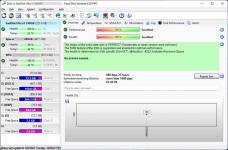
Screenshot
System Requirements
- Windows XP/ Vista/ 7/ 8/ 8.1/ 10 / 11 (32 bit or 64-bit – all editions)
- No special requirements
You do not have permission to view the full content of this post.
Log in or register now.
You do not have permission to view the full content of this post. Log in or register now.
You do not have permission to view the full content of this post. Log in or register now.