 PH
PHIntroduction
In this thread, how to lock 90hz mode on your low-end Infinix/TECNO/itel devices in order support high refresh rate on games. Even sa settings, walang option nakalagay na 90hz, kaya mayroon akong solusyon kung paano paganahin ito, gamit ng SetEdit. And sa ibang device na may 120hz daw, pero 60hz lang gumagana actual use everytime magswitch ng apps or games.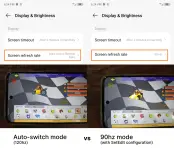
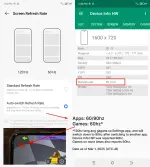
Specifically dito sa TECNO SPARK Go 1, mayroong 2 options: Auto-switch (120hz) and Standard (60 hz)
Sa Auto-switch will instead locks to 60hz when switching to games, and sometimes 90hz naman sa mga apps.
E ano ang silbi yung 120hz dito, saan kaya magagamit yan?
- Sa Settings app.

So yun nga, bogus pala yung 120hz sa SPARK Go 1 (marketing strategy eh), so what should we do?
Paano kaya ma-eenable etong 90hz na wala sa settings?
Step-by-step
Prerequistes:
- Devices with 90hz/120hz. (144hz pwede rin, mas bogus to)
- Cheapest hardware like Unisoc or MediaTek G85 equivalent (na wag lalagpas ng level sa Helio G99)
- Must have enable Developer Options, then enable USB Debugging.
- Must have working witn ADB platform tools (requires PC).
- Technical knowledge of ADB commands.
- Technical knowledge of using SetEdit app. USE RESPONSIBLY
Step 1: Install SetEdit app
Install SetEdit app (Settings Database Editor You do not have permission to view the full content of this post. Log in or register now.). After installed, copy and paste the command.
Code:
adb shell pm grant by4a.setedit22 android.permission.WRITE_SECURE_SETTINGSOr this one made by Muntashir Al-Islam (via You do not have permission to view the full content of this post. Log in or register now.). This feature search functions (Recommended).
Due to restrictions on installing SetEdit app on Android 14+, try using the command to bypass install it. Replace "" with that name you want, or paste the apk directly to the cmd.
Code:
adb install --bypass-low-target-sdk-block "SetEdit-v3.0-rc01.apk"
Code:
adb shell pm grant io.github.muntashirakon.setedit android.permission.WRITE_SECURE_SETTINGSStep 2: Search "refresh" under system properties.
Open SetEdit, then follow the figure below.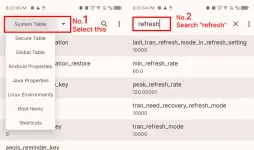
Step 3: Change these value to "90". Follow these steps.
Make sure that the string you select is correct. Here is the list.last_tran_refresh_mode_in_refresh_setting → 90
peak_refresh_rate → 90.0
tran_need_recovery_refresh_mode → 90
tran_refresh_mode → 90
tran_transform_refresh_mode_in_refresh_setting → 90
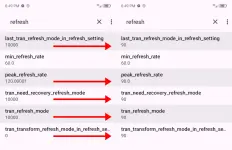
Moment of truth:
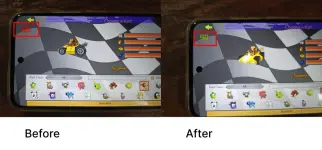
Auto-switch mode (Before)
Summary:
Apps: 60/90hz
Games: 60hz
Settings app: 120hz

90hz mode (After)
Summary:
Apps: 90hz
Games: 90hz
Settings app: 90hz
even 120hz mode (doesn't work for me). Test your luck.
Summary:
Apps: 60/90hz
Games: 60hz
Settings app: 120hz
and 60hz (makes sense 60hz talaga minimum)
no video attached hehe~So ayun, eto na yata ang wakas natin. I think very optimized na yung 90hz mode ng SPARK Go 1, at mapakinabangan na din sa games.
Ang takeover ko dito, huwag basta basta ma-hype sa 120hz sa gantong klase ng specs, tulad nito. SPARK Go 1 ang pinakamurang phone na may 120hz mode, 4G+ connectivity, Dual Speakers with DTS, and IR Blaster.
And yeah, I don't think sa ibang models na may 120hz mode (in low-end category) if ever nyo naexperience ng bad refresh rate behavior [Needs research].
- itel A80
- itel P65
- itel S25
- itel S25 Ultra
- Infinix Smart 9
- *Infinix HOT 50i
- *TECNO SPARK 30C
- TECNO SPARK Go 1S (Helio G50)
- ...
So ayun lang mga ka PHC, sana mayroon kayong takeover dito sa mga experience ko dito.
At ayun, ako nga pala si morbChest
