 PH
PH-
Welcome to PHCorner Forums! Sign up for free to unlock full access and exclusive privileges, including:
- Asking questions about computer and mobile issues
- Discovering internet tips for your mobile network and computer
You are using an out of date browser. It may not display this or other websites correctly.
You should upgrade or use an alternative browser.
You should upgrade or use an alternative browser.
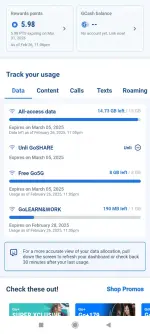
<think>
Okay, let's tackle this problem. The user is having trouble accessing games and GCash even though their data connection (Daw) is open. They mentioned that websites and other platforms load quickly, but games and GCash won't open. The search result provided seems to be a Facebook login page with a temporary block message. Hmm, that's a bit confusing.
First, I need to figure out possible reasons why games and GCash aren't working. Since websites are loading fine, the internet connection itself is probably okay. So maybe it's not a general connectivity issue. Let's think about possible causes:
1. App-Specific Issues: Maybe there's a problem with the GCash app or the games themselves. They could be down for maintenance or having server issues. The user should check if there are any known outages.
2. Blocked Access: The search result mentions a temporary block on Facebook. Could the ISP or network be blocking certain services like games and GCash? Some networks restrict access to non-essential services to save bandwidth.
3. Firewall or Security Settings: If the user is on a restricted network (like school or work), they might have firewalls blocking gaming or financial apps. The temporary block message might indicate some security measure in place.
4. DNS Issues: Sometimes, incorrect DNS settings can prevent specific apps from connecting even if the browser works. Using a different DNS like Google's 8.8.8.8 might help.
5. App Permissions: Maybe the apps don't have the necessary permissions to access the internet. The user should check app settings to ensure they can use mobile data or Wi-Fi.
6. Cache or Data Corruption: Clearing the app cache or reinstalling the apps might resolve issues caused by corrupted data.
7. Date and Time Settings: Incorrect date/time settings can sometimes cause SSL errors, preventing apps from connecting. Ensuring automatic settings are enabled could help.
The search result link seems to be about a GCash feature through Glife, but the content shows a login block. Maybe the user tried accessing GCash via a browser and got blocked, but the app should be separate. Alternatively, the temporary block could be a red herring if it's from a different context.
So, the answer should list possible troubleshooting steps addressing these points without referencing the search result directly, since it doesn't provide relevant info about the issue. The key is to guide the user through checking app status, network restrictions, settings, etc.
</think>
Possible Causes & Solutions for Inaccessible Games/GCash Despite Working Internet
1. Network Restrictions
2. App-Specific Issues
3. Device/App Configuration
4. Security Blocks
- Temporary Account Restrictions: If you recently violated GCash’s terms (e.g., suspicious transactions), your account might be temporarily restricted. Contact GCash support via *4433 (PH).
5. DNS/Connection Tweaks
- Try switching to Google DNS (
Immediate Troubleshooting Steps
If Issues Persist
Okay, let's tackle this problem. The user is having trouble accessing games and GCash even though their data connection (Daw) is open. They mentioned that websites and other platforms load quickly, but games and GCash won't open. The search result provided seems to be a Facebook login page with a temporary block message. Hmm, that's a bit confusing.
First, I need to figure out possible reasons why games and GCash aren't working. Since websites are loading fine, the internet connection itself is probably okay. So maybe it's not a general connectivity issue. Let's think about possible causes:
1. App-Specific Issues: Maybe there's a problem with the GCash app or the games themselves. They could be down for maintenance or having server issues. The user should check if there are any known outages.
2. Blocked Access: The search result mentions a temporary block on Facebook. Could the ISP or network be blocking certain services like games and GCash? Some networks restrict access to non-essential services to save bandwidth.
3. Firewall or Security Settings: If the user is on a restricted network (like school or work), they might have firewalls blocking gaming or financial apps. The temporary block message might indicate some security measure in place.
4. DNS Issues: Sometimes, incorrect DNS settings can prevent specific apps from connecting even if the browser works. Using a different DNS like Google's 8.8.8.8 might help.
5. App Permissions: Maybe the apps don't have the necessary permissions to access the internet. The user should check app settings to ensure they can use mobile data or Wi-Fi.
6. Cache or Data Corruption: Clearing the app cache or reinstalling the apps might resolve issues caused by corrupted data.
7. Date and Time Settings: Incorrect date/time settings can sometimes cause SSL errors, preventing apps from connecting. Ensuring automatic settings are enabled could help.
The search result link seems to be about a GCash feature through Glife, but the content shows a login block. Maybe the user tried accessing GCash via a browser and got blocked, but the app should be separate. Alternatively, the temporary block could be a red herring if it's from a different context.
So, the answer should list possible troubleshooting steps addressing these points without referencing the search result directly, since it doesn't provide relevant info about the issue. The key is to guide the user through checking app status, network restrictions, settings, etc.
</think>
Possible Causes & Solutions for Inaccessible Games/GCash Despite Working Internet
1. Network Restrictions
- ISP/Data Provider Blocking: Some ISPs or mobile data plans restrict access to gaming platforms or financial apps (like GCash) to manage bandwidth or comply with policies.
- Firewall/Security Settings: Check if your network/router has enabled "Safe Mode" or parental controls blocking these services.
2. App-Specific Issues
- GCash Server Downtime: GCash might be undergoing maintenance (common during late-night hours). Check their official social media for updates.
- Game Server Issues: Online games often have regional server outages. Visit the game’s status page or community forums for alerts.
3. Device/App Configuration
- App Permissions: Ensure GCash/games have permission to use mobile data/Wi-Fi (check device settings).
- Outdated Apps: Update GCash/games to the latest version.
- Cache/Data Corruption: Clear app cache or reinstall problematic apps.
4. Security Blocks
- Temporary Account Restrictions: If you recently violated GCash’s terms (e.g., suspicious transactions), your account might be temporarily restricted. Contact GCash support via *4433 (PH).
5. DNS/Connection Tweaks
- Try switching to Google DNS (
8.8.8.8 or 8.8.4.4) in your Wi-Fi/mobile data settings. Immediate Troubleshooting Steps
- Test with a different network (e.g., switch from Wi-Fi to mobile data).
- Restart your device and router.
- Use a VPN to bypass ISP restrictions (may violate GCash’s terms of service).
If Issues Persist
- Contact your ISP or mobile provider to confirm if they’re blocking these services.
- Reach out to GCash support (via app chat or hotline) for account-specific assistance.
Similar threads
-
-
-
-
-
📖 Stories Ako lang ba bilang batang 90's ang may ganitong pakiramdam? :(
- Started by mojie28
- Replies: 10
About this Thread
-
2Replies
-
546Views
-
3Participants
Last reply from:
macjunard
macjunard
New Topics
-
Unligo99 tiktok gawin nating unlimited sa ating ρáíd vpn 50 a month
- Started by amber vpn
- Replies: 2
- 🌐 Globe & TM
-
Oct/11 low ping ph vless server use netmod
- Started by ace0486
- Replies: 13
- 🌐 Globe & TM
-
Oct.11globe/GO99+unlitiktok/GOwatch/Android ios PC /ovpn/netmod/npv tunnel/
- Started by _-_-LhOnZ-_-_
- Replies: 12
- 🌐 Globe & TM
-
If anyone sell global eism send my for my telegram @NNNN2S
- Started by Nnnnn2s
- Replies: 1
- 🌐 Globe & TM
-
Globe load question
- Started by iPixx
- Replies: 1
- 🌐 Globe & TM
-
UNLIGO99 TIKTOK AT GTM NO LOAD SA PILING AREA sa ρáíd vpn natin 50 a month
- Started by amber vpn
- Replies: 1
- 🌐 Globe & TM
-
About TM sim registration
- Started by jebhgytrytr76567576
- Replies: 2
- 🌐 Globe & TM
-
Unligo99 tiktok and gtm no load piling area lang to our ρáíd vpn 50 a month
- Started by amber vpn
- Replies: 0
- 🌐 Globe & TM
Trending Topics
-
-
Oct.6globe/GO99+unlitiktok/GOwatch/Android ios PC /ovpn/netmod/npv tunnel/
- _-_-LhOnZ-_-_
Replies: 11 -
-
Oct.11globe/GO99+unlitiktok/GOwatch/Android ios PC /ovpn/netmod/npv tunnel/
- _-_-LhOnZ-_-_
Replies: 12 -
-
-
-
-
-
Online now
- Members online
- 1,238
- Guests online
- 8,164
- Total visitors
- 9,402