 PH
PH
File size: 332 MB
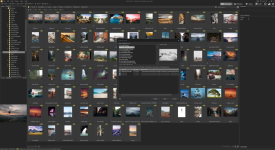
ACDSe Photo Studio Home 2025 is a comprehensive application ideal for acquiring, organizing, viewing, enhancing and sharing your images. With the image browser, you can find, organize, and preview images and media files on your computer. Also you can efficiently acquire images from digital cameras, scanners, and other devices.
The best digital asset manager on the market.
As a practical amateur, your photo collection keeps expanding and you need to keep your workflow flowing. With tools expediting digital asset management, productivity, and photo editing and distribution, ACDSee Photo Studio Home 2020 packs a valuable punch. Now featuring face detection and recognition, multiple image baskets for gathering assets from across your hard drive, improved keyword management, converting files in batches, and duplicate finding, Home is filled with efficiency-driven tools to help you inspire your friends, family, and followers.
Face Detection & Facial Recognition (64-bit)
Organizing has never been this personal. ACDSee's Face Detection & Recognition tool will find the humans in your photographs so that you can name the individuals for quick searching. Keep photos distinguished by client, family member, or person of interest. ACDSee will immediately learn which names to put to which faces, even suggesting possible matches. Save hours of tedious manual skimming by searching photos by unnamed, auto-named, and suggested names. Then embed face data in your photos for safe keeping.
Edit Photos
Achieve the perfect conditions you couldn't get in the field by applying fine-tuned adjustments with a toolkit of precision filters. Handle geometric imperfection with cropping, flipping, resizing, and rotation tools. Correct flaws, red eye, blurriness, noise, and clarity. Liven things up by adding text, borders, vignettes, watermarks, and even draw on your image. Select the minute parts of your images you want to impact. Brush on special effects, alterations, and improvements to make your photos exactly what you want them to be.
Effortless Digital Asset Management
Finding, sorting, moving, organizing, and sharing-everything you need for complete mastery over your photography workflow is right here, at your fingertips. Add ratings, hierarchical keywords, categories, and location data to your images. Quickly identify photos for further processing with visual tags or customizable color labels.
Screen :
What's New
Spoiler contents are visible only to Established Members.
HOMEPAGE
Code:
https://www.acdsee.com/
You do not have permission to view the full content of this post. Log in or register now.
You do not have permission to view the full content of this post. Log in or register now.