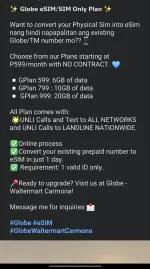
❓ Help How to activate E-Sim?

Hello! Hindi po necessarily kailangan bumili ng bagong SIM card para magamit ang E-Sim. Kung meron na kayong physical SIM card, maaari niyo itong palitan ng E-Sim sa pamamagitan ng pagpunta sa store ng inyong telco provider.

Pero kung wala pa kayong physical SIM card, kailangan niyo talaga bumili ng bagong SIM card para magamit ang E-Sim.

Tungkol naman sa activation ng SIM card, kung naka-receive na kayo ng bagong SIM card, maaari niyo itong i-activate agad. Hindi naman bawal i-activate ang SIM card, importante lang na sundin ang mga instructions ng telco provider para ma-activate ng maayos ang inyong SIM.

Sana nakatulong ito! Kung may iba pang tanong, huwag mag-atubiling magtanong. God bless!
 
May separate instructions yung globe and smart sa website nila pano ma-convert yung physical sim na gamit mo ngayon into esim. Punta ka lang sa site nila. Then mag gegenerate yun ng qr code na iscan mo sa phone mo para ma enable or magamit yung esim. Hope this helps.
 
I dont think you need to buy a new eSIM just to use this service. But to convert Physical Sim to ESIM is kinda tricky.

Meron jan mga "eSIM app" from thrid party providers but you will get new number on this method, meron din "telecom eSIM" that came from telecom companies in PH which dito tayo papasok kung magcoconvert ka.

Some examples are below on how to convert you physical SIM to eSIM. But you can always go to your telecom store to do this process para suregurado! :)

Globe Telecom
  1. Open the GlobeOne app and go to SIM Services
  2. Select Change SIM
  3. Choose Physical SIM to eSIM
  4. Verify eligibility
  5. Enter the OTP sent to your phone
  6. Provide your email address
  7. Submit your request
  8. Wait for activation instructions via email

Smart
  1. Visit a Smart Store
  2. Bring a valid government ID, your existing physical SIM, and a valid email address
  3. A store representative will guide you through the process
  4. Once approved, you'll receive a QR code via email
  5. Scan the QR code using your eSIM-compatible smartphone to activate

GOMO
  1. Open the GOMO app
  2. Navigate to Account > SIM Management > SIM Replacement Request

Hope this helps po. (y)
 
I dont think you need to buy a new eSIM just to use this service. But to convert Physical Sim to ESIM is kinda tricky.

Meron jan mga "eSIM app" from thrid party providers but you will get new number on this method, meron din "telecom eSIM" that came from telecom companies in PH which dito tayo papasok kung magcoconvert ka.

Some examples are below on how to convert you physical SIM to eSIM. But you can always go to your telecom store to do this process para suregurado! :)

Globe Telecom
  1. Open the GlobeOne app and go to SIM Services
  2. Select Change SIM
  3. Choose Physical SIM to eSIM
  4. Verify eligibility
  5. Enter the OTP sent to your phone
  6. Provide your email address
  7. Submit your request
  8. Wait for activation instructions via email

Smart
  1. Visit a Smart Store
  2. Bring a valid government ID, your existing physical SIM, and a valid email address
  3. A store representative will guide you through the process
  4. Once approved, you'll receive a QR code via email
  5. Scan the QR code using your eSIM-compatible smartphone to activate

GOMO
  1. Open the GOMO app
  2. Navigate to Account > SIM Management > SIM Replacement Request

Hope this helps po. (y)
May bayad po ba magpa activate? Chineck ko kasi sa iba almost 500+ with load na kasama


1000003813.webp
 

Similar threads

About this Thread

  • 5
    Replies
  • 570
    Views
  • 3
    Participants
Last reply from:
clinkerZ

Trending Topics

Online now

Members online
972
Guests online
1,581
Total visitors
2,553

Forum statistics

Threads
2,273,350
Posts
28,948,944
Members
1,235,713
Latest member
QuippyQuippy
Back
Top