PH
PHX-hashira-X
Forum Expert

Key Features of WinToHDD
- Install, re-install or clone Windows
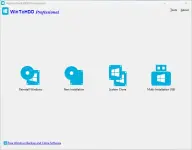
Attempting to make the Windows deployment procedure as simple as possible, WinToHDD comes with a straightforward, clean interface that only comprises three buttons: one for re-installing the OS on the local workstation, one for starting a fresh Windows install on a second storage device (hard drive), and the third for creating an exact copy of the local system.
In other words, not only that you can deploy Windows with WinToHDD, but it is also possible to create a copy of the Windows setup files and save it to another disk. - Go through simple steps to create a WinPE image
No matter what your choice is, getting the job done is only a matter of pressing a few Next buttons from this point on. As expected, you are prompted to select the source ISO file that contains the Windows setup files. WinToHDD automatically reads data from the disk image and retrieves information regarding the operating system and its architecture. - Next, you must select the system partition that Windows will be deployed on and choose the installation mode. There are three available options, namely ‘Legacy’ (standard mode), ‘VHD’ or ‘VHDX’.
Whether you choose to install, re-install or clone Windows, it will take a while for WinToHDD to create the WinPE image that’s needed to proceed. - Deploy Windows without a disc or a bootable drive
Some prefer deploying Windows the old-fashioned way by booting from a disc while others like having a bootable USB drive at hand and thus not keep the Windows disk image on the computer to occupy storage space. WinToHDD offers a method to conveniently install or clone Windows without a disc or a bootable drive. This alternative will surely have its public, especially since it is easy to use and should pose no problems to the average user.
WinToHDD Download Links
You do not have permission to view the full content of this post. Log in or register now. | You do not have permission to view the full content of this post. Log in or register now. | You do not have permission to view the full content of this post. Log in or register now.
How to use Ac†ïvâ†ør of WinToHDD?
Follow the below instructions to activate your version of WinToHDD.- Disable internet and install the program (use given setup)
- Close the program and use given ac†ïvâ†ør for activation
- Block application with firewall (recommended)
- That’s it, Enjoy!
WinToHDD Screenshots