PH
PH
IObit Uninstaller 14 Pro Free License Tutorial
Introduction
IObit Uninstaller 14 Pro is a powerful tool designed to help you easily remove unwanted programs, plugins, and other software from your PC, ensuring a cleaner and safer computing experience. With its advanced features, it can quickly uninstall applications and remove leftover files that standard uninstallers often miss.
How to Download and Install IObit Uninstaller 14 Pro
1. Download the Software
- Click on the following link to download IObit Uninstaller 14 Pro:
You do not have permission to view the full content of this post. Log in or register now.
2. Run the Installer
- Once the download is complete, locate the setup file (
IObitUninstaller.exe) in your downloads folder and double-click to run it.3. Follow Installation Instructions
- Follow the on-screen instructions to install the software. You can choose the installation directory and decide whether to create desktop shortcuts.
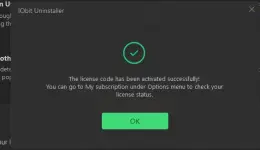
4. Activate the Pro Version
- After installation, launch IObit Uninstaller 14 Pro.
- Click on the "Enter Code" or "Activate" option, usually found in the bottom right corner of the main screen.
- Enter the following license key:
Code:
     F8629-D9F0A-87FD4-1CETD
     F8629-D9F0A-87FD4-1CETD
### Using IObit Uninstaller 14 Pro
1. Uninstall Software
- To uninstall a program, open IObit Uninstaller.
- Locate the program you wish to remove from the list.
- Click on the "Uninstall" button next to the program.
2. Batch Uninstall
- You can select multiple programs by checking the boxes next to them and then click on the "Uninstall" button at the top.
3. Remove Plugins and Toolbars
- Navigate to the "Plugins" or "Toolbars" section from the left menu to easily remove unwanted browser extensions.
4. Scan for Leftover Files
- After an uninstallation, IObit Uninstaller will offer to scan for leftover files. Allow it to do so, and remove any leftover components to free up space on your computer.
IObit Uninstaller 14 Pro is a comprehensive solution for managing unwanted software and ensuring your system remains clean and efficient. By following the above steps, you can easily download, install, and utilize this powerful uninstaller.