 PH
PH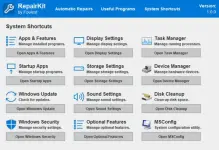
Looking for a comprehensive tool to repair and maintain your PC? RepairKit is here to help! This powerful software offers a dedicated system repair engine, quick access to essential OS features, and a bundle of PC maintenance tools, all in one package.
With its clean and intuitive interface, RepairKit makes it easy to perform automatic repairs. In just a few moments, it can identify and resolve system issues, ensuring your PC runs smoothly. Whether you’re dealing with performance slowdowns or system errors, RepairKit provides a hassle-free solution for both beginners and advanced users.
Ready to optimize your PC’s performance? Download and install RepairKit today! Once you’ve tried it, let us know how the review matched your experience. Did we cover all the features you loved? If something was missing, share it in the comments below. Start repairing and maintaining your system now!
Features of RepairKit
This direct approach toward cleaning the system is quite efficient, as it can be a good way for those who don’t want to get too complex with their entanglement in terms of PC maintenance.In addition to providing such a simple and direct solution through the automated repair module, RepairKit also provides a centralized platform for accessing Windows’ most useful system maintenance features, all joined together under a single, centralized layout, as dedicated shortcuts.
This will allow you to quickly access any Windows features that you might require for PC maintenance, and even more so, the app also bundles a series of third-party apps that can prove to be beneficial for PC maintenance.
If you’re keen on keeping your PC running smoothly and wish to do so in a convenient manner, RepairKit provides a simple and efficient take on that, with an automated repair/cleaning module, as well as access to Windows’ PC maintenance features, and multiple, third-party apps for cleaning and repair.
Download :
You do not have permission to view the full content of this post. Log in or register now.