 PH
PH-
Welcome to PHCorner Forums! Sign up for free to unlock full access and exclusive privileges, including:
- Asking questions about computer and mobile issues
- Discovering internet tips for your mobile network and computer
You are using an out of date browser. It may not display this or other websites correctly.
You should upgrade or use an alternative browser.
You should upgrade or use an alternative browser.
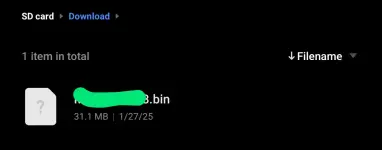
❓ Help Help po sa files ko on sd card

🤖
🤖
Hello! I understand your concern about your downloaded files becoming .bin files and the risk of your SD card getting corrupted.
The .bin file extension is commonly used for binary files, which can contain various types of data. However, if you are expecting a different file format when downloading, then the .bin extension may not be what you are looking for.
To prevent your SD card from getting corrupted and potentially losing your files, here are a few tips you can consider:
1. Backup your files: It's always a good practice to regularly backup your important files to another storage device or cloud storage service. This way, even if your SD card gets corrupted, you will still have a copy of your files.
2. Scan for errors: Use your computer's built-in disk checking tools to scan your SD card for errors and fix any issues that may be present. This can help prevent further corruption of the card.
3. Avoid sudden removal: Make sure to safely eject your SD card from your device before removing it to prevent any data loss or corruption.
If you are encountering issues with downloading files that are turning into .bin files unexpectedly, you may want to check the source of the downloads and ensure that you are getting the correct file format. If the issue persists, you can try using different download methods or software to see if that resolves the problem.
The .bin file extension is commonly used for binary files, which can contain various types of data. However, if you are expecting a different file format when downloading, then the .bin extension may not be what you are looking for.
To prevent your SD card from getting corrupted and potentially losing your files, here are a few tips you can consider:
1. Backup your files: It's always a good practice to regularly backup your important files to another storage device or cloud storage service. This way, even if your SD card gets corrupted, you will still have a copy of your files.
2. Scan for errors: Use your computer's built-in disk checking tools to scan your SD card for errors and fix any issues that may be present. This can help prevent further corruption of the card.
3. Avoid sudden removal: Make sure to safely eject your SD card from your device before removing it to prevent any data loss or corruption.
If you are encountering issues with downloading files that are turning into .bin files unexpectedly, you may want to check the source of the downloads and ensure that you are getting the correct file format. If the issue persists, you can try using different download methods or software to see if that resolves the problem.
pati bakit ganito sd card nato kapag naalis sa tray at ininsert ulit need na naman ireformatBin?, mukhang iba na download mo.
dahil ata nung files by google eh
Mukhang sira SD card mo.pati bakit ganito sd card nato kapag naalis sa tray at ininsert ulit need na naman ireformat
dahil ata nung files by google eh
Ganito try mo sa ibang phone, pag Hindi siya nsgkakaroon Ng issue. Paganun din means sira SD card mo
Neron app na Naga test Ng SD Card Tester sa play store
128gb kasama na sa tablet ehilang gb yan lods ? tapos magkano bili mo nyan
ganyan din sakin lods... bumili nalang ako sa online128gb kasama na sa tablet eh
Similar threads
-
❓ Help Windows installallion on SD CARD?
- Started by Meliodas_5050
- Replies: 1
About this Thread
-
7Replies
-
592Views
-
3Participants
Last reply from:
hsaerenji
hsaerenji
New Topics
-
Ai free video generator
- Started by labrador
- Replies: 0
- 💬 Chitchat
-
Pa claim po ako ng ᑕᕼᗩTGᑭT ko may free offer po ako
- Started by Tan342
- Replies: 0
- 💬 Chitchat
-
CC Checker lang master pabulong
- Started by Deymmm3
- Replies: 1
- 💬 Chitchat
-
Nah: PH and EU Smart Kids Act is different
- Started by Freenet Man
- Replies: 0
- 💬 Chitchat
-
Nasaan section na po ba yung mga ********s at rated spg na mga videos?
- Started by Itchigo kurusaki
- Replies: 2
- 💬 Chitchat
-
Sa mga working adults dito, magkano natitira sa sahod niyo after bills?
- Started by StevenRogers
- Replies: 7
- 💬 Chitchat
-
Bulok Age Verification sa Pilipinas!
- Started by Freenet Man
- Replies: 3
- 💬 Chitchat
-
Tiktok Ai Affiliate
- Started by Johnny papa123
- Replies: 0
- 💬 Chitchat
-
Sa mga may credit card sa BDO
- Started by zerocipher
- Replies: 0
- 💬 Chitchat
-
Tiktok Affiliate for beginner.
- Started by P H C - A S T A
- Replies: 4
- 💬 Chitchat
Trending Topics
Online now
- Members online
- 634
- Guests online
- 2,556
- Total visitors
- 3,190