 PH
PH
File size: 280 MB
X-Sec Malware Scanner, previously known as X-Sec Antivirus, is a user-friendly and efficient virus scanner designed to work seamlessly with other antivirus programs. It was developed to be lightweight and easy to use.
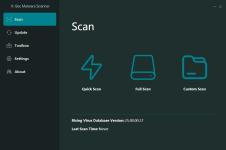
The user interface has been crafted to be intuitive and easy to navigate. On the left-hand side of the screen, you'll find a series of tabs that grant access to various functions, including Scan, Update, Toolbox, Settings, and About. Each tab offers a wealth of information, which can be viewed in detail on the right-hand side of the interface. With this design, you'll have no trouble finding the information you need precisely when you need it.
One complaint out of the gate is that the file is packed in 7z format. While many of you can open 7z, everyone can open a ZIP or executable. You will need 7-zip or similar to unpack and use X-Sec Malware Scanner.
In order to perform a scan, you will need to access the Scan Task Manager by navigating to the Scan button. Once there, you can choose between three different scan options: Quick Scan, Full Scan, or Custom Scan. Depending on the speed of your computer, a Quick Scan can take as little as two minutes, while a Full Scan may take up to fifteen minutes, especially if it involves scanning two large drives that are combined to total 1.5 Terabytes.
Screen :
What's New
Spoiler contents are visible only to Established Members.
HOMEPAGE
Code:
https://www.xsecantivirus.com/index.aspx
You do not have permission to view the full content of this post. Log in or register now.
You do not have permission to view the full content of this post. Log in or register now.