 PH
PH-
Welcome to PHCorner Forums! Sign up for free to unlock full access and exclusive privileges, including:
- Asking questions about computer and mobile issues
- Discovering internet tips for your mobile network and computer
You are using an out of date browser. It may not display this or other websites correctly.
You should upgrade or use an alternative browser.
You should upgrade or use an alternative browser.
Itel P55 5g (p661n)
- Thread starter Hatdoggs
- Start date
-
- Tags
- itel roms & recoveries
Sakura Lee
Established
ρá†ch boot.img for root :
1. Install magisk (recommended kitsune)
2. Open magisk, click install
3. Click ρá†ch
4. Choose boot.img from stock rom in here
5. Wait until finish, and u will get ρá†ch file in folder Download
6. Paste the patched boot.img to your computer/laptop, then we continue with the flashing process
Flashing patched boot.img :
Requirements: UBL required! The ROOT process cannot be carried out if the cellphone has not been unlocked bootloader (UBL)
1. Open Minimal ADB/Fastboot or similar tool/Terminal on Linux, to make the phone enter bootloader mode, type :
adb reboot bootloader
Then press Enter.
Make sure before the process starts that the USB cable is connected between the phone and the computer.
2. Flash the patched boot.img with Magisk, type:
fastboot flash boot (drag and drop the patched boot.img file here)
Then press Enter.
3. The flash process is complete, reboot, type:
fastboot reboot
Then press Enter.

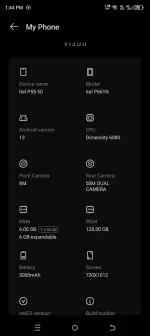
Punta lang kau sa "needrom" site tas register kau and hanapin niyo nalang yong firmware mismo sa model niyo tas download mo yong files and hanapin mo nalang yong boot.img file sa firmware. And lastly sundin nyo nalang yong si nend ko
Sa pag unlock nang BL ,sundin nyo nalang din to How to Unlock Bootloader:
1. Enable Developer Options
2. Enable OEM Unlock
3. Enable USB debugging
Plug the phone into the PC then open the platform tool:
1. adb devices
2. adb reboot bootloader
3. fastboot devices
4. fastboot flashing unlock
Afraid of Bootloop?Just Type This:
fastboot --disable-verity --disable-verification flash vbmeta vbmeta.img
Kapag na lilito parin , hanap kayu dto mai nag post nadin or YouTube lang kayu
1. Install magisk (recommended kitsune)
2. Open magisk, click install
3. Click ρá†ch
4. Choose boot.img from stock rom in here
5. Wait until finish, and u will get ρá†ch file in folder Download
6. Paste the patched boot.img to your computer/laptop, then we continue with the flashing process
Flashing patched boot.img :
Requirements: UBL required! The ROOT process cannot be carried out if the cellphone has not been unlocked bootloader (UBL)
1. Open Minimal ADB/Fastboot or similar tool/Terminal on Linux, to make the phone enter bootloader mode, type :
adb reboot bootloader
Then press Enter.
Make sure before the process starts that the USB cable is connected between the phone and the computer.
2. Flash the patched boot.img with Magisk, type:
fastboot flash boot (drag and drop the patched boot.img file here)
Then press Enter.
3. The flash process is complete, reboot, type:
fastboot reboot
Then press Enter.
Punta lang kau sa "needrom" site tas register kau and hanapin niyo nalang yong firmware mismo sa model niyo tas download mo yong files and hanapin mo nalang yong boot.img file sa firmware. And lastly sundin nyo nalang yong si nend ko
Sa pag unlock nang BL ,sundin nyo nalang din to How to Unlock Bootloader:
1. Enable Developer Options
2. Enable OEM Unlock
3. Enable USB debugging
Plug the phone into the PC then open the platform tool:
1. adb devices
2. adb reboot bootloader
3. fastboot devices
4. fastboot flashing unlock
Afraid of Bootloop?Just Type This:
fastboot --disable-verity --disable-verification flash vbmeta vbmeta.img
Kapag na lilito parin , hanap kayu dto mai nag post nadin or YouTube lang kayu
Salamat paps testing ko to!ρá†ch boot.img for root :
1. Install magisk (recommended kitsune)
2. Open magisk, click install
3. Click ρá†ch
4. Choose boot.img from stock rom in here
5. Wait until finish, and u will get ρá†ch file in folder Download
6. Paste the patched boot.img to your computer/laptop, then we continue with the flashing process
Flashing patched boot.img :
Requirements: UBL required! The ROOT process cannot be carried out if the cellphone has not been unlocked bootloader (UBL)
1. Open Minimal ADB/Fastboot or similar tool/Terminal on Linux, to make the phone enter bootloader mode, type :
adb reboot bootloader
Then press Enter.
Make sure before the process starts that the USB cable is connected between the phone and the computer.
2. Flash the patched boot.img with Magisk, type:
fastboot flash boot (drag and drop the patched boot.img file here)
Then press Enter.
3. The flash process is complete, reboot, type:
fastboot reboot
Then press Enter.
View attachment 3430577View attachment 3430579
Punta lang kau sa "needrom" site tas register kau and hanapin niyo nalang yong firmware mismo sa model niyo tas download mo yong files and hanapin mo nalang yong boot.img file sa firmware. And lastly sundin nyo nalang yong si nend ko
Sa pag unlock nang BL ,sundin nyo nalang din to How to Unlock Bootloader:
1. Enable Developer Options
2. Enable OEM Unlock
3. Enable USB debugging
Plug the phone into the PC then open the platform tool:
1. adb devices
2. adb reboot bootloader
3. fastboot devices
4. fastboot flashing unlock
Afraid of Bootloop?Just Type This:
fastboot --disable-verity --disable-verification flash vbmeta vbmeta.img
Kapag na lilito parin , hanap kayu dto mai nag post nadin or YøùTùbé lang kayu
Sakura Lee
Established
download mo nalang din yong driver nya bossSalamat paps testing ko to!
PHC-kramxyz
Eternal Poster
Ito ang hinahanap koooo , hahahaha salamat dito
PHC-kramxyz
Eternal Poster
Nagawa ko to same model tayo, oo need unlock bootloader, pero take note same dapat sa last version ng stock rom na naka install sa phone mo ..pahelp po magflash ng stock rom ng p661n.
need po ba muna iunlock bootloader using the above method?
PHC-kramxyz
Eternal Poster
Kung ntatandaan mo build number ng p661n mo madali lang yanpahelp po magflash ng stock rom ng p661n.
need po ba muna iunlock bootloader using the above method?
yes po .nagagamit ko pa naman yung p55 5g ko.Kung ntatandaan mo build number ng p661n mo madali lang yan
ang nakakainis po. lagi bootloop after reset doon sa setup language.
PHC-kramxyz
Eternal Poster
Paano na bboot loop sayo? Sakin kase pagka unlock ko bootloader d naman nagkaka ganyan, diretso lang..katulad po ngayon. nagunlock bootloader ako using the above method. success naman po.kaso magrereformat pala kapag nagunlock ng bootloder. mabuti na lang nagbackup muna ako lahat ng nasa internal storage ko. kaya ayun, bootloop na naman sa laguage setup. ang ginawa ko. nagbootako sa safemoe gamit hold volume down button. tapos ok na nagtuloy sa yung setup til homescreen.
PHC-kramxyz
Eternal Poster
Pwede mo yan Fastboot method since unlocked bootloader nanaunlockbootloader ko na po yung p55 5g ko.
ano pong fash tool gagamitin ko?
battery na po yata problema. kasi nung nagpalit sim lang ako, bigla nagrestart, tapos bootloop na . sinaksak ko yung charger , ayun, nagtuloy na sa homescreen.Paano na bboot loop sayo? Sakin kase pagka unlock ko bootloader d naman nagkaka ganyan, diretso lang..
ano pong command?Pwede mo yan Fastboot method since unlocked bootloader na
PHC-kramxyz
Eternal Poster
fastboot erase systemano pong command?
fastboot erase userdata
fastboot flash boot boot.img
fastboot flash super super.img
Sakura Lee
Established
join kahyu sa telegram boss , mai mga way dyan para d na kayu mahirapanpano po yung buong rom ang ifaflash?
Similar threads
-
-
❓ Help Itel p55 5G fastboot stockrom walang pc
- Started by PHC-kramxyz
- Replies: 14
About this Thread
-
16Replies
-
3KViews
-
5Participants
Last reply from:
Sakura Lee
Sakura Lee
New Topics
-
Help Bypass Realme c71/73
- Started by XsanX
- Replies: 0
- 📖 Android Guides, Recoveries, ROMs
-
Zte f50 5g B10 version
- Started by Reyjrtagaro
- Replies: 0
- 📖 Android Guides, Recoveries, ROMs
-
ZTE F50 5G restore 5G capability
- Started by Reyjrtagaro
- Replies: 0
- 📖 Android Guides, Recoveries, ROMs
-
[updated 18/10/26] - UNLOCKTOOL 2026.10.15.0 + L0ader
- Started by vivek1
- Replies: 16
- 📖 Android Guides, Recoveries, ROMs
-
[11/10/26] - A.N.TOOL v4.6 [Life time Free]
- Started by vivek1
- Replies: 3
- 📖 Android Guides, Recoveries, ROMs
-
[12/10/26] - KG Killer Tool V3.8.0 Cr@cked
- Started by vivek1
- Replies: 2
- 📖 Android Guides, Recoveries, ROMs
-
[11/10/26] - TSM-Tool PRO Edition Cr@cked
- Started by vivek1
- Replies: 13
- 📖 Android Guides, Recoveries, ROMs
-
Top 5 Best Android Phones in the market today
- Started by francis3
- Replies: 11
- 📖 Android Guides, Recoveries, ROMs
Trending Topics
Online now
- Members online
- 454
- Guests online
- 10,340
- Total visitors
- 10,794