PH
PHauto shutdown PC using AMP WINOFF

Link:You do not have permission to view the full content of this post. Log in or register now.
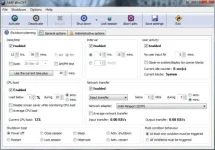
AMP WinOFF is a comprehensive application that allows users to schedule power management options. It includes a few handy features, such as multi-condition behavior mode.
The interface is based on a window with multiple panels dedicated to shutdown planning, general options, and administrative settings.
The shutdown types include power off, restart, close or lock session, sleep, and hibernate, together with shutdown and restart with administrative rights.
You can enable conditions based on date and time settings (on a specific time/date, countdown timer), user activity (system idle), CPU load (below a specific level), and network transfer (input, output, or combined). The power management option is triggered when at least one or all enabled conditions are met.
Aside from enabling multi-condition shutdown planning, you can ask AMP WinOFF to automatically reactivate the last planned shutdown, and to use force for all apps or only non-responding ones.
You can schedule a program for execution, hang up the modem, and take a desktop screenshot (with timestamps) before shutdown is initialized. The program can autorun at startup, autosave settings, disable modem features and warnings, ask for shutdown confirmation, or show power-off warnings for a specific time interval (with a snooze button and sound alerts).
As far as administrative options are concerned, you may apply the same settings for all Windows users, set up an administrative password and anti-close protection, schedule shutdowns for remote computers, as well as send messages to other users.
AMP WinOFF allows users to save settings for further tasks. It uses low CPU and RAM, and has a good reaction speed. We have not come across any issues throughout our evaluation. In conclusion, AMP WinOFF is an excellent utility that comes packed with numerous useful options for scheduling automatic shutdowns, and it mainly caters to advanced users.
Filed under
System shutdown Restart system Schedule task Schedule Scheduler Shutdown SuspendWhat's new in AMP WinOFF 5.0.1:
- Fixed: The list of network adapters in Windows Vista/7 included also disabled adapters.
- Fixed: The program failed sometimes to detect the list of network adapters, especially in Vista/7.
- Fixed: In certain situations the program failed to save the settings for all users in Vista/7.
- Fixed: When using the same settings for all users in Vista/7 the program displayed an User Account Control confirmation before activating the shut down planning, even if the settings wasn't changed.