 PH
PHPHC - yowzed
Elite
Ping test in Windows
 Enjoy!
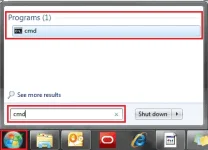
- Open the Start menu by clicking the orb in the bottom left-hand corner of the screen.
- Type “cmd” in the search bar at the bottom of the menu.
- Click cmd found in the search results for Programs.
- A black box with a flashing cursor will open; this is the Command Prompt. Type “ping -t” and then hit the Space bar on your keyboard.
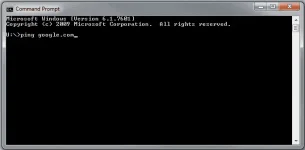
- Type in the address you’d like to ping and then hit the Enter key on your keyboard. Wait for the You do not have permission to view the full content of this post. Log in or register now..
Enjoy! 