 PH
PHRequirements: A8.0+
Overview: App developed to control your Android TV devices from smartphone. You need to have enabled USB/Network debugging on your Android TV device to get it work.
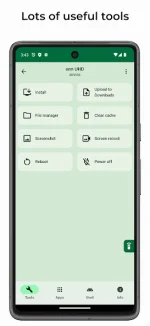
App Allows:
• Install (sideload) apps from your smartphone to your TV devices
• Control your TV apps (include opening, uninstalling, disabling/enabling and downloading APK)
• Control apps permissions (grant/revoke)
• Build-in File Manager
• Make screenshot
• Send files from your phone to TV
• Control your device using remote control and mouse mode in the app
• Paste text from your phone
• Run Shell commands
• Clear all apps cache using one button
• Reboot and power TV device
• See usage of CPU, RAM, network and storage
• See running apps and force-stop them if needed
What’s New:
• Implemented auto search for devices with "Wireless debugging" (thx to Allen)
• Implemented real-time keyboard
• Added "Screensaver" and "Sleep" buttons to the "Tools" tab
• Fixed file manager and custom app language
• Added Bulgarian (tnx to @TopperBG) and Simplified Chinese translations (thx to ᑕᕼᗩTGᑭT), improved German translation (thx to @KèyGénMe)
This app has no advertisements
More Info:
Download Link:
You do not have permission to view the full content of this post. Log in or register now.
You do not have permission to view the full content of this post. Log in or register now.
Overview: App developed to control your Android TV devices from smartphone. You need to have enabled USB/Network debugging on your Android TV device to get it work.
App Allows:
• Install (sideload) apps from your smartphone to your TV devices
• Control your TV apps (include opening, uninstalling, disabling/enabling and downloading APK)
• Control apps permissions (grant/revoke)
• Build-in File Manager
• Make screenshot
• Send files from your phone to TV
• Control your device using remote control and mouse mode in the app
• Paste text from your phone
• Run Shell commands
• Clear all apps cache using one button
• Reboot and power TV device
• See usage of CPU, RAM, network and storage
• See running apps and force-stop them if needed
What’s New:
• Implemented auto search for devices with "Wireless debugging" (thx to Allen)
• Implemented real-time keyboard
• Added "Screensaver" and "Sleep" buttons to the "Tools" tab
• Fixed file manager and custom app language
• Added Bulgarian (tnx to @TopperBG) and Simplified Chinese translations (thx to ᑕᕼᗩTGᑭT), improved German translation (thx to @KèyGénMe)
This app has no advertisements
More Info:
https://play.google.com/store/apps/details?id=dev.vodik7.atvtoolsDownload Link:
You do not have permission to view the full content of this post. Log in or register now.
You do not have permission to view the full content of this post. Log in or register now.