 PH
PH
File size: 373 MB
Best Burning software for creating DVD and Blu-ray. DVD Creator provides the easiest way for you to burn DVD or Blu-ray disc/ISO/folder from all kinds of videos, including MP4, AVI, MOV, WMV, MKV, FLV, and HD videos like TS, MTS, M2TS, AVCHD, TP, TRP, etc.
Powerful Tools for Creating DVD
With clean and intuitive interface, Vidmore DVD Creator is easy to use, even for beginners. This powerful DVD/Blu-ray burning software is specially designed for DVD/Blu-ray burning with powerful features that can meet all your DVD needs. Let's check what makes it become the best powerful DVD maker.
Edit DVD Videos with Built-in Video Editor
This DVD maker allows you to trim/crop/rotate videos easily, enhance the video by adjusting the brightness, saturation, contrast, etc., add text/image watermark to video, and add audio track and subtitles with built-in video editor before burning to DVD.
Personalize Your DVD with Free Menu Templates
You are able to select a suitable theme to enrich your DVD project from the list of customized DVD menu templates. What's more, you can customize the DVD menu by changing the content/font/color/size and other parameters of the menu text. Or you can select an image or add background music from your local file as the background image and music of menu.
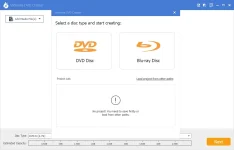
Screen :
What's New
Code:
official site does not provide any info about changes in this versionHOMEPAGE
Code:
https://www.vidmore.com/dvd-creator/
You do not have permission to view the full content of this post. Log in or register now.