 PH
PHarsenal1205
Rarely opens PHC
Now as of Chrome 131, google restrict its users on their chrome browser using manifest v2 extensions it totally affects ublock Origin and other manifest v2 extensions on the chrome web store.
Why this happened? Google is now making manifest v3 standard in their chrome browser, other chromium based browsers might follow soon.
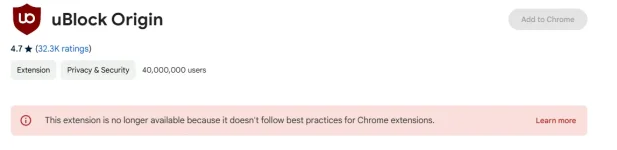
If you don't have uBlock origin or any manifest v2 extensions installed and trying to install or reinstall them, you can't install them anymore.
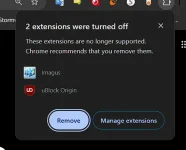
If you have uBlock Origin or any MV2 extensions installed, google will turn them off forcing you to uninstall them. However you can still turn them on in google chrome settings. Re-enabling them manually in settings might turn off again so here's a workaround to still use these manifest v2 extensions.
NOTE: Close all instances of google chrome first before installing the registry file. this registry trick will be effective until June 2025, after that month it may not work anymore.
NOTE: You must be logged in an administrator account to install this enablement for manifest v2 extensions on your browser.
Open notepad and save this registry into .reg file
Reg file without DNS over HTTPS: (if you are not using custom DNS)
Reg file with DNS over HTTPS: (if you are using custom DNS. remove the You do not have permission to view the full content of this post. Log in or register now.{?dns} (don't remove the quotes) in the reg file into your desired custom DNS.)
Once the registry files are saved, click the registry file you have created and click yes on prompt. User Account Control dialog may appear. also click yes.
Note: After installing the reg file, chrome will say "this browser managed by your organization" when you open the settings page. This is normal because this is an enterprise policy for chrome. it allows and extends the usage of manifest v2 extensions.
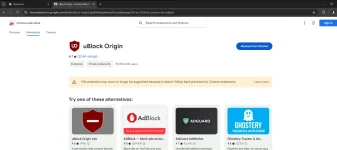
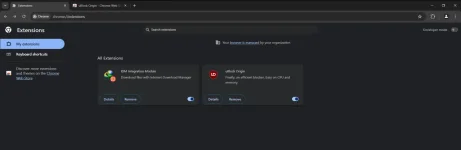
Proof screenshots:
TESTED ON CHROME 131.0.6778.205

Why this happened? Google is now making manifest v3 standard in their chrome browser, other chromium based browsers might follow soon.
If you don't have uBlock origin or any manifest v2 extensions installed and trying to install or reinstall them, you can't install them anymore.
If you have uBlock Origin or any MV2 extensions installed, google will turn them off forcing you to uninstall them. However you can still turn them on in google chrome settings. Re-enabling them manually in settings might turn off again so here's a workaround to still use these manifest v2 extensions.
NOTE: Close all instances of google chrome first before installing the registry file. this registry trick will be effective until June 2025, after that month it may not work anymore.
NOTE: You must be logged in an administrator account to install this enablement for manifest v2 extensions on your browser.
Open notepad and save this registry into .reg file
Reg file without DNS over HTTPS: (if you are not using custom DNS)
Code:
Windows Registry Editor Version 5.00

[HKEY_LOCAL_MACHINE\SOFTWARE\Policies\Google]

[HKEY_LOCAL_MACHINE\SOFTWARE\Policies\Google\Chrome]
"ExtensionManifestV2Availability"=dword:00000002
Reg file with DNS over HTTPS: (if you are using custom DNS. remove the You do not have permission to view the full content of this post. Log in or register now.{?dns} (don't remove the quotes) in the reg file into your desired custom DNS.)
Code:
Windows Registry Editor Version 5.00

[HKEY_LOCAL_MACHINE\SOFTWARE\Policies\Google]

[HKEY_LOCAL_MACHINE\SOFTWARE\Policies\Google\Chrome]
"DnsOverHttpsMode"="automatic"
"DnsOverHttpsTemplates"="https://dns.google/dns-query{?dns}"
"ExtensionManifestV2Availability"=dword:00000002
Once the registry files are saved, click the registry file you have created and click yes on prompt. User Account Control dialog may appear. also click yes.
Note: After installing the reg file, chrome will say "this browser managed by your organization" when you open the settings page. This is normal because this is an enterprise policy for chrome. it allows and extends the usage of manifest v2 extensions.
Proof screenshots:
TESTED ON CHROME 131.0.6778.205