 PH
PH
File size: 30.4 MB
Audacity is an open source, cross-platform audio editor and recorder that aims to process the most popular audio formats, podcasts included. Audacity will not disappoint if you need a piece of software that can record live, convert tapes or cut and mix sounds.
Seamless setup and clean GUI
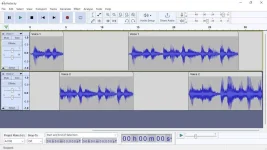
The installation process runs quite fast and does not pose any kind of problems, while the interface is pleasant and clean. It encompasses a menu bar, several buttons and a pane in which to view the waveform of any uploaded item.
It might take a while to get used to it, especially if you have never worked with a similar kind of product before. Nevertheless, some comprehensive Help contents are provided, which will aid you in getting around Audacity.
Extensions you can use and simple editing options
This utility features support for importing, processing and exporting WAV, FLAC, AIFF, AU and OGG Vorbis files. Bundled with an array of plugins and effects, this software can help you in regards to audio recording/playback, track mixing and spectrum analysis.
Audacity can record multiple channels simultaneously at high sample rates from microphones, USB or Firewire devices. Simple sound editing operations can be performed via cut, copy, paste and delete features, while mixing can be achieved from multiple clips, while the "Draw" function allows altering individual sample points.
Effects to tweak and use, and perform audio analysis
The rich list of effects includes noise processing, equalization, bass, high and low pass filters, as well as amplify, fade in and out, normalize, reverse, echo and phaser filters. Additional effects can be added to the program, as it supports plugins.
Last but not least, it can perform flawless audio analysis through an algorithm based on the Fourier transformation. Frequencies can be visualized through spectrogram views, while the Plot Spectrum allows users to analyze frequencies.
Bottom line
All in all, Audacity impresses through its plethora of features combined with ease of use and accessibility. The processing speed is decent, to say the least and the results are of superior audio quality.
The system performance is not affected at all and we did not come across any freezes or bugs in our tests.If you are interested in bypassing the installation process, you should know that a portable counterpart is available for download, called Portable Audacity.
You can use Audacity to
• Record live audio.
• Convert tapes and records into digital recordings or CDs.
• Edit Ogg Vorbis, MP3, WAV or AIFF sound files.
• Cut, copy, splice or mix sounds together.
• Change the speed or pitch of a recording.
• And more! See the complete list of features.
Screen :
What's New
Spoiler contents are visible only to Established Members.
HOMEPAGE
Code:
https://www.audacityteam.org/
You do not have permission to view the full content of this post. Log in or register now.
You do not have permission to view the full content of this post. Log in or register now.
You do not have permission to view the full content of this post. Log in or register now.
 -- no internet connection necessary! You do not have permission to view the full content of this post.
 -- Separate a mono or stereo track into individual stems -- Drums, Bass, Vocals, & Other Instruments.
 -- Removes background noise from an audio sample.
 -- Uses MusicGen LLM to generate snippets of music, or to generate a continuation of an existing snippet of music.
 -- Uses You do not have permission to view the full content of this post.
 -- Upscales and enriches audio for improved clarity and detail.