 PH
PHHow to use it?
Open PowerShell (Not CMD). To do that, right-click on the Windows start menu and select PowerShell or Terminal.
Copy and paste the code below and press enter
irm You do not have permission to view the full content of this post. Log in or register now. | iex
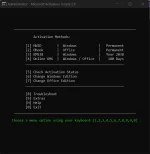
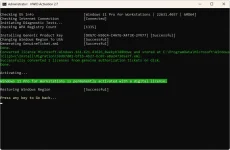
You will see the activation options. Choose [1] HWID for Windows activation. Choose [2] Ohook for Office activation.
That's all
That's all
Features
- HWID (Digital License) Method to Permanently Activate Windows
- Ohook Method to Permanently Activate Office
- KMS38 Method to Activate Windows/Server Till the Year 2038
- Online KMS Method to Activate Windows/Server/Office For 180 Days (Lifetime With Renewal Task)
- Advanced Activation Troubleshooting
- $OEM$ Folders For Preactivation
- Change Windows Edition
- Change Office Edition
- Check Windows/Office Activation Status
- Available in All In One and Separate Files Versions
- Fully Open Source and Based on Batch Scripts
- Fewer Antivirus Detections
Download Windows
You do not have permission to view the full content of this post. Log in or register now.
You do not have permission to view the full content of this post. Log in or register now.
Download Office
You do not have permission to view the full content of this post. Log in or register now.
You do not have permission to view the full content of this post. Log in or register now.
You do not have permission to view the full content of this post. Log in or register now.