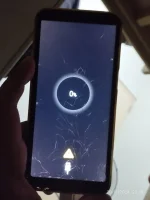
May Caution sign na lumalabas pag mag charge
It sounds like the caution sign that appears when you try to charge your Samsung J6+ Pro could indicate a potential issue with the charging process. Here are a few steps you can try to troubleshoot and resolve this problem:
1.
Check the Charger and Cable: Ensure that the charger and cable you received from Shopee are compatible with your Samsung J6+ Pro. Sometimes using an incompatible or low-quality charger can trigger warning signs.
2.
Inspect the Charging Port: Make sure that the charging port on your phone is clean and free from any debris or lint that could be obstructing the connection between the charger and the phone.
3.
Restart Your Phone: Try restarting your phone to see if that resolves the issue. Sometimes a simple reboot can fix minor software glitches that may be causing the caution sign to appear.
4.
Use a Different Power Source: Plug the charger into a different power outlet or USB port to rule out any issues with the power source you are using.
5.
Check for Software Updates: Ensure that your Samsung J6+ Pro is running the latest software version. Sometimes updating the software can resolve compatibility issues with chargers.
6.
Try a Different Charger: If possible, try using a different charger and cable to see if the caution sign still appears. This will help determine if the issue is with the charger you ordered.
If none of these steps resolve the problem and the caution sign continues to appear when you try to charge your phone, it might be best to reach out to Samsung customer support or visit a service center to have your device checked for any hardware issues.
 PH
PH