🌐 G·TM Proxifier for pc, no need vpn, httpinjector, eproxy or any ssh account.free internet 100% no capping

Status
Not open for further replies.

elenjon4ever

Honorary Poster
for globe/tm user

download the attachment below
extract it then run "Proxifier.exe"
then run google chrome then
start to browse. thats it...

use this setting
APN: internet.globe.com.ph
or http.globe.com.ph
or internet.abs-cbn.com.ph

note! dapat ip ninyo nag-start sa 10
like this 10.xxx.xxx.xxx
connect disconnect lang hanggang
makuha ninyo yung ganyang ip.

enjoy!...
 
ah ok hehehe mabilis parin settings ko hehehe kesa sayo hehehe paki report nalang tong Thread na to para madelete nang mga mods, at actually nireport ko narin po tong Thread ko for deletion, for your satisfaction, hehehe i mean for your peace of mind...peace... and i will not give credit to anyone co's magisa ko lang po inisip yung profile or settings nyan sobrang layo nung profile or settings namin parehas. tama po ba ako boss?
 
ah ok hehehe mabilis parin settings ko hehehe kesa sayo hehehe paki report nalang tong Thread na to para madelete nang mga mods, at actually nireport ko narin po tong Thread ko for deletion, for your satisfaction, hehehe i mean for your peace of mind...peace...
joke lang depende rin sa ginagamit yan panget kasi pag repost xD hehehe :)
 
joke lang depende rin sa ginagamit yan panget kasi pag repost xD hehehe :)
pasensya na boss ah hindi ko kasi ginamit yung search eh, tapos walapang option dito na pwedi mo idelete or ilock yung sarili mong Thread, hopefully mapansin yung report ko bout this matter ng mga mods,.. peace tayo ah hehe
 
your welcome...


kanino po? sa pagkakaalam ko po wala pang ganyang profile nang proxyfier sa ibang site, dito palang po sa phcorner meron niyan. try mo po idownload proxyfier nila kung gagana sa globe/tm, please... then tell me the time and date para mabigyan ko po sila nang tamang credit...
nakita ko na yan sa kabilang bakod. nalate kana sa pagpost ts :p
 
ts elenjon4ever tama ba ito...
1. extract proxifier
2. install it
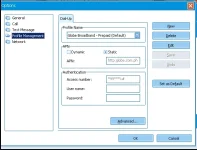
3. open your modem dashboard
4.
upload_2016-11-21_7-45-28.webp

4. ganto po ba ts....
5. wait for the ip til 10xxx...

tama ba ts??
papano ko po makikita yung ip? run-cmd-ipconfig po ba???


thanks in advance ts...
 
Status
Not open for further replies.

About this Thread

  • 16
    Replies
  • 2K
    Views
  • 8
    Participants
Last reply from:
dark30

Online now

Members online
407
Guests online
1,003
Total visitors
1,410

Forum statistics

Threads
2,273,593
Posts
28,950,484
Members
1,235,847
Latest member
eevaliceturtle
Back
Top