PH
PHpotatocorner
Fanatic
Wanna share one of my Xp configs.
Install and use XP Psiphon V6.
DL Link - You do not have permission to view the full content of this post. Log in or register now.
Before opening the app, go to settings > application manager > Xp Psiphon > Clear Data, so all servers will show up including the India and Spain after you have been connected to Best Performance.
Use WAP APN. Go to settings > Connections > More Networks > Mobile Networks > Access Point Names > Add new APN,
- Name = Any name
- APN = wap
then save. Select the new Wap APN you have just created.
Now open the Xp App and import my XpV6 Config. PASSWORD - PotatoCorner
Before connecting, make sure you have a Data Connection (H+). If none, reset it first by turning on and off the flight mode.
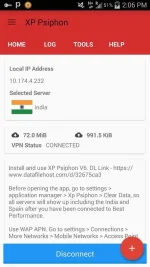
Connect... (You have no other server to choose from but the Best Performance.) Once connected, you can now disconnect and then select India Server for no capping.
Again, make sure you have your Data Connection. Connect now and Enjoy!
You may reply your feedback if working or not. Thank You!
- Potatocorner
Install and use XP Psiphon V6.
DL Link - You do not have permission to view the full content of this post. Log in or register now.
Before opening the app, go to settings > application manager > Xp Psiphon > Clear Data, so all servers will show up including the India and Spain after you have been connected to Best Performance.
Use WAP APN. Go to settings > Connections > More Networks > Mobile Networks > Access Point Names > Add new APN,
- Name = Any name
- APN = wap
then save. Select the new Wap APN you have just created.
Now open the Xp App and import my XpV6 Config. PASSWORD - PotatoCorner
Before connecting, make sure you have a Data Connection (H+). If none, reset it first by turning on and off the flight mode.
Connect... (You have no other server to choose from but the Best Performance.) Once connected, you can now disconnect and then select India Server for no capping.
Again, make sure you have your Data Connection. Connect now and Enjoy!
You may reply your feedback if working or not. Thank You!
- Potatocorner