Free TTS, STT and other AI audio related trends - Running Thread

(This will be a running thread for free AI audio stuffs, so don't just read this first post! Scan the thread for additonal uploads)
Itutuloy ko lang yung mga free AI alternatives for "audio & text" processing like TTS (Text to Speech), STT (Speech to Text), voice changing, vocalizers for music at mga iba pang kaya kong gawin sa aking old hardware to test and share here. Some are easy and some are hard. Meaning, some will use python, typescript, C++, etc. pero hangga't maaari, hahanap ako ng executable for ease of use. Kayo na ang bahala sa huli. Read the guides on the hyperlinks and try them yourself. I'll pick the apps at random.

Sa desktop users, the easiest TTS application to use nowadays is You do not have permission to view the full content of this post. Log in or register now. or the one at You do not have permission to view the full content of this post. Log in or register now.. It uses python, so best is you have it installed on your pc. The links will show you how to use it.
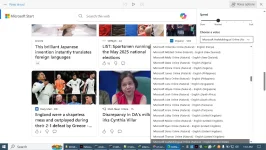
edge-tts is a Python module that allows you to use Microsoft Edge's online text-to-speech service from within your Python code or using the provided commands. You can change the voice, rate, volume and pitch of the generated speech, and write the output to media and subtitles files.
Kung gumagamit kayo ng Microsoft Edge browser, nandyan yon.
1728668599219.png

Microsoft Edge can read aloud news, sports stories, and other web pages to you. With your web page open, select and hold (right-click) anywhere on the page and choose Read aloud . You can also go to Settings and more and then select Read aloud.

Or use the following keyboard shortcut:

Press thisTo do this
Ctrl + Shift + UStart or stop Read aloud
Dahil yung Read Aloud ay accessible lang para bumasa ng web page or documents, pwede kayong gumamit ng mga browser addons using the same tool mentioned like MsEdge TTS You do not have permission to view the full content of this post. Log in or register now.to convert text to speech using Microsoft Neural Voices (for free) ans save it as mp3. Yang Chrome addon ay compatible din sa Edge or even opera Browser since they use the same browser engine!

For alternative uses of edge-tts, try the following below and compare the difference. Nasa inyong taste kung ano yung mapapakinabangan nyo sa inyong purpose.
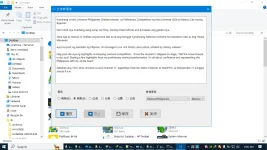
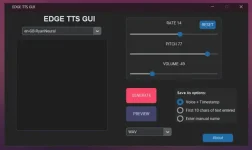
1. You do not have permission to view the full content of this post. Log in or register now. by You do not have permission to view the full content of this post. Log in or register now. - It's just a GUI for edge-tts using python. Pero get the binary release para one-click na and portable.
Nandito sa spolier yung infos nya for a quick look.
Spoiler contents are visible only to Established Members.
1728670713931.png

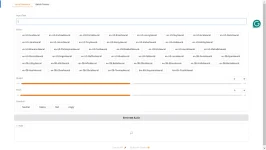
2. You do not have permission to view the full content of this post. Log in or register now. by You do not have permission to view the full content of this post. Log in or register now. - Same as above pero may option for Emotions (Neutral, Angry, Sad, Happy). Read the spoiler below for a brief overview.
Spoiler contents are visible only to Established Members.

You need to run it in python sa command prompt. Either you download the zip code and extract, or git the main repository, install the requirements, then run app.py and open at You do not have permission to view the full content of this post. Log in or register now. in your browser. Or follow the guide on the link, creating a python environment, activate it then do the same I mentioned. Wala pang 2 minutes napaandar nyo na yan or earlier. BTW, python 3.10 ang ginamit ko dyan. Mabilis din ang inference nya since api yung ginamit online - hindi local AI model. So you need an internet to use edge-tts.
Kung gusto ninyong magdagdag ng additional Voice Labels, bawasan ninyo yung di nyo kailangang voices and the appropriate names and models. Hanapin nyo na lang sa code ng edge-tts yung tagging or You do not have permission to view the full content of this post. Log in or register now..
1728670867706.png

Ito na lang muna sa ngayon. Try natin maghanap ng ibang maaaring dumikit sa standards ng premium service ng ElevemLabs or even done locally sa desktop with low resources.
Note: This is free, unrestricted, unlimited use of AI generated voices (~318 languages), so use your imagination to use it.
 
Para makuha nyo yung logic how TTS works, ito yon:
A text-to-speech (TTS) model generates a mel-spectrogram from input text, while a vocoder converts that mel-spectrogram into a waveform that can be heard:


Here's how TTS and vocoders work together:
  1. Text analysis: A text analysis module converts a text sequence into linguistic features.
  2. Acoustic model: The acoustic model generates acoustic features from the linguistic features.
  3. Vocoder: The vocoder synthesizes a waveform from the acoustic features.
Some TTS models are fully end-to-end, converting the input character sequence directly to the output waveform. Others use a neural vocoder, such as WaveNet, to generate the output waveform.


Not every vocoder is compatible with every TTS model.
Ang ibig sabihin, merong full package na like the ones provided by OpenAI APIs:
OpenAI's text-to-speech (TTS) models are tts-1 and tts-1-hd, which are used to convert text into spoken audio:


  • tts-1: Optimized for real-time use cases, but may have more static than tts-1-hd


  • tts-1-hd: Optimized for quality
The OpenAI TTS API can be used for a variety of purposes, including: Narrating written content, Producing spoken audio in multiple languages, and Real-time audio output.


The API takes in three inputs: The model, The text to be turned into audio, and The voice to be used for the audio generation.


The API supports the following voices:
Alloy, Echo, Fable, Onyx, Nova, and Shimmer.


The API supports the following output formats:
MP3, Opus, AAC, FLAC, PCM, and WAV.
Yung ibang online TTS service ay thru Web API like the free Microsoft Azure TTS voices using Edge browser. They have their own restrictions and limitations like all other online services. Yung binanggit kong edge-tts uses the same back-end to try to extend its use with other additional features. Kaya mas matagal gamitin kaysa sa Edge service - like more usage of characters.

Sa open-source, and close resemblance for text analysis+model+vocoder is You do not have permission to view the full content of this post. Log in or register now., You do not have permission to view the full content of this post. Log in or register now., You do not have permission to view the full content of this post. Log in or register now. and others. yung first 2 ay pwede sa CPU, pero yung sa Coqui kailangan mo ng malakas na GPU kahit sa inference lang. SA CPU baka mag-restart ang pc nyo kung mamali settings nyo dyan he he. Pinag-aarlan ko pa kung kayang pigain sa CPU. Yung first two may binary package na to try them. Just download the requirements.

Yung Piper TTS runs using onnx models. You just need an onnxruntime for cpu or gpu.
Sa GPU, check nyo dito kung pasok sa nvidia card ninyo.
You do not have permission to view the full content of this post. Log in or register now.
Sa ibang CPU/GPU, check your requirements here:
You do not have permission to view the full content of this post. Log in or register now.
Check nyo yung voice samples, para mapakinggan nyo kung OK siyang gamitin:
You do not have permission to view the full content of this post. Log in or register now.
Since wala yang interface (di tulad ng Tensorvox), gamitan nyo na lang ng UI para mapadali.
You do not have permission to view the full content of this post. Log in or register now.

I recommend piper tts as the best local AI to use for TTS dahil mababa ang requirements for offline use, plus desente ang voices kaysa sa mga SAPI5 TTS sa Windows. Wala lang Tagalog pa he he. Mga selected premium providers lang ang merong development nya. Sa open-source, meron pero ayaw nilang ilabas for some personal reason - sinubukan ko na. Ang bagsak nyo na lang ay "voice cloning" he he dahil yon ang solusyon!
Don't forget:
You can You do not have permission to view the full content of this post. Log in or register now. ( for Linux or WSL due to no support for piper-phonemizer at the moment for Windows but a You do not have permission to view the full content of this post. Log in or register now.) or download a binary release:
You do not have permission to view the full content of this post. Log in or register now.
For Windows, Mac OS and below.

Ang last option ninyo to test piper-tts and other free options is by using this browser addon:
You do not have permission to view the full content of this post. Log in or register now.
or this:
You do not have permission to view the full content of this post. Log in or register now.
Mamili kayo ng models to try. Medyo kakain yan ng RAM for each model you use - be warned!

++++++++++++++++++++++++++++++++++++++++++++++++++
++++++++++++++++++++++++++++++++++++++++++++++++++
Dagdag ko na lang itong isa na related sa edge-tts sa first post kung hindi nyo napansin yung thread nito.
You do not have permission to view the full content of this post. Log in or register now.:
Make Azure natural TTS voices accessible to any SAPI 5-compatible application.
An You do not have permission to view the full content of this post. Log in or register now. that can utilize the You do not have permission to view the full content of this post. Log in or register now. provided by the You do not have permission to view the full content of this post. Log in or register now., including:

  • Installable natural voices for Narrator on Windows 11
  • Online natural voices from Microsoft Edge's Read Aloud feature
  • Online natural voices from the Azure AI Speech Service, if you have a proper subscription key
Any program that supports SAPI 5 voices can use those natural voices via this TTS engine.

See the You do not have permission to view the full content of this post. Log in or register now. for some more technical information.
Check nyo na lang yung ibang detalye sa github site sa taas.
Ang good side nito, any TTS reader can use it like You do not have permission to view the full content of this post. Log in or register now.. Magaan din gamitin dahil incorporated na sa Microsoft Speech API compatible apps, and easy to install. Kahit sa Windows XP, supported nya. Parang semi-h@cked version ng SAPI5 siya. Kahit yung Read Aloud ng Microsoft Office nagagamit siya. Best option for educational use. Try it.
 
Itong sinimulan ko ay the simplest basics lamang for decent TTS for local use if anyone wants to try. Marami namang APIs sa net kaya hindi ito masyadong magiging interisado sa nakakabasa. Sa Win11 naman may Neural TTS na rin. May mga advanced pa dito but you can find them andg use for free sa github. You have to search for it for TTS, STT, Voice-Voice (RVC), etc. Medyo mataas lang ang requirements depende sa runtime libraries ng AI na gagamitin.
Subukan ninyong i-setup yung You do not have permission to view the full content of this post. Log in or register now. to learn more advanced tricks - combining local and online apis. In this way, mas mapapadali yung venture ninyo sa vtubing with 2d or 3d. Everything is free naman sa AI if you are into open-source projects and have hardware that satisfies the app requirements. Marami namang may CPU-mode support for as low as 4 - 8GB RAM or GPU-mode na at least 4GB VRAM. Kailangan lang magbasa ng docs to find the providers that give these types of minimum features. Or opt for free api providers, collect/combine all and separate the api calls (for text/image generation, vision, embedding, etc.). Lahat halos ng LLM apis ay openai compatible na or with an api converter para magamit ninyo as if using an openai api. Kahit webapis may converter na rin to make it a usable api endpoint like I mentioned. No api key needed and free. Magtiyaga na lang talaga sa rate limits kung galing sa premium providers. Bihira dyan ang unlimited requests. Pero marami rin ang aabot sa +1000 requests for selective LLMs. Mas madaling intindihin yung apps na makikita online kung alam mo kung ano yung prosesong ginagawa ng AI na gagamitin mo. Start venturing on testing apps like llama.cpp, ollama and open webui, Oobabooga text generation webui, LM Studio, Sillytavern, librechat, vLLM, gpt4all, gpt4free, etc. Nasa github naman lahat yan (free to use) or look for running apps sa huggingface spaces. In the long run, di na kayo dependent sa iba to find the AI you want. Yang Quillbot at Grammarly ay obsolete na since kaya yan ng latest AI ngayon na MOE (mixture-of-experts) or multimodals with just using a prompt, like the free Gemini AI (flash or pro) models. From pdf to long videos, kaya nyang i-transcribe and supports many languages. Sa context window na lang magtatalo kaya use +128k models for it to make this happen aside from Gemini. Just check the AI leaderboards sa lahat ng categories to find the right AI for you.
Good luck na lang sa mga nakakuha sa message ko.
 
Sa mga gumagamit na ng You do not have permission to view the full content of this post. Log in or register now. (w/ or w/o Ollama) and You do not have permission to view the full content of this post. Log in or register now., ito yung best alternative for TTS din.
You do not have permission to view the full content of this post. Log in or register now.
Text-to-speech API endpoint compatible with OpenAI's TTS API endpoint, using Microsoft Edge TTS to generate speech for free locally
Easy to install and run using python or via docker by a few clicks. Yung api key sa .env is just a dummy like "1234" para madaling tandaan.
Doon sa gusto naman mag-test ng iba't ibang
Text-to-speechAudio/Music GenerationAudio Conversion/Tools
try this GUI or any supported AI separately.
You do not have permission to view the full content of this post. Log in or register now.
Test them one at a time as long as supported yung hardware ninyo for CPU and GPU.
Para kayong may free Elevenlabs sa pc ninyo using open-source applications.
 
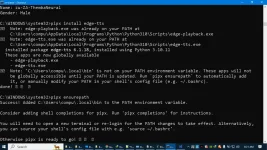
Para doon sa mga naghahanap ng quick TTS sa tagalog na hindi pa naka-test ng edge-tts options, ito yung samples ayon sa taas. Kung ginamit nyo yung edge-tts sa python, nakalista naman yung Filipno language dyan.
edge-tts
Name: fil-PH-AngeloNeural
Gender: Male

Name: fil-PH-BlessicaNeural
Gender: Female
Yan yung gamitin ninyo. Sa Edge TTS GUI standalone (w/ no python needed), ito yung sample.
1731801242009.png

Seconds lang yung generation at may option for preview (or playback).
Same case din sa QT version ng GUI.
1731802056614.png

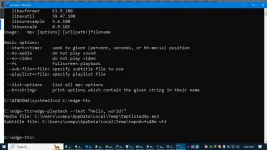
Using You do not have permission to view the full content of this post. Log in or register now. sa python, pwede rin manually using pip and pipx option. Mas maganda, kunin ninyo yung edge-tts.exe and edge-tts-playback as seen below
1731802944014.png

and place them at say C:\edge-tts path. since it requires mpv command line player for playback, go here:
You do not have permission to view the full content of this post. Log in or register now..
Then set mpv system environmental variable to make it work properly. Open another command prompt para sigurado. Kahit wala namang mpv, ok rin as it will save the audio by default. For playback lang yan.
1731804655910.png

May apps na nangangailangan ng ffmpeg, so be aware of this. Nasa mpv release builds din yan so do the same with it - setting environmental variables sa OS nyo.
Binigay ko lang yung short and long method as example.
For other UIs, try them here;
You do not have permission to view the full content of this post. Log in or register now.
Mas maganda yung WebUI dahil pwede ninyong i-translate yung menu nila sa browser.

Note:
Yung isang alternative sa Edge-TTS for open-webui sa post#4 is this:
You do not have permission to view the full content of this post. Log in or register now.
Sa gumagamit naman ng oobabooga Ui, try this extension:
You do not have permission to view the full content of this post. Log in or register now.
May option yan to use RVC for TTS.
Ito yung standalone:
You do not have permission to view the full content of this post. Log in or register now.
Note:
TTS-with-RVC (Text-to-Speech with RVC) is a package designed to enhance the capabilities of text-to-speech (TTS) systems by introducing a RVC module. The package enables users to not only convert text into speech but also personalize and customize the voice output according to their preferences with RVC support.
Yan yung ginagamit sa ElevenLabs using a vast chain of voice TTS models for many languages to make them sound more realistic.

Dagdag ko doon sa mga naghahanap ng Tagalog voiceovers at hindi yung gusto lang ng TTS sa pagsalita ng text sa browser or documents, the best way is just use some voice cloning or RVC related apps for FREE.

Record through your voice para madali, kahit taglish he he. Save it to mp3.
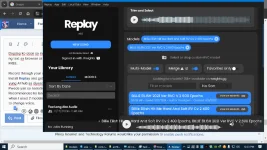
Install You do not have permission to view the full content of this post. Log in or register now. and get the models at weights.gg or its alternative links. Google nyo na lang at patay na kasi yung AI hub sa diyescord channel.
Pwede yan sa narration at songs at di naman masyadong matagal mag-process sa cpu mode. The app is free as well as the voices - na sobrang dami. Recommended ko lang is, you need at least 12 - 16 GB RAM sa pc ninyo. Mga 6GB kasi yung napansin kong kinakain when I used 2 models merged to change a voice. Check nyo na lang kung ok sa 8GB RAM sa single model to change voice. Ganito itsura nyan.
1731817399045.png

Ito yung class-B song ko na na-generate sa AI using my lyrics:
You do not have permission to view the full content of this post. Log in or register now.
Ito na yung final song converting it merging 2 voices of Billy Eilish:
You do not have permission to view the full content of this post. Log in or register now.
Actually, mas maganda yung original he he.

Kung gusto nyong mag-clone ng voice ninyo, hanapin nyo sa YT si You do not have permission to view the full content of this post. Log in or register now. tungkol sa "(Tutorial) Use YOUR Voice in AI Cover Songs with Replay and RVC" using RVC GUI. Marami namang GUI na ganyan sa github. You do not have permission to view the full content of this post. Log in or register now. yung ginamit ko noon using You do not have permission to view the full content of this post. Log in or register now.. Or, try it at weights.gg.

With this, you don't need Elevenlabs or any premium site he he! Same is true to other AIs, maraming free and unlimited options ng mga yan ngayon. Mahiraptt lang maghanap ng pinipiga sa cpu mode para mapaandar dahil karamihan ay mataas yung requirement agad sa GPU mode na Cuda 11 or 12 yung minimum.
 
do u have one na may api integration boss ?
Explain ko na lang para sa ibang naghahanap.
Halos lahat sa posts sa taas pwedeng gawing api basta meron silang server option. Check mo sa github links nila kung papano mag-setup ng api server locally (natively, w/ docker) or sa cloud. May iba kasi na di ko mentioned na suitable for other OS like Linux sa github. Ako, sa Windows lang sa ngayon nag-test.
Ang best example that integrates different TTS apis is this one I mentioned:
You do not have permission to view the full content of this post. Log in or register now.
Check mo na lang yung guides and requirements for them to work in your end. Mamili ka kung alin dyan yung kaya mong i-setup.
Kung gumagamit ka naman ng open webui, pwedeng integrate yung edge-tts api using this guide:
You do not have permission to view the full content of this post. Log in or register now.
Itong You do not have permission to view the full content of this post. Log in or register now. ay gumagamit ng sari-saring apis for LLM, STT, TTS, Vision, etc. Check mo sa github yung links ng apis to integrate with it aside from their demo settings. Pag nag-deploy ka ng Amica locally, dyan mo matutunan to input all needed apis (online or offline) to customize the app for your needs.
Yung iba dyan, merong mga option to use their apis as a web browser addon for Chrome. Check mo sa webstore at libre naman yan like pipe-tts and edge-tts.
Itong You do not have permission to view the full content of this post. Log in or register now. mas dense gamitin if you run it in python.
Yung api integration depends on the AI app you are using. Maghahanap ka talaga ng app na gumagamit ng specific api na meron ka. Sa mga AIO AI apps yan nakikita.Pero kung TTS app lang yung hanap mo, yung client app na lang yung paandarin mo, para direkta na yung text to speech usage mo - same as other AI specialties for text, image, audio, etc. Marami namang nagkalat sa github to test.
Pero kung ang hanap mo yung mas ok na free online api integration, sa RapidAPI ka maghanap at marami rin nag-provide ng disenteng api usage kahit sa 11labs, atbp. pa yan. Bahala ka na lang sa voice id na mag-check kung alin ang gusto mo.
I hope you get the idea.

Bigyan mo ako ng sample api na gagamitin mo kung sakali para mas klaro sa akin. Medyo magaan ang loob ko't Taga-Lucena ka. May dugo din kasi akong Atimonanin at marami akong kamag-anak dyan he he.
 
Ts may copy ka pa ung Kay You do not have permission to view the full content of this post. Log in or register now. salamat nabura ung sakin baka pwede ako makahingi Ng copy Ng files ty
Sorry. Wala akong naalalang kopya nyan. Ano ba yung voice|_gen na yan ni You do not have permission to view the full content of this post. Log in or register now.; related ba sa sa tts online service o local model? Voice effect?
Hanap ka na lang ng clone nyan sa github o yung iba sa taas. Sa local tts naman sobrang dami na he he like the variants of RVC, XTT2 (from the old COQUI)... or just install Replay and use the voice models sa weights.gg and other sources - mas madali. Pero di ako sure sa pakay mo sa "voice_gen".
Kahit nga boses ng pusa o aso ay may TTS tool na rin to convert to human speech he he.
 
Sorry. Wala akong naalalang kopya nyan. Ano ba yung voice|_gen na yan ni You do not have permission to view the full content of this post. Log in or register now.; related ba sa sa tts online service o local model? Voice effect?
Hanap ka na lang ng clone nyan sa github o yung iba sa taas. Sa local tts naman sobrang dami na he he like the variants of RVC, XTT2 (from the old COQUI)... or just install Replay and use the voice models sa weights.gg and other sources - mas madali. Pero di ako sure sa pakay mo sa "voice_gen".
Kahit nga boses ng pusa o aso ay may TTS tool na rin to convert to human speech he he.
Yups un nga, nareformat ko laptop pati backup ko sa SD card, masok sya sakin Kasi light weight sya kunti lang requirements. Maghanap na ako Ng clone Kaso wala ako makita
 
Yups un nga, nareformat ko laptop pati backup ko sa SD card, masok sya sakin Kasi light weight sya kunti lang requirements. Maghanap na ako Ng clone Kaso wala ako makita
Explain mo sa akin yang voice_ai na hanap mo para makapag-search ako ng kapalit nyan he he. Sabihin mo kung python, typescript, atbp. yung platform... Anong klaseng lightweight na TTS yan? For cpu, gpu, online, offline ba? Gagamit ka ba ng local ai or online apis? Kung lightweight na voice_gen, piper-tts yung pinakamabilis kahit sa cpu. Wala lang tagalog model yan. Sinubukan kong mag-train to make a tts model pero nag-hang pc ko he he, bukod sa matagal ang process. Akala ko noon madali pero limited ako. Kailangan ko pa ng gpu na mataas ang vram bukod sa kaalaman to edit the model's mistakes.
Maraming klase kasi ng TTS voice generation tools from simple to sophisticated.
Lipas na rin kasi ako dyan sa TTS at sa advanced AI na yung kinukutingting ko ngayon sa github - yung mga latest related sa engineering. Basta local AI sila. Seconday lang yang TTS, STT, atbp. at di ko pwedeng pagsabayin lahat sa pc ko.
Binabalikan ko lang kung may time akong mag-test sa sillytavern o open-webui para maging realistic yung aking mga local assistants sa freestyle mode - kung may bagong lumabas na mas OK gamitin at supported ng mga UIs ko.
Sabihan mo na lang ako kung wala ka pa ring mahanap.
 
Explain mo sa akin yang voice_ai na hanap mo para makapag-search ako ng kapalit nyan he he. Sabihin mo kung python, typescript, atbp. yung platform... Anong klaseng lightweight na TTS yan? For cpu, gpu, online, offline ba? Gagamit ka ba ng local ai or online apis? Kung lightweight na voice_gen, piper-tts yung pinakamabilis kahit sa cpu. Wala lang tagalog model yan. Sinubukan kong mag-train to make a tts model pero nag-hang pc ko he he, bukod sa matagal ang process. Akala ko noon madali pero limited ako. Kailangan ko pa ng gpu na mataas ang vram bukod sa kaalaman to edit the model's mistakes.
Maraming klase kasi ng TTS voice generation tools from simple to sophisticated.
Lipas na rin kasi ako dyan sa TTS at sa advanced AI na yung kinukutingting ko ngayon sa github - yung mga latest related sa engineering. Basta local AI sila. Seconday lang yang TTS, STT, atbp. at di ko pwedeng pagsabayin lahat sa pc ko.
Binabalikan ko lang kung may time akong mag-test sa sillytavern o open-webui para maging realistic yung aking mga local assistants sa freestyle mode - kung may bagong lumabas na mas OK gamitin at supported ng mga UIs ko.
Sabihan mo na lang ako kung wala ka pa ring mahanap.
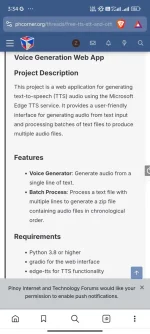
Thank you ts, ung need ko ung post mo na may Voice Generation Web App, python light weight sya na magrurun sa local web, mas effective sya sakin tsaka mabilis mag generate

Ito ung exact post mo nasa 1st page ata sya, nalimutan ko mag fork hehe hinhanap ko din kung Meron nakapag fork pero no luck, thann you sa pag accommodate.
Screenshot_2025-01-07-03-34-56-869_com.brave.browser.webp
 
Thank you ts, ung need ko ung post mo na may Voice Generation Web App, python light weight sya na magrurun sa local web, mas effective sya sakin tsaka mabilis mag generate

Ito ung exact post mo nasa 1st page ata sya, nalimutan ko mag fork hehe hinhanap ko din kung Meron nakapag fork pero no luck, thann you sa pag accommodate.
View attachment 3390520
Alam ko nga meron akong thread na ganyan pero di ko ma-scan sa PHC kung saan. Kanina ko pa hinahanap. Link mo nga sa'kin?
Dyan sa pinakita mo ay You do not have permission to view the full content of this post. Log in or register now. yung base app niya. Marami yang fork using this search:
You do not have permission to view the full content of this post. Log in or register now.
Meron yang option to run as cli, with UI, Web-UI, as standalone app, etc. and integrated with other applications on various platforms.
Ang pinakamadali ay use edge-tts as browser plugin for integration:
You do not have permission to view the full content of this post. Log in or register now.
It's either you download the plugin or build it using nodes.js.

Sa case ko, ang gamit ko sa You do not have permission to view the full content of this post. Log in or register now. as ito:
You do not have permission to view the full content of this post. Log in or register now.. Dummy lang yung api key or no api key needed for openai.

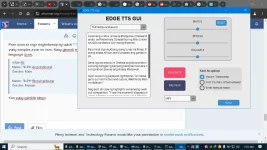
Note: Sa paghanap ng forks or derivatives from scratch, kailangan mo ng tamang query. Since alam na natin na edge-tts yung base at gusto mo ng web app. Kita mo dyan sa pic mo yung word na "gradio" (a python library for building web-based interfaces for machine learning models), so dyan ka mag-umpisa. Try mo "edge-tts with gradio, github" sa google at may makikita kang malapit sa hanap mo - easy to hard he he. Test mo na lang kung working sila at marami rin dyan ay outdated. Saka ka pumasok sa forked channels ng mga yan sa github.
Ex. Ito, 7 month old pero working ms web app:
You do not have permission to view the full content of this post. Log in or register now.
 
Alam ko nga meron akong thread na ganyan pero di ko ma-scan sa PHC kung saan. Kanina ko pa hinahanap. Link mo nga sa'kin?
Dyan sa pinakita mo ay You do not have permission to view the full content of this post. Log in or register now. yung base app niya. Marami yang fork using this search:
You do not have permission to view the full content of this post. Log in or register now.
Meron yang option to run as cli, with UI, Web-UI, as standalone app, etc. and integrated with other applications on various platforms.
Ang pinakamadali ay use edge-tts as browser plugin for integration:
You do not have permission to view the full content of this post. Log in or register now.
It's either you download the plugin or build it using nodes.js.

Sa case ko, ang gamit ko sa You do not have permission to view the full content of this post. Log in or register now. as ito:
You do not have permission to view the full content of this post. Log in or register now.. Dummy lang yung api key or no api key needed for openai.

Note: Sa paghanap ng forks or derivatives from scratch, kailangan mo ng tamang query. Since alam na natin na edge-tts yung base at gusto mo ng web app. Kita mo dyan sa pic mo yung word na "gradio" (a python library for building web-based interfaces for machine learning models), so dyan ka mag-umpisa. Try mo "edge-tts with gradio, github" sa google at may makikita kang malapit sa hanap mo - easy to hard he he. Test mo na lang kung working sila at marami rin dyan ay outdated. Saka ka pumasok sa forked channels ng mga yan sa github.
Ex. Ito, 7 month old pero working ms web app:
You do not have permission to view the full content of this post. Log in or register now.
Salamat sa response I appreciated.
Btw ung post mo nandito lang din sa page na 'to number 2 sya naka spoiler, natry ko na ung number 1 pero prefer ko ung number 2 Kasi may emotion sya tapos ang bilis mag generate, nagtatry ako Ng ibang tools mo pero low budget lang laptop ko sinunsondan ko pa mga tools mo dami magaganda na pwede magamit. Very useful ung thread mo ts thank you so much.
 
Salamat sa response I appreciated.
Btw ung post mo nandito lang din sa page na 'to number 2 sya naka spoiler, natry ko na ung number 1 pero prefer ko ung number 2 Kasi may emotion sya tapos ang bilis mag generate, nagtatry ako Ng ibang tools mo pero low budget lang laptop ko sinunsondan ko pa mga tools mo dami magaganda na pwede magamit. Very useful ung thread mo ts thank you so much.
Senior na talaga ako he he. Nasa harap ko pala. Di kasi ako palatingin sa spoilers he he. Malamang nabura o nasama na sa deleted or archived AI folders ko sa separate disks yan. Nagbubura ako ng mga folders madalas dahil sa laki ng models ng AIs na gamit ko at mga env folders nila.
Tama lang na GUI gamitin mo at maasikaso sa cli, at mahahaba yung commands ng edge-tts.
Basta (web) api lang ang gamit like edge-tts ay ayos lang yung potato pc sa cpu mode - less RAM. Kahit yung piper-tts, ang bilis sa cpu mode dahil sa onnx, same as fastsdcpu sa image generation. Kahit pagsabayin ko yung ASR/STT, TTS, at LLM (GPT) na puro local AI, kaya pa rin ng pc ko na 3rd gen. Sa RAM lang ako bumawi at 16GB lang yung sagad for 1K pesos he he. Marami naman dyan na pwede sa cpu mode o sa mga 2GB VRAM na GPU. Kailangan lang na alam mo yung requirements ng AIs para smooth gamitin.
Sa'kin, yung best AIO sa TXT and/with AUDIO AI is You do not have permission to view the full content of this post. Log in or register now.. Marami kang options para gamitin siya, pero kung TTS lang ay piper. Yung medium or high quality voices ang gamitin mo.
Test mo dito, parang premium na online yung high quality voices:
Spoiler contents are visible only to Established Members.
Yung pth models kasi ng high quality tuned voices ng RVC ay converted to onnx models kaya halos same quality sila sa UIs na yan. Naghahanap pa ako ng UI para ma-tweak yung speech synthesis with emotions, proper pausing, etc. Sa RVC UIs, meron pero mabagal sa cpu, at di pa supported doon yung onnx runtime for inference - conversion pa lang.
Enhance mo na lang yung bitrates ng audio para malinaw at crisp. Marami namang DAW na kaya yan o hanap ka ng ng AI audio upscaler or enhancer sa github he he.
Pwede rin gumawa ng subtitles yang edge-tts. Check mo sa guides kahit sa MS Edge.
 
btw ts thank you ulit narecover ko na ung file working na ulit
Pasensya rin at di ko na makita yung file na hinahanap mo. Marami namang edge-tts apps na pwedeng pamalit he he. Yan din yung gamit ko sa mga open source apps ko dito like SillyTavern (even the original TavernAI), Amica, open-webui, atbp. kaysa pigahin ko ang net sa 11labs apis he he. Yung NaturalVoiceSAPIAdapter ang kasunod dahil same din yan galing sa Azure TTS na gamit ng MSEdge browser - thru Read Aloud and Immersive Reader. Mabilis kasi pag online api. Halos di halata yung delay kung gagamitin in real time. Mataas din ang character limits ng RE na edge-tts ni rany2 (di hamak) for a free ai app. Sa offline TTS, ang pinakamabilis ay yang piper-tts dahil sa onnx runtime. (Subukan mong mag-download ng bagong release na onnx runtime (dll) at itabi no sa chrome.exe or replace the one in System32 folder, may mapapansin kang bilis he he.), Ang laptop ko rin ay luma na, 3rd gen na i7, pero napipiga ko sa bilis at performance using latest trends sa software. Kahit cpu mode yung local AIs, mabilis yung inference, pero hinahaluan ko ng online apis para sakop lahat ng features at para di manghingalo siya he he. Kailangan lang magbasa ng maraming documentation at malakas ang loob na mag-trial and error.

Kaya ang focus ko is "Generative AI & LLM APIs" + "AI Agents". Marami namang may installers na at minimal yung requirements. APIs lang ang kulang. I-manage ko lang yung RAM para sa ibang local AI models na accessories ng aking AI interfaces. AI is FREE and everywhere sa dami ng alternatives! At hindi mahirap intindihing gamitin sila even without programming knowledge. Ako, nangangapa lang at yung chatbot yung aking padrino. Kung di malinaw sa documents/guide, search lang sa net yung issues o doon sa gumawa o users ng app, malamang nasa YT pa yung sagot. Sinasabi ko lang ito para mapadali yung paghanap ng kung ano sa net sa iba para sila self-sufficient.

Sa ibang free alternative, pag-aralan mo yung huggingface inference api or You do not have permission to view the full content of this post. Log in or register now.. Free Huggingface account lang, up to 1000 requests per day na yan for an assortment of AIs to use including TTS, STT, text generation, audio and video inference, etc. You do not have permission to view the full content of this post. Log in or register now. module lang (sa python or nodes.js) + yung free token mo buhay ka na. Magsawa ka sa online models. Pwede rin gawin local api para magamit as openai compatible api (with key and endpoint in most cases) like gpt4free api server, atbp. Pwede mo rin lokohin mo yung OpenAI to be able to use TTS-1, Whisper, Dall-E, embedding models, and as cloned gpt-3.5-turbo (using another non-openai api). Kaya maraming fake AI din ngayon like the GPT-4x series na paborito ng marami he he.

Sabihan mo ako pag may kailangan ka. Marami rin madaling i-setup at gamitin sa AI. APIs na lang para di mahirapan pc mo. Umpisahan mo sa Gemini. Yung You do not have permission to view the full content of this post. Log in or register now.may TTS feature na atbp.
 
ok na ts nahanap ko na ung file na hinahanap ko nag recovery na ako, kaliit na file hirap hanapin hahaha pero thanks talaga
Pwede bang i-upload mo sa dropmb at padala mo sa'kin yung "main.zip" code lang ng makutingting ko ulit he he.
Balik din ako sa Emotional-TTS project using APIs at naglabasan na yung mga bagong multimodal models na AIO. Baka makuha sa isang api lang. Maganda yung mismong model yung mag-interpret/mag-analyze ng text at gumawa ng audio ayon sa emotional content nya automatically back to the user. Habang kinakausap mo o sa tema ng text input, yung response nya conforms like an actual normal conversation - may "sentient" reaction though artificial. Yung sa edge-tts UI manual lang. Sa local TTS AI UIs, meron na yan noon pa, pero hardware extensive sa dami ng models na gagamitin for each task, at mahirap i-setup. Post ko yung madali.

Itong una hindi siya api (sorry) pero can run in cpu mode if using the ONNX mod. Gagamit siya ng sample audio as basis (preferably <10 sec) and as of now can generate an output of 30 sec from your text input.
Ito yung original: You do not have permission to view the full content of this post. Log in or register now.: Official code for "F5-TTS: A Fairytaler that Fakes Fluent and Faithful Speech with Flow Matching"
For fast inference use this:
1. You do not have permission to view the full content of this post. Log in or register now.: Running the F5-TTS by ONNX Runtime
2. You do not have permission to view the full content of this post. Log in or register now.: Running the F5-TTS by ONNX Runtime standalone with GUI

Yung #2 ang and sinubukan ko. Please read instructions carefully dahil assumed nila na alam nyo yung paggamit ng onnxruntime providers na gusto nyong gamitin.
Sa #2 for cpu mode, I used torch and torchaudio for cpu only and onnxruntime-openvino (instead of onnxruntime-directml) since yon ang required nila from requirements.txt na compatible sa pc ko. Check nyo sa ibang ibang links dyan for your preferred GPUs like NVIDIA, latest NPUs, INTEL/AMD cards use.
(Para sigurado, discarded ko sa "pip install -r requirements.txt" command yung tatlo sa taas muna at inuna ko ito sa activated environment "venv" folder by default (see at install.bat):
pip install torch torchaudio --extra-index-url You do not have permission to view the full content of this post. Log in or register now.
pip install onnxruntime-openvino
Nasa "models/onnx/" folder yung 3 na onnx models at sa "models/" folder yung vocab.txt.
Mag-ipon kayo ng emotional audios (of your choice) na "sample.wav" (<15 sec) files, tagged for various emotions/personalities at i-save nyo for future use. Ang limit lang ng models na provided is for English and Chinese. subukan nyo sa Tagalog kung OK he he.
For demos, try this link: You do not have permission to view the full content of this post. Log in or register now. (free to use yan kung ayaw nyong gamitin yung open source app locally with a free API pa).

Nag-test lang ako due to curiosity dahil ang target komg susunod ay itong You do not have permission to view the full content of this post. Log in or register now. dahil lightweight at mas mabilis. Ang demo nya ay nandito: You do not have permission to view the full content of this post. Log in or register now. (free to use din at may free API rin). For local inference, try here: You do not have permission to view the full content of this post. Log in or register now.: TTS with kokoro and onnx runtime.

Mamili ma lang kayo dyan. Yan F5-TTS is a form of audio cloning and generation. Pwede siyang Basic-TTS, for Multi-speech, and Voicechat. Maraming ganitong TTS like You do not have permission to view the full content of this post. Log in or register now.
Though di provided yung E2-models sa local AI ma ginamit ko, ito yung note nila:
F5-TTS: Robustness, speed, and user-friendly design make it suitable for a wide range of applications. E2-TTS: Offers simplicity but may struggle with consistency and efficiency compared to F5-TTS.
Sa demos nyo lang makukumpara yung dalawa. Yung E2-TTS models ay mas magandang pakinggan yung generated audios - correct me. Yung Kokoro-TTS ay mas maraming supported na linggwahe kahit lightweight compared sa F5-TTS. Parehas din sila ng limits. FYI.

Ang least na magagamit nyo for them as an API are the guidelines when you click "Use via API" na nasa pinakababa ng playground page ng demo links. May api server option din locally pero naghahanap pa ako ng integrated sila sa AI UIs at may online provider ng api service. Good Luck.

PS. Yung open-webui pa lang ang may support sa TTS dito sa thread + Koko-FastAPI as stated here: You do not have permission to view the full content of this post. Log in or register now.
Yung You do not have permission to view the full content of this post. Log in or register now. ay pwede rin sa cpu mode. Pag-andar ng server, endpoint lang, walang api key. One-click lang sa docker to install.

Ito isa pang free demo link ng kokor na di na kailangan ng sample audio ngayon :
You do not have permission to view the full content of this post. Log in or register now.
Parang 11labs yung results.
I-clone nyo ito using your Huggingface account: You do not have permission to view the full content of this post. Log in or register now.
Sa free, yung provided cpu nila ang magagamit or else pay for the upgrade. Just click the 3-dot button to click "clone repository" at the top center of the page. Same is true with other "Spaces" there.
 
looks like ok yan ung may kasama ng emotion, as of now ung web tts palang ginamit ko with 4 option to add emotion, and tatry ko din si piper with my rp3 ko heheh
 

About this Thread

  • 28
    Replies
  • 3K
    Views
  • 7
    Participants
Last reply from:
alist1986

Online now

Members online
1,237
Guests online
1,483
Total visitors
2,720

Forum statistics

Threads
2,272,050
Posts
28,939,875
Members
1,237,967
Latest member
samudesu69
Back
Top