PH
PHMga kailangan:
- Windows PC
- OBS (Download You do not have permission to view the full content of this post. Log in or register now.)
- Snaz (Download You do not have permission to view the full content of this post. Log in or register now.)
- Background photo (in my case i will use this photo You do not have permission to view the full content of this post. Log in or register now.)
- Any Font you want (in this tutorial i will use Bebas Neue)
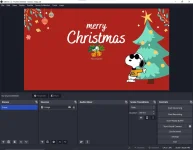
Open OBS. Then add Source at gamitin ang napiling Background Picture
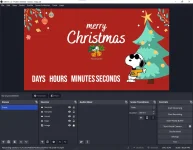
Pagkatapos mailagay ang Background Picture ganto magiging itsura niyan.
Pagkatapos add source then select Text(GDI+)
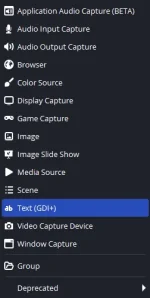
Then type Days, Hours, Minutes, Second isa isa at pumili ng gustong font at size ng text na tingin niyo ay babagay.
Pagnatapos na kayo ganto magiging itsura niyan.
After niyan punta naman tayo sa Snaz Open niyo snaz tapos lagay niyo sa date 25/12/2024 (Which in my case Christmass since Christmass Countdown ang akin)
para maging allign siya sa text na Days Hours Minutes Seconds edit niyo lang yung output text box lat lagyan niyo ng spaces tulad ng nasa screenshot.
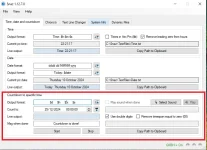
Pagtapos niyo jan Click niyo yung Start sa baba para mag start na siya mag countdown.
Once na start niyo na balik kayo kay OBS then add new source>>Text(GDI+). Then check niyo yung Read from File at i locate niyo yung text ng countdown which is sa
C:\Snaz\TextFiles the click niyo yung Countdown.txt
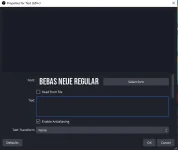
Then after nun adjust niyo na lang kung ano sa tngin niyo maganda akin ganto itsura
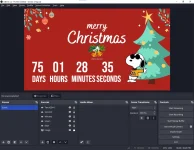
Pwede niyo din lagyan ng background music play niyo lang via VLC or kahit directa sa youtube
Sorry kung medyo magulo paliwanag bukod sa inaantok na ako di rin ako magaling pagdating sa scripts sa tutorials kaya pag pasensiyahan niyo na

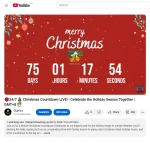
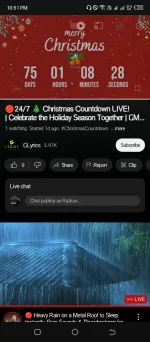
Eto yung aking final Product na Live na sa YT pa remove na lang admins kung bawal
You do not have permission to view the full content of this post. Log in or register now.