👨‍🏫 Tutorial Compress Video × Termux

Status
Not open for further replies.

MAZ3

Elite
The best way to compress video using Termux via a special script. Note that this method is much better than any existing application or website because it maintains the quality of the video and compresses it greatly.

Put the video path and video name

You do not have permission to view the full content of this post. Log in or register now.

Adjust the Constant Rate Factor (CRF) method with the following command:
You do not have permission to view the full content of this post. Log in or register now.
 
cd /Path video && ffmpeg -i VideoName.mp4 -vcodec libx264 -crf 28 output.mp4

Lods ano po papalitan jan?

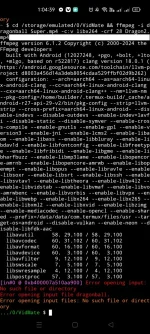
Boss pa help po dto stuck up ako sa cd /storage/emulated/0/VidMate && ffmpeg -i dragonball Super.mp4 -vcodec libx264 -crf 28 dragonball Super.mp4
baka mali po ako ano po gawin ko

Screenshot_2024-10-20-01-04-40-17_84d3000e3f4017145260f7618db1d683.webp
 
Ulok give permission
termux-setup-storage

dapat tama yung path kung saan nakalagay yung video. Tapos sa video name lagay mo yung name ng vid at sa output naman dapat di same sa video name.

cd /storage/emulated/0/VidMate video && ffmpeg -i dragonballSuper.mp4 -vcodec libx264 -crf 28 output.mp4
 
Ulok give permission
termux-setup-storage

dapat tama yung path kung saan nakalagay yung video. Tapos sa video name lagay mo yung name ng vid at sa output naman dapat di same sa video name.

cd /storage/emulated/0/VidMate video && ffmpeg -i dragonballSuper.mp4 -vcodec libx264 -crf 28 output.mp4
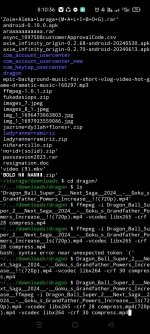
Screenshot_2024-10-20-08-10-36-67_84d3000e3f4017145260f7618db1d683.webp

Yan po idol pa proceed na san ako sa input to output wley parin baka kulang command ko eh
 
Ulok simplehan mo muna yung name ng video na edit mo lods like dragon.mp4 sa input sa output naman pwedi na output.mp4 or any dapat wala space.

yung may kulay lods need mo palitan

cd /storage/emulated/0/VidMate video && ffmpeg -i dragonballSuper.mp4 -vcodec libx264 -crf 28 output.mp4

double check yung path kung saan nakalagay yung video
 
Ulok simplehan mo muna yung name ng video na edit mo lods like dragon.mp4 sa input sa output naman pwedi na output.mp4 or any dapat wala space.

yung may kulay lods need mo palitan

cd /storage/emulated/0/VidMate video && ffmpeg -i dragonballSuper.mp4 -vcodec libx264 -crf 28 output.mp4

double check yung path kung saan nakalagay yung video
Sge po try ko ulit lods thank u

Ulok simplehan mo muna yung name ng video na edit mo lods like dragon.mp4 sa input sa output naman pwedi na output.mp4 or any dapat wala space.

yung may kulay lods need mo palitan

cd /storage/emulated/0/VidMate video && ffmpeg -i dragonballSuper.mp4 -vcodec libx264 -crf 28 output.mp4

double check yung path kung saan nakalagay yung video
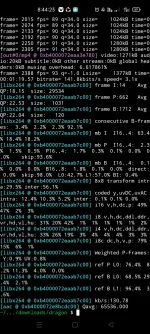
Lods napagana kona dito naba mag tatapos?
Screenshot_2024-10-20-08-44-23-44_84d3000e3f4017145260f7618db1d683.webp


Legit lods thank u ng marami
 
Status
Not open for further replies.

About this Thread

  • 17
    Replies
  • 3K
    Views
  • 14
    Participants
Last reply from:
polkulotz

Trending Topics

Online now

Members online
970
Guests online
1,378
Total visitors
2,348

Forum statistics

Threads
2,272,326
Posts
28,942,038
Members
1,237,141
Latest member
Yuri1221212
Back
Top