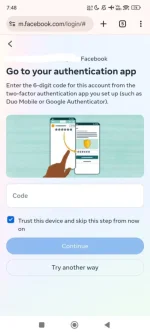
Hello! I'm sorry to hear about the trouble you're experiencing with your Facebook account's 2FA. It seems like you've already tried to recover your account by submitting your ID and following the steps provided by Facebook via email, but you're still unable to access your account due to the authentication process.
Here are some steps you can take to try and resolve this issue:
1. Contact Facebook Support: If you're still unable to access your account after following the recovery steps provided by Facebook, you can try reaching out to Facebook's support team directly. You can usually find contact options on their help pages or support center.
2. Try Different Devices/Browsers: Sometimes, issues with authentication can be browser or device-specific. Try accessing your account recovery process on a different device or using a different web browser to see if that makes a difference.
3. Clear Browser Cache and Cookies: Clearing your browser's cache and cookies can sometimes resolve authentication issues. This will help ensure that you're not encountering any cached data that might be causing the problem.
4. Use a Different Network: If possible, try accessing the account recovery process from a different network (e.g., using mobile data instead of Wi-Fi or vice versa). Sometimes network-related issues can interfere with the authentication process.
5. Check for Updates: Make sure that your browser, operating system, and any relevant applications are up to date. Outdated software can sometimes cause compatibility issues with authentication processes.
If none of these steps work, it's important to continue trying to reach out to Facebook's support for further assistance. They should be able to provide more specific guidance based on your account and the issues you're facing. Good luck, and I hope you're able to regain access to your account soon!
 PH
PH