 PH
PHUnlimited ESIM Creator
Made by JemPH
Feature:
Unlimited Order
Free Unlimited Data
Supported Multiple Countries
1 Day use each profile
PC Preview:
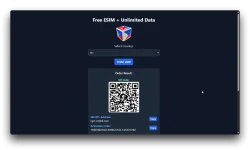
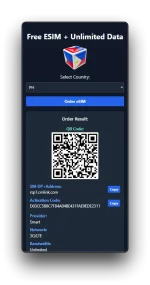
Mobile Preview:
What is eSIM?
eSIM, short for embedded SIM, is a small chip built directly into your device, eliminating the need for a physical SIM card. This groundbreaking technology enables you to activate mobile plans without the hassle of swapping SIM cards.
How Does eSIM Work?
With eSIM, activating a mobile plan is as simple as scanning a QR code or entering an activation code. Once activated, your device securely stores multiple mobile plans, allowing you to switch between them effortlessly.
What are the benefits of eSIM?
1. Convenience
Say goodbye to fumbling with SIM cards. With eSIM, activating a new plan is quick and easy, whether you're traveling abroad or switching carriers.
2. Flexibility
eSIM gives you the freedom to choose the mobile plan that best fits your needs. Easily switch between plans without the need for a physical SIM card.
3. Space-saving
By eliminating the need for a physical SIM card slot, eSIM technology allows for sleeker device designs and more internal space for other components.
4. Global Connectivity
Traveling internationally? eSIM makes it simple to stay connected wherever you go. Activate local plans on the fly without the hassle of purchasing and installing physical SIM cards.
5. Security
eSIM offers enhanced security features, protecting your mobile identity and reducing the risk of SIM card fraud.
How to Get Started with eSIM
1. Check Compatibility
Ensure your device supports eSIM technology. Most newer smartphones and tablets are eSIM-enabled.
2. Activate eSIM
Once you've received your activation QR code or activation code, follow the simple on-screen instructions to activate your eSIM.
3. Enjoy Seamless Connectivity
Experience the convenience and flexibility of eSIM as you stay connected wherever life takes you.
SETUP FOR ANDROID
1. Go to Settings > Connections
2. Tap on 'SIM Manager', then tap on 'Add eSIM'
3. Tap 'Scan QR code from service provider'
4. Scan the QR code provided
5. When prompted, tap 'Add'
6. Allow up to 10 minutes for the eSIM to activate >Tap 'Done'
7. Tap 'Mobile Data' > Select the eSIM > Tap 'Change'
8. Go to 'Settings' > Connections > Mobile Networks > Ensure 'Data Roaming' is turned on
SETUP FOR IOS
1. Navigate to the Settings menu on your iPhone.
2. Select the 'Cellular' option.
3. Choose 'Add eSIM' from the menu. *
4. Choose the 'Use QR Code' option and use your camera to scan the QR code.
5. Alternatively, click 'Enter Details Manually' to input the activation code and SM-DP+ address manually.
6. Follow the on-screen prompts to confirm activation. This may involve verifying your identity and agreeing to the terms and conditions.
7. Depending on your preferences, you may need to designate the eSIM as your primary line for data. You can do this in the Cellular settings.
8. After completing the activation process, restart your iPhone to finalize the eSIM setup.
Main URL: You do not have permission to view the full content of this post. Log in or register now.
Update: Naubusan ng voucher, pinalitan nila date expiration ng voucher. No longer working.
Update 2: Voucher expiration date is back 11.11 free of purchase can no longer be used for 1 Day Data Plans. It is now applied as a discount voucher working only for higher than 3 days and up data plans.
Previous post here from bulk ordered ESIMs recently available:
https://phcorner.org/threads/x170-a...id-for-1-day-only-sept-30-oct-1-2024.2102704/
