 PH
PHCannot visit ISP blocked sites? Heres a guide how to access blocked sites 

There are 2 method on accessing ISP blocked sites.
2: Click the 3-dot menu in the top-right corner, then go to Settings > Privacy and security > Security.
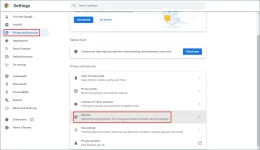
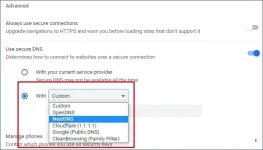
Step 3: Scroll down to the Advanced section on the next page. Under Use secure DNS, select With.
Step 4: Expand the options next to With, then select DNS you want to use. You can also select Custom and enter the DNS URL you want to use.
2: Tap the 3-dot menu in the top-right corner. Then go to Settings > Privacy and security.
3: Scroll down to find Use Secure DNS. Then, tap it to access it.
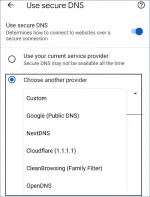
4: Use your current service provider is selected by default. You need to select Choose another provider.
5: Select a provider from the drop-down list under Choose another provider. You can also select Custom and then enter a DNS URL as per your need. This is used to customize DNS server in Google Chrome.
Note: This is the same for all browsers but it may different on how to configure it. And this only affect on your browser on method 1. You can choose anywhere but best option are Cloudflare or Google Public DNS.
You do not have permission to view the full content of this post. Log in or register now.
2: Install Warp
3: Connect to Warp
4: Done
Free Warp+ keys can change your ip address (optional)
https://phcorner.org/threads/25x-warp-24petabyte-keys.1968125/
Note: Using Warp+ can cause slow internet speeds just turn it off when playing games.
2: Install and Connect. (preferably asia servers)
3: Enjoy.
There are 2 method on accessing ISP blocked sites.
Method 1 (changing your default dns) (best method)
For Chrome (PC) :
1: Open Google Chrome on your device.2: Click the 3-dot menu in the top-right corner, then go to Settings > Privacy and security > Security.
Step 3: Scroll down to the Advanced section on the next page. Under Use secure DNS, select With.
Step 4: Expand the options next to With, then select DNS you want to use. You can also select Custom and enter the DNS URL you want to use.
For Mobile Chrome :
1: Open Chrome on your mobile device.2: Tap the 3-dot menu in the top-right corner. Then go to Settings > Privacy and security.
3: Scroll down to find Use Secure DNS. Then, tap it to access it.
4: Use your current service provider is selected by default. You need to select Choose another provider.
5: Select a provider from the drop-down list under Choose another provider. You can also select Custom and then enter a DNS URL as per your need. This is used to customize DNS server in Google Chrome.
Note: This is the same for all browsers but it may different on how to configure it. And this only affect on your browser on method 1. You can choose anywhere but best option are Cloudflare or Google Public DNS.
Method 2 (using Warp) (alternative method)
1: Download WarpYou do not have permission to view the full content of this post. Log in or register now.
2: Install Warp
3: Connect to Warp
4: Done
Free Warp+ keys can change your ip address (optional)
https://phcorner.org/threads/25x-warp-24petabyte-keys.1968125/
Note: Using Warp+ can cause slow internet speeds just turn it off when playing games.
Method 3 (using VPN)
1: Download any VPN.2: Install and Connect. (preferably asia servers)
3: Enjoy.