 PH
PHUpscaling in the AI World: A Comprehensive Guide
(
Upscaling, also known as super-resolution, is a technique used in artificial intelligence (AI) to enhance the resolution of low-quality images or videos. This process involves using machine learning algorithms to analyze the input image or video and generate a higher-resolution output that retains the original details and clarity. Here's a detailed overview of upscaling in the AI world:
What is Upscaling?
Upscaling is a form of image or video processing that involves increasing the resolution of a low-quality image or video while maintaining its original details. This technique is particularly useful when working with outdated or compressed media, such as old photographs or low-resolution videos.
Types of Upscaling Techniques:
Advanced Techniques:
(Tinigil ko na, at baka mahilo kayo sa kababasa he he. Madaldal kasi!)
=================================================
Ang tanong: paano natin magagawa iyan? Maraming paraan sa sangay ng mga "applications" na ating pwedeng gamitin. Pero ang aking tatalakayin ay yung aking piling ginagamit sa ngayon na pwedeng gamitin ng libre sa ating desktop, PC, atbp. Yung mga open-source applications sa You do not have permission to view the full content of this post. Log in or register now.. Ang mga halimbawa ay tinalakay rin dito sa forum:
lossless-scaling-v2-5-0-x-aid-increase-game-fps-improve-performance-amd-fsr-ls1
how-to-increase-anime-2d-resolution-up-to-4k-while-playing-in-mpv-player
Pero ito yung maaari ninyong gamitin provided pasok yung hardware requirements/software na gamit ninyo.

 Features:
Quality Scaler is developed entirely in Python.
 Features:
The project uses Shell (58.4%), PowerShell (24.6%), and Batchfile (17.0%).
For images only, try this: You do not have permission to view the full content of this post. Log in or register now. or You do not have permission to view the full content of this post. Log in or register now.
 Features:
The core of Waifu2x-GUI is developed using TypeScript (82.2%), with other components in Less, JavaScript, and HTML.
(Note: An alternative is You do not have permission to view the full content of this post. Log in or register now.. See comparison below:
 Features:
The application is primarily developed in Python (57.1%), with components in Vue (24.8%), JavaScript (12.9%), Shell (4.4%), and HTML (0.8%).
 Features:
Video2X is predominantly developed in Python, accounting for 94.4% of the codebase, with other components in Dockerfile and Shell.
 Features:
RealScaler is entirely developed in Python, encompassing both the backend and frontend functionalities.
===========================================
In addition, I may also add You do not have permission to view the full content of this post. Log in or register now. for High-Quality Real Time Upscaling for Anime Videos (provided your hardware can use it with high fps) . Maraming clones/derivatives yan sa github if you are interested, for the same purpose.
Since C++ applications perform a lot better than Python, I use You do not have permission to view the full content of this post. Log in or register now. to upscale anime videos on my potato pc using GT 740m (cuda-enabled) with decent waiting period. Pwede rin siyang gamitin using CPU mode. Matagal lang mag-process. Ang difference niya sa Anime4K, hindi siya for real time streaming.
Siyempre, lahat naman yan pwede ninyong gamitin sa mga AIO AI generators like You do not have permission to view the full content of this post. Log in or register now. (A1111, ComfyUI, Invoke AI, atbp.). Yung clarity naman depende sa best models na gamit at settings to enhance different types of graphic formats.
Ex. Sa Stable Diffusion A1111, use these parameters to enhance your images:
Pag-aralan ninyo na ring enabled yung You do not have permission to view the full content of this post. Log in or register now. (pamalit sa You do not have permission to view the full content of this post. Log in or register now.) ng mga latest browsers to test the new advantages of using it. Check nyo sa wikipedia at sa inyong browser sites in order to enable try its features. For chrome users, check link below:
You do not have permission to view the full content of this post. Log in or register now.
Pag enabled nyo na, test ninyo kung gumana using the You do not have permission to view the full content of this post. Log in or register now.
Kung meron kayong malakas na gpu, subukan ninyong gamitin yung mga project samples using Anime4k with WebGPU. Type nyo sa goole ito: anime4k with webgpu
Dapat alam natin yan at may kasunod na You do not have permission to view the full content of this post. Log in or register now. pa he he dahil nakakalito na itong mga apps ngayon. May for cpu, gpu, npu (neural network processing unit), tpu na.
SA pahuli, bisitahin ninyo itong mga links sa baba para updated kayo mundo ng "upscaling", from the old and latest models and other information linked from the sites:
Eka nga ni pareng "AE" , You do not have permission to view the full content of this post. Log in or register now.
(
Based on my custom desktop AI)Upscaling, also known as super-resolution, is a technique used in artificial intelligence (AI) to enhance the resolution of low-quality images or videos. This process involves using machine learning algorithms to analyze the input image or video and generate a higher-resolution output that retains the original details and clarity. Here's a detailed overview of upscaling in the AI world:
What is Upscaling?
Upscaling is a form of image or video processing that involves increasing the resolution of a low-quality image or video while maintaining its original details. This technique is particularly useful when working with outdated or compressed media, such as old photographs or low-resolution videos.
Types of Upscaling Techniques:
- Pixel Art-Based Methods: These methods involve analyzing individual pixels and rebuilding the image based on patterns and colors found in similar pixels from the same region.
- Deep Learning-Based Methods: These methods use convolutional neural networks (CNNs) to learn the patterns and relationships between pixels, allowing for more accurate and detailed upscaling.
- Optical Flow-Based Methods: These methods use optical flow estimation to predict the motion of pixels between frames, enabling better handling of moving objects and reducing artifacts.
- DeepFake: A popular open-source framework for AI-powered upscaling and face swapping.
- SRMD: A high-performance model for single-image super-resolution developed by NVIDIA.
- ESRGAN: An enhanced version of the popular GAN-based super-resolution model, ESRGAN.
- Real-ESRGAN: A real-world implementation of ESRGAN, optimized for faster performance and better quality.
- Image Restoration: Enhancing the quality of damaged or low-quality images.
- Video Enhancement: Improving the resolution and clarity of old videos for archival or entertainment purposes.
- Art Creation: Generating high-resolution artwork from lower-resolution references.
- Virtual Reality: Upscaling 2D content for use in VR environments.
- Artifacts and Blurriness: AI upscaling can introduce artifacts, such as halos or blurriness, especially in complex scenes.
- Lack of Training Data: The quality of upscaling depends heavily on the availability and diversity of training data.
- Computational Resources: High-resolution upscaling requires significant computational power and memory.
- Multi-Task Learning: Integrating upscaling with other tasks, such as denoising or deblocking, to create more robust models.
- Self-Supervised Learning: Leveraging unlabeled data to improve model performance and reduce reliance on large datasets.
- GPU-Accelerated Computing: Optimizing upscaling algorithms for parallel processing on modern GPUs to improve efficiency.
- PyTorch: A widely-used deep learning framework for developing and training upscaling models.
- TensorFlow: Another popular framework for building and deploying upscaling AI models.
- Keras: A high-level neural networks API, built on top of TensorFlow, for easy model creation.
- OpenCV: A computer vision library providing pre-built functions for image and video processing, including upscaling.
- Netflix: Using AI upscaling to enhance the quality of older content for streaming.
- Disney+: Applying upscaling techniques to restore classic movies and TV shows.
- Game Console Manufacturers: Enhancing retro games for modern hardware using upscaling algorithms.
- Photography: Artists using AI upscaling to create high-resolution prints from vintage photographs.
- Increased Adoption: AI upscaling will become increasingly common in various industries, from entertainment to photography.
- Improved Quality: Advancements in deep learning and GPU technology will lead to higher-quality upscaling results.
- Automated Workflows: Integration of upscaling into automated content pipelines will streamline the process.
- Customization: Users will be able to fine-tune upscaling models for specific applications and preferences.
- Choose the Right Model: Select a model suitable for your specific upscaling needs, considering factors like quality, speed, and complexity.
- Preprocess Input Data: Apply filters or adjustments to the input image or video to improve upscaling results.
- Post-processing: Apply additional enhancements, such as noise reduction or color correction, after upscaling.
- Monitor Progress: Regularly evaluate upscaling results to adjust parameters and improve outcomes.
Advanced Techniques:
- Multiscale Deep Learning: Combining multiple scales within a single network to achieve better results.
- Attention Mechanisms: Focusing the model's attention on specific regions or features during upscaling.
- Generative Adversarial Networks (GANs): Pitting a generator against a discriminator to create more realistic outputs.
- Cycle Consistency Loss: Ensuring that upscaled images can be downscaled back to their original resolution without significant loss.
- NASA's Vintage Space Images: Using AI upscaling to restore historic space photos for public release.
- The British Museum's Art Collection: Applying upscaling to enhance and preserve ancient artworks for digital exhibitions.
- The Getty Museum's Photographic Archive: Restoring and upscaling rare historical photographs for research and display.
- Retro Game Consoles: Enhancing classic games for modern displays and hardware using AI upscaling.
- Preservation vs. Manipulation: Balancing the need to preserve original content with the temptation to manipulate it for aesthetic gain.
- Ownership and Copyright: Ensuring proper clearance and attribution when upscaling copyrighted materials.
- Bias and Fairness: Monitoring upscaling algorithms for potential bias and ensuring equitable outcomes.
- Transparency and Accountability: Providing clear information about the upscaling process and its limitations to users.
- Document the Process: Maintain records of inputs, parameters, and results to ensure transparency.
- Set Clear Goals: Define the desired outcome and limitations of the upscaling project.
- Consult Experts: Involve historians, curators, and artists in the upscaling process to ensure authenticity and relevance.
- Provide Context: Offer viewers information about the original material and the upscaling process to promote understanding.
(Tinigil ko na, at baka mahilo kayo sa kababasa he he. Madaldal kasi!)
=================================================
Ang tanong: paano natin magagawa iyan? Maraming paraan sa sangay ng mga "applications" na ating pwedeng gamitin. Pero ang aking tatalakayin ay yung aking piling ginagamit sa ngayon na pwedeng gamitin ng libre sa ating desktop, PC, atbp. Yung mga open-source applications sa You do not have permission to view the full content of this post. Log in or register now.. Ang mga halimbawa ay tinalakay rin dito sa forum:
lossless-scaling-v2-5-0-x-aid-increase-game-fps-improve-performance-amd-fsr-ls1
how-to-increase-anime-2d-resolution-up-to-4k-while-playing-in-mpv-player
Pero ito yung maaari ninyong gamitin provided pasok yung hardware requirements/software na gamit ninyo.
Image and Video Upscaling AI on GitHub
1. You do not have permission to view the full content of this post. Log in or register now.
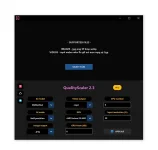
Quality Scaler is a cutting-edge video upscaler on GitHub designed to upscale images and videos using the power of BSRGAN Artificial Intelligence. This tool not only enhances visuals but also reduces noise, ensuring users get the best quality possible.Features:- User-friendly GUI.
- Upscales both images and videos.
- Overcomes GPU VRAM limitations with automatic image tiling and merging.
- Option to resize before upscaling.
- Multi-GPU support.
- Supports a wide range of image and video formats.
- Operating System: Windows 11 or Windows 10.
- RAM: 8GB or more.
- GPU: DirectX12 compatible with 4GB VRAM or more.
Quality Scaler is developed entirely in Python.
2. You do not have permission to view the full content of this post. Log in or register now.
Upscaler is a project that consolidates various open-source AI tools for upscaling images and videos. Designed to be CLI-friendly, it offers a solution for those seeking a low-cost, local AI upscaling tool without the constraints of a GUI.Features:- Consolidation of multiple AI upscaling tools.
- CLI-friendly interface.
- Suitable for large video files with a streaming algorithm approach.
- Designed for both image and video upscaling without GUI overheads.
- Hardware: Compatible GPU recommended for faster upscaling.
- OS: Tested on debian-amd64 (linux) and windows-amd64 (windows).
- Dependencies: ffmpeg and ffprobe for video processing.
The project uses Shell (58.4%), PowerShell (24.6%), and Batchfile (17.0%).
For images only, try this: You do not have permission to view the full content of this post. Log in or register now. or You do not have permission to view the full content of this post. Log in or register now.
3. You do not have permission to view the full content of this post. Log in or register now.
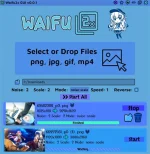
Waifu2x-GUI is a dedicated application tailored for upscaling anime-styled images, gifs, and videos. It leverages the power of waifu2x and Real-ESRGAN Anime to deliver enhanced visuals. The application is designed for simplicity, but advanced settings are accessible for those who need them.Features:- Upscale and denoise images (png, jpg, webp, etc.).
- Enhance animated images (gif, animated webp).
- Improve video quality (mp4, webm, ogv, etc.).
- Apply effects like speed or reverse.
- Customize settings: noise, scale, mode, framerate, etc.
- Concurrent upscaling for multiple images or frames.
- Switch between waifu2x and Real-ESRGAN Anime upscalers.
- Installation: Download the installer from the releases tab.
- Note: Installation under C:/Program Files may require administrative rights.
- MacOS: users need to compile waifu2x-converter-cpp from source.
The core of Waifu2x-GUI is developed using TypeScript (82.2%), with other components in Less, JavaScript, and HTML.
(Note: An alternative is You do not have permission to view the full content of this post. Log in or register now.. See comparison below:
Spoiler contents are visible only to Established Members.
4. You do not have permission to view the full content of this post. Log in or register now.
SimpleMediaUpscalerLite, abbreviated as smuL, is an Electron App combined with a Python CLI designed to upscale images and videos. It harnesses the capabilities of multiple upscaling engines, offering users a versatile tool for enhancing their media.Features:- Upscale individual files or entire folders using various engines.
- GUI file manager for input & output file selection.
- Set custom scaling multipliers.
- Supports images (.png, .jpg, .jpeg) and videos (.mp4, .mkv).
- Multiple upscaling algorithms to choose from.
- Plugin support to expand upscaling engine options.
- Officially supported on Windows 10, 11.
- Unofficial support for Windows XP, Vista, 7, 8 via Python.
- Linux distros with wine installed.
The application is primarily developed in Python (57.1%), with components in Vue (24.8%), JavaScript (12.9%), Shell (4.4%), and HTML (0.8%).
5. You do not have permission to view the full content of this post. Log in or register now.
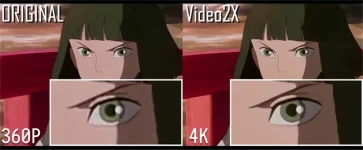
Video2X is an advanced software designed for upscaling videos, GIFs, and images without compromising on quality. It integrates state-of-the-art algorithms, including waifu2x, Anime4K, SRMD, and RealSR, to provide users with superior upscaling results.Features:- Upscales video/GIF/image with lossless quality.
- Supports multiple renowned upscaling algorithms.
- Offers both GUI and CLI interfaces for user convenience.
- Capable of upscaling demos like Spirited Away's movie trailer and various GIFs.
- Provides a standard test clip for performance benchmarks.
- While specific system requirements aren't explicitly mentioned, it's implied that a compatible GPU and necessary dependencies like FFmpeg are required for optimal performance.
Video2X is predominantly developed in Python, accounting for 94.4% of the codebase, with other components in Dockerfile and Shell.
6. You do not have permission to view the full content of this post. Log in or register now.
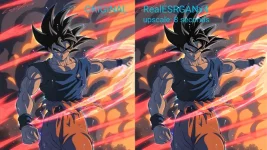
RealScaler is a Windows-based application that leverages the capabilities of Real-ESRGAN artificial intelligence to enhance, enlarge, and reduce noise in photographs and videos. It's a powerful tool that brings out the best in your media, ensuring clarity and detail.Features:- User-friendly GUI for easy operation.
- Capable of upscaling both images and videos.v
- Features automatic image tiling and merging to bypass GPU VRAM limitations.
- Provides an option to resize media before upscaling.
- Multi-GPU support for enhanced performance.Multi-GPU support for enhanced performance.
- Supports a variety of image formats (png, jpeg, bmp, webp, tif) and video formats (mp4, wemb, gif, mkv, flv, avi, mov, qt).
- Operating Systems: Windows 11 or Windows 10.
- Minimum RAM: 8GB.
- GPU: DirectX12 compatible with at least 4GB VRAM.
RealScaler is entirely developed in Python, encompassing both the backend and frontend functionalities.
===========================================
In addition, I may also add You do not have permission to view the full content of this post. Log in or register now. for High-Quality Real Time Upscaling for Anime Videos (provided your hardware can use it with high fps) . Maraming clones/derivatives yan sa github if you are interested, for the same purpose.
Since C++ applications perform a lot better than Python, I use You do not have permission to view the full content of this post. Log in or register now. to upscale anime videos on my potato pc using GT 740m (cuda-enabled) with decent waiting period. Pwede rin siyang gamitin using CPU mode. Matagal lang mag-process. Ang difference niya sa Anime4K, hindi siya for real time streaming.
Siyempre, lahat naman yan pwede ninyong gamitin sa mga AIO AI generators like You do not have permission to view the full content of this post. Log in or register now. (A1111, ComfyUI, Invoke AI, atbp.). Yung clarity naman depende sa best models na gamit at settings to enhance different types of graphic formats.
Ex. Sa Stable Diffusion A1111, use these parameters to enhance your images:
Spoiler contents are visible only to Established Members.
Pag-aralan ninyo na ring enabled yung You do not have permission to view the full content of this post. Log in or register now. (pamalit sa You do not have permission to view the full content of this post. Log in or register now.) ng mga latest browsers to test the new advantages of using it. Check nyo sa wikipedia at sa inyong browser sites in order to enable try its features. For chrome users, check link below:
You do not have permission to view the full content of this post. Log in or register now.
Pag enabled nyo na, test ninyo kung gumana using the You do not have permission to view the full content of this post. Log in or register now.
Kung meron kayong malakas na gpu, subukan ninyong gamitin yung mga project samples using Anime4k with WebGPU. Type nyo sa goole ito: anime4k with webgpu
Dapat alam natin yan at may kasunod na You do not have permission to view the full content of this post. Log in or register now. pa he he dahil nakakalito na itong mga apps ngayon. May for cpu, gpu, npu (neural network processing unit), tpu na.
SA pahuli, bisitahin ninyo itong mga links sa baba para updated kayo mundo ng "upscaling", from the old and latest models and other information linked from the sites:
Spoiler contents are visible only to Established Members.
Eka nga ni pareng "AE" , You do not have permission to view the full content of this post. Log in or register now.