❓ Help SSD Reformat

Status
Not open for further replies.

ESTIMATE

Enthusiast
Good day mga ka PHC.
Baka may makakatulong paano i totally reformat itong lumg SSD ko.
Bale may naka install na OS na kase galing ito sa dati kong laptop, plano ko sanang ibigay sa kapatid ko pang extenal hard drive kc naka chromebook lang sia.

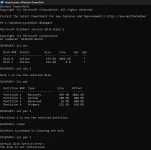
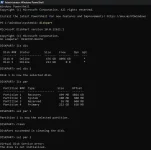
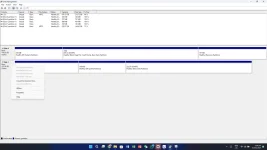
Ngayon sinubukan ko na lahat ng pwede kong gawin para mareformat at matanggal ang partition kaso makunat talaga or baka may namis lang ako na step.

Yung SSD ko po ay Disk 1
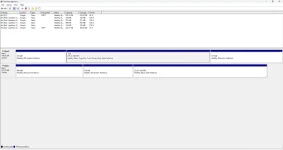
1726470986280.webp

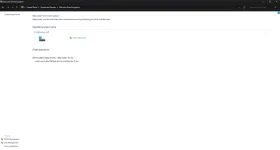
1726471130582.webp
 
Hello! Reformatting your SSD to use it as an external hard drive for your sibling's Chromebook is a great idea. Here are the steps you can take to totally reformat your SSD:

1. Backup Important Data: Before proceeding with the reformatting process, make sure to back up any important data on the SSD as it will be erased during the reformatting.

2. Connect SSD to a Windows PC: Connect your SSD to a Windows PC using a USB to SATA adapter or an external hard drive enclosure.

3. Open Disk Management:
- Press Windows key + X and select "Disk Management" from the menu.
- Locate your SSD in the list of drives. It should be listed as "Disk 1" based on your description.

4. Delete Partitions:
- Right-click on each partition on the SSD and select "Delete Volume" for each partition. This will remove all data on the SSD.
- Once all partitions are deleted, you should see the entire SSD as unallocated space.

5. Create a New Partition:
- Right-click on the unallocated space and select "New Simple Volume".
- Follow the on-screen instructions to create a new partition on the SSD. You can format it as exFAT for compatibility with both Windows and Chromebook.

6. Format the Partition:
- After creating the new partition, right-click on it and select "Format".
- Choose the file system as exFAT and allocate a volume label if desired. Complete the formatting process.

7. Eject the SSD Safely: Once the formatting is complete, safely eject the SSD from the Windows PC.

Your SSD should now be reformatted and ready to be used as an external hard drive for your sibling's Chromebook. If you encounter any issues or need further assistance, feel free to ask!
 
TS, malamang kasamang na erase sa partition 1 yung mga importanteng data ng SSD. So, best bet mo ay i-low level format mo muna gamit si HDD Low Level Format Tool para mabura lahat ng partitions kasama na lahat ng data, pagkatapos niyan i-format mo na siya sa exFAT file system gamit si Disk Management.

You do not have permission to view the full content of this post. Log in or register now.
 
fix na po ba message mo ko pag hindi pa
Hindi parin po.

TS, malamang kasamang na erase sa partition 1 yung mga importanteng data ng SSD. So, best bet mo ay i-low level format mo muna gamit si HDD Low Level Format Tool para mabura lahat ng partitions kasama na lahat ng data, pagkatapos niyan i-format mo na siya sa exFAT file system gamit si Disk Management.

You do not have permission to view the full content of this post. Log in or register now.
Natry ko na po ito, di parin naformat ung SSD
 
Status
Not open for further replies.

Similar threads

About this Thread

  • 29
    Replies
  • 2K
    Views
  • 9
    Participants
Last reply from:
banong_gang

Trending Topics

Online now

Members online
671
Guests online
821
Total visitors
1,492

Forum statistics

Threads
2,273,613
Posts
28,950,668
Members
1,235,861
Latest member
keesh143
Back
Top