PH
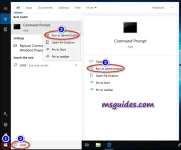
PHStep 1: Open Command Prompt as administrator.
Click on the start button, search for “cmd” then Run as administrator
Step 2: Install KMS client key.
Use the command “slmgr /ipk yourlicensekey” to install a license key (yourlicensekey is the activation key that corresponds to your Windows edition). The following is the list of Windows 10 Volume license keys.
Home: TX9XD-98N7V-6WMQ6-BX7FG-H8Q99
Home N: 3KHY7-WNT83-DGQKR-F7HPR-844BM
Home Single Language: 7HNRX-D7KGG-3K4RQ-4WPJ4-YTDFH
Home Country Specific: PVMJN-6DFY6-9CCP6-7BKTT-D3WVR
Professional: W269N-WFGWX-YVC9B-4J6C9-T83GX
Professional N: MH37W-N47XK-V7XM9-C7227-GCQG9
Education: NW6C2-QMPVW-D7KKK-3GKT6-VCFB2
Education N: 2WH4N-8QGBV-H22JP-CT43Q-MDWWJ
Enterprise: NPPR9-FWDCX-D2C8J-H872K-2YT43
Enterprise N: DPH2V-TTNVB-4X9Q3-TJR4H-KHJW4
Note: You need to hit [Enter] key to execute commands.
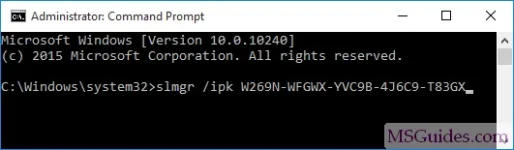
Install Windows license key
Step 3: Set KMS machine address.
Use the command “slmgr /skms kms8.msguides.com” to connect to my KMS server.

Set KMS server
Step 4: Activate your Windows.
The last step is to activate your Windows using the command “slmgr /ato”.

Run command slmgr ato
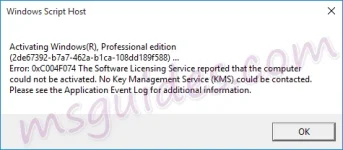
0xC004F074 error code
If you see the error 0xC004F074, it means that your internet connection is unstable or the server is busy. Please make sure your device is online and try the command “ato” again until you succeed.
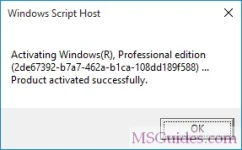
Windows activated successfully
Now check the activation status again.
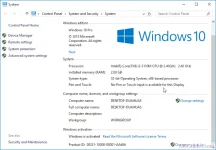
Windows 10 is activated successfully
credits to : msguides.com
Click on the start button, search for “cmd” then Run as administrator
Step 2: Install KMS client key.
Use the command “slmgr /ipk yourlicensekey” to install a license key (yourlicensekey is the activation key that corresponds to your Windows edition). The following is the list of Windows 10 Volume license keys.
Home: TX9XD-98N7V-6WMQ6-BX7FG-H8Q99
Home N: 3KHY7-WNT83-DGQKR-F7HPR-844BM
Home Single Language: 7HNRX-D7KGG-3K4RQ-4WPJ4-YTDFH
Home Country Specific: PVMJN-6DFY6-9CCP6-7BKTT-D3WVR
Professional: W269N-WFGWX-YVC9B-4J6C9-T83GX
Professional N: MH37W-N47XK-V7XM9-C7227-GCQG9
Education: NW6C2-QMPVW-D7KKK-3GKT6-VCFB2
Education N: 2WH4N-8QGBV-H22JP-CT43Q-MDWWJ
Enterprise: NPPR9-FWDCX-D2C8J-H872K-2YT43
Enterprise N: DPH2V-TTNVB-4X9Q3-TJR4H-KHJW4
Note: You need to hit [Enter] key to execute commands.
Install Windows license key
Step 3: Set KMS machine address.
Use the command “slmgr /skms kms8.msguides.com” to connect to my KMS server.
Set KMS server
Step 4: Activate your Windows.
The last step is to activate your Windows using the command “slmgr /ato”.
Run command slmgr ato
0xC004F074 error code
If you see the error 0xC004F074, it means that your internet connection is unstable or the server is busy. Please make sure your device is online and try the command “ato” again until you succeed.
Windows activated successfully
Now check the activation status again.
Windows 10 is activated successfully
credits to : msguides.com