🔒 Closed How to activate all processor cores

Status
Not open for further replies.

13kev

Established
Hello, Turo ko lang paano iActivate lahat ng cores ng processsor ng PC or Laptop mo,

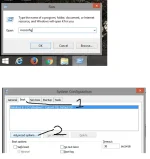
1. Press "windows key" + "R" then type "msconfig" .
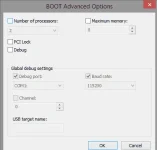
2. Select "boot" then click "advance options".
3. Check the box in "Number of processors"
( Pili ka kung anong pinakamataas na number pra magamit lahat).
 

Attachments

  • 1.webp
    1.webp
    32.1 KB · Views: 70
  • 3.webp
    3.webp
    8.7 KB · Views: 69
Maintqnance lng kulang nyan hehe, clean cache/registry , dpende lng dn s unit mo,


Di naman hehe tagal ko ng gamit yan, kahot 2 cores lng akin haha
hehe core i5 po at marunong naman po ako mag maintenance sakanya . using cmd po yong mga junk files
 
Normally, naka-set na sa bios kung ano talaga ang no. of processors na gagamitin ng system ninyo - by default. MSconfig setting is for the boot process and the setting there is unchecked (unticked) so that we let Windows handle it all. Not all softwares use multi-cores, depende sa paggawa ng author/s. Windows will tell your processor when to use your available cores (true and virtual).
Sa pagkakalam ko, ginagamit ang msconfig no. of processors setting to limit the processors to use. Kapag naka-unticked, yon ang maximum setting!
Correct me if I'm wrong experts.
Just my 2 cents guys.
 
Status
Not open for further replies.

About this Thread

  • 30
    Replies
  • 1K
    Views
  • 25
    Participants
Last reply from:
Master bhuten03

Online now

Members online
502
Guests online
2,484
Total visitors
2,986

Forum statistics

Threads
2,288,939
Posts
29,055,247
Members
1,214,416
Latest member
pena
Back
Top