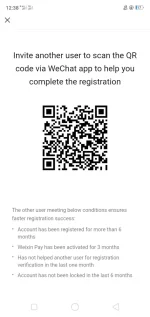
Help me.activate my WeChat new registration account
To activate your new WeChat account, you'll typically need to follow these steps:
1. Download the WeChat app: Go to the app store on your device (Google Play Store for Android or App Store for iOS) and search for "WeChat." Download and install the app on your device.
2. Sign up for a new account: Open the WeChat app and select "Sign Up" or "Register." You'll be asked to enter your phone number, create a password, and complete the verification process.
3. Verification process: WeChat will send a verification code to the phone number you provided. Enter the code in the app to verify your account.
4. Set up your account: Once your account is verified, you can set up your profile by adding a profile picture, updating your personal information, and customizing your account settings.
5. Activate your account: After completing the registration process and setting up your account, your WeChat account should be activated and ready to use.
If you encounter any specific issues during the registration or activation process, please provide more details so I can offer more tailored assistance.
 PH
PH