🔒 Closed Pahelp po... too high cpu usage

Status
Not open for further replies.

joserizal69

Eternal Poster
pahelp po mga sir kasi po kapag inopen ko yung pc ang taas agad ng cpu usage minsan umaabot ng 100% tapos po kahit hndi ko nmn ginagamit minsan 20-40% yung usage..... kapag nmn nagoopen ako ng app(ex: warcraft, google chrome, mpc star, or mp3 player) ang taas ng cpu usage nila kahit paisa2 lang... panoko po kaya ito maaaus? sana po may makatulong... ty in adv... nag scan na din po pala ako gamit ang avast antivirus wala nmn pong nadedetect na virus tnry ko na idn po 𝐌𝐚𝐥𝐰𝐚𝐫𝐞𝐛𝐲𝐭𝐞𝐬 wala din....
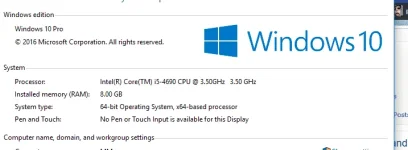
 
eto ex..yung i5-4690 yun ang procie o processor
Capture.webp


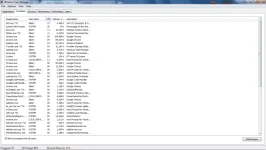
sa resource monitor mkikita mo kung anong apps yung kumukonsumo 100% ng cpu mo


yung cpu miner dun mo mkikita sa program and features..tingnan mo yung list kung may naka install na cpu miner.uninstall mo
 
High CPU usage is cause by anti virus software or having multiple antivirus application in your system. Avast has been known for CPU eater especially Avast internet security. Try to downgrade your AV to Avast Free or uninstall your 2nd AV software. I presume you are using Avast and 𝐌𝐚𝐥𝐰𝐚𝐫𝐞𝐛𝐲𝐭𝐞𝐬 at the same time so select AV that suits your system and RAM. Please also consider the lower your RAM is the more CPU will be use during process. Upgrading your RAM will also help ease the CPU.
 
eto ex..yung i5-4690 yun ang procie o processor
View attachment 93984


sa resource monitor mkikita mo kung anong apps yung kumukonsumo 100% ng cpu mo


yung cpu miner dun mo mkikita sa program and features..tingnan mo yung list kung may naka install na cpu miner.uninstall mo

upload_2016-11-5_19-42-8.webp

upload_2016-11-5_19-42-13.png

High CPU usage is cause by anti virus software or having multiple antivirus application in your system. Avast has been known for CPU eater especially Avast internet security. Try to downgrade your AV to Avast Free or uninstall your 2nd AV software. I presume you are using Avast and 𝐌𝐚𝐥𝐰𝐚𝐫𝐞𝐛𝐲𝐭𝐞𝐬 at the same time so select AV that suits your system and RAM. Please also consider the lower your RAM is the more CPU will be use during process. Upgrading your RAM will also help ease the CPU.
i already remove my anti virus... ang i have 12gb ram
 

Attachments

High CPU usage is cause by anti virus software or having multiple antivirus application in your system. Avast has been known for CPU eater especially Avast internet security. Try to downgrade your AV to Avast Free or uninstall your 2nd AV software. I presume you are using Avast and 𝐌𝐚𝐥𝐰𝐚𝐫𝐞𝐛𝐲𝐭𝐞𝐬 at the same time so select AV that suits your system and RAM. Please also consider the lower your RAM is the more CPU will be use during process. Upgrading your RAM will also help ease the CPU.
i already remove my anti virus....and i have 12gm ram

eto ex..yung i5-4690 yun ang procie o processor
View attachment 93984


sa resource monitor mkikita mo kung anong apps yung kumukonsumo 100% ng cpu mo


yung cpu miner dun mo mkikita sa program and features..tingnan mo yung list kung may naka install na cpu miner.uninstall mo
sa tingin ko po may nagpapataas ng cpu usage ng mga apps ko.. pero d ko po makita kung ano...
1day before pala to mangyari inopen ng kaibigan ko yung sa processor para daw tignan nya kung anong klase, tas sinabi nya na kailangan na daw lagyan ng thermal paste kasi ubos na, pwede kaya yun yung rason(thermal paste)?

wala din po akong nakita na cou miner
 
thermal paste para sa temp.


80% usage maraming running apps uninstall mo yung hnd kailangan...tune up utilities gamit ko para i disable yung programs sa start up at background.


Capture1.webp

sa akin puro naka zero disabled yung mga hindi kailangan..:cool:
 
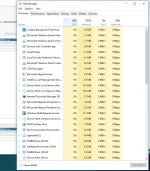
Sir as per ss of your processes the problem lies on that IHS.exe *32 and System Idle Process. Try to investigate on that processes or try to end that task and see what happens then restart your PC if still exist you better reformat your OS and use another Windows image. The problem might be embedded on the image of that ISO file.
 
thermal paste para sa temp.


80% usage maraming running apps uninstall mo yung hnd kailangan...tune up utilities gamit ko para i disable yung programs sa start up at background.


View attachment 94186
sa akin puro naka zero disabled yung mga hindi kailangan..:cool:
kahit nmn po alisin ko yung iba ganun pa din eh.. kung makikita nyo po yung IHS.exe eh gumagamit na ng ilang percent ng cpu, lalo na po kung magwawarcraft ako umaabot ng 100% warcraft lang po nakabukas at ang lag kapag naglalaro... d ko din po alam kung pano mauninstall yung ibang running apps at hindi ko din alam kung alin yung kailangan at hindi, kaya kinakabahan ako iuninstall...
 
Sir as per ss of your processes the problem lies on that IHS.exe *32 and System Idle Process. Try to investigate on that processes or try to end that task and see what happens then restart your PC if still exist you better reformat your OS and use another Windows image. The problem might be embedded on the image of that ISO file.
sir as i already said even if i only use google chrome it also use so much cpu, or even if i just scan using anti virus alone(ex: if i use avast alone to full scan my pc it will use 50% or more cpu), about system idle process it is the cpu % that is not being used at the time.. Before I am already using IHS, google chrome etc. all at once but the cpu does not go 100%.... my theory is that something is causing my apps to use so much cpu but i dont know what or how to remove it,
 
kahit nmn po alisin ko yung iba ganun pa din eh.. kung makikita nyo po yung IHS.exe eh gumagamit na ng ilang percent ng cpu, lalo na po kung magwawarcraft ako umaabot ng 100% warcraft lang po nakabukas at ang lag kapag naglalaro... d ko din po alam kung pano mauninstall yung ibang running apps at hindi ko din alam kung alin yung kailangan at hindi, kaya kinakabahan ako iuninstall...


right click mo yung running apps,open file loacation basta hindi sa windows folder pwede mo i uninstall..

pwewde mo i system restore dun sa time na ok pa sya..

reformat.
 
browsing lang po,, umaabot ng 100%.. ano pong procie? pano po makikita?...


intel po
download mo real temp para observe natin ang processor temp. update mo nalang kung ma link:You do not have permission to view the full content of this post. Log in or register now.

Sundin mo na rin iyong kay R4dd
right click mo yung running apps,open file loacation basta hindi sa windows folder pwede mo i uninstall..

pwewde mo i system restore dun sa time na ok pa sya..

reformat.
joserizal69, gawin mo ito. kasi yang ihs.exe unknown apps yan walang tamang info regarding sa app (kahit google search mo). Palagay ko virus yan. kung di mo ma uninstall. try mo gumamit ng 𝐌𝐚𝐥𝐰𝐚𝐫𝐞𝐛𝐲𝐭𝐞𝐬.
 
download mo real temp para observe natin ang processor temp. update mo nalang kung ma link:You do not have permission to view the full content of this post. Log in or register now.

Sundin mo na rin iyong kay R4dd

joserizal69, gawin mo ito. kasi yang ihs.exe unknown apps yan (walang tamang info regarding sa app kahit google search mo)
CCleaner can disable unwanted apps running when windows starts.
Ngayon ko lang ito nalaman. Hindi na rin kasi ako gumagamit ng ccleaner.
 
Status
Not open for further replies.

About this Thread

  • 27
    Replies
  • 1K
    Views
  • 10
    Participants
Last reply from:
joserizal69

Trending Topics

Online now

Members online
335
Guests online
1,101
Total visitors
1,436

Forum statistics

Threads
2,273,575
Posts
28,950,428
Members
1,235,837
Latest member
ninzi
Back
Top