 PH
PH-
Welcome to PHCorner Forums! Sign up for free to unlock full access and exclusive privileges, including:
- Asking questions about computer and mobile issues
- Discovering internet tips for your mobile network and computer
You are using an out of date browser. It may not display this or other websites correctly.
You should upgrade or use an alternative browser.
You should upgrade or use an alternative browser.
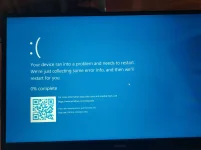
❓ Help Pahelp po BSOD CRITICAL_PROCESS_DIED
- Status
- Not open for further replies.
🤖
🤖
Hello! It seems like you are experiencing the CRITICAL_PROCESS_DIED error on your laptop. This Blue Screen of Death (BSOD) error can be caused by various factors, such as corrupt system files, hardware issues, driver problems, or malware infections. Here are some steps you can take to troubleshoot and resolve this issue:
1. Restart Your Laptop: Sometimes, a simple restart can fix temporary issues. If you are able to restart your laptop, do so and see if the error persists.
2. Check for Windows Updates: Make sure your operating system is up to date. Windows updates often include bug fixes and patches that can resolve BSOD errors.
3. Run System File Checker (SFC): This built-in tool can scan and repair corrupted system files that may be causing the CRITICAL_PROCESS_DIED error. Open Command Prompt as an administrator and type
4. Check Disk for Errors: You can use the Check Disk utility to scan and fix disk errors that might be causing the problem. In Command Prompt, type
5. Update Device Drivers: Outdated or faulty drivers can trigger BSOD errors. Make sure all your device drivers are up to date. You can do this manually or by using third-party software.
6. Check for Malware: Run a full system scan using your antivirus software to check for any malware infections that could be causing the issue.
7. Perform System Restore: If the error started recently, you can try restoring your system to a point where it was working fine. This can help undo any recent changes that may have caused the problem.
8. Check Hardware: Sometimes hardware issues like faulty RAM or hard drive can lead to BSOD errors. You can run hardware diagnostics to check for any hardware problems.
If none of the above steps resolve the issue, you may need to seek help from a professional technician to diagnose and fix the problem. Remember to backup your important data regularly to prevent data loss in case of system crashes. Let me know if you need further assistance or if you have any specific details about the error you are encountering.
1. Restart Your Laptop: Sometimes, a simple restart can fix temporary issues. If you are able to restart your laptop, do so and see if the error persists.
2. Check for Windows Updates: Make sure your operating system is up to date. Windows updates often include bug fixes and patches that can resolve BSOD errors.
3. Run System File Checker (SFC): This built-in tool can scan and repair corrupted system files that may be causing the CRITICAL_PROCESS_DIED error. Open Command Prompt as an administrator and type
sfc /scannow then press Enter.4. Check Disk for Errors: You can use the Check Disk utility to scan and fix disk errors that might be causing the problem. In Command Prompt, type
chkdsk /f /r then press Enter.5. Update Device Drivers: Outdated or faulty drivers can trigger BSOD errors. Make sure all your device drivers are up to date. You can do this manually or by using third-party software.
6. Check for Malware: Run a full system scan using your antivirus software to check for any malware infections that could be causing the issue.
7. Perform System Restore: If the error started recently, you can try restoring your system to a point where it was working fine. This can help undo any recent changes that may have caused the problem.
8. Check Hardware: Sometimes hardware issues like faulty RAM or hard drive can lead to BSOD errors. You can run hardware diagnostics to check for any hardware problems.
If none of the above steps resolve the issue, you may need to seek help from a professional technician to diagnose and fix the problem. Remember to backup your important data regularly to prevent data loss in case of system crashes. Let me know if you need further assistance or if you have any specific details about the error you are encountering.
- Status
- Not open for further replies.
Similar threads
-
-
❓ Help Pahelp po. Laptop keyboard not fully functioning
- Started by mitchmp
- Replies: 4
-
❓ Help Pahelp po ayaw kasi gumana ng browser messenger desktop user po
- Started by IamJaycee04
- Replies: 0
-
❓ Help Pahelp po ayaw po kasi gumana ng messenger sa browser desktop
- Started by IamJaycee04
- Replies: 1
-
About this Thread
-
1Replies
-
258Views
-
1Participants
Last reply from:
Unknown user
Unknown user
New Topics
-
Enlighten me please with these two
- Started by Jeii
- Replies: 4
- ❓ Computer Discussion & Support
-
Win 10 Home keys
- Started by Ali246
- Replies: 6
- ❓ Computer Discussion & Support
-
Windows 11 26H2
- Started by tholitz
- Replies: 1
- ❓ Computer Discussion & Support
-
Help po !!!! My account got häçked Facebook and steam
- Started by bujoy20
- Replies: 8
- ❓ Computer Discussion & Support
-
Mga bossing patulong po nahäçk account ko due to carelessness
- Started by Jeii
- Replies: 4
- ❓ Computer Discussion & Support
-
Computer parts na cheap
- Started by bjenjay1
- Replies: 4
- ❓ Computer Discussion & Support
-
PC APPS - remote or auto saved type and auto audio
- Started by babyzero
- Replies: 1
- ❓ Computer Discussion & Support
-
Data Recovery May Chance pa bato
- Started by tambay28
- Replies: 3
- ❓ Computer Discussion & Support
-
Capcut PC pasabit po
- Started by L A Z A
- Replies: 0
- ❓ Computer Discussion & Support
Trending Topics
Online now
- Members online
- 1,060
- Guests online
- 7,927
- Total visitors
- 8,987